<?xml version="1.0" encoding="utf-8"?>
<feed xmlns="http://www.w3.org/2005/Atom" xmlns:media="http://search.yahoo.com/mrss/">
    <title>Yan&#x27;s Blog</title>
    <link href="https://yanlinnthor.github.io/feed.xml" rel="self" />
    <link href="https://yanlinnthor.github.io" />
    <updated>2025-08-16T22:32:37+06:30</updated>
    <author>
        <name>yan</name>
    </author>
    <id>https://yanlinnthor.github.io</id>

    <entry>
        <title>Kate Editor and LSP setup</title>
        <author>
            <name>yan</name>
        </author>
        <link href="https://yanlinnthor.github.io/kate-editor-and-lsp-servers-setup.html"/>
        <id>https://yanlinnthor.github.io/kate-editor-and-lsp-servers-setup.html</id>

        <updated>2025-08-14T01:07:21+06:30</updated>
            <summary>
                <![CDATA[
                    After switching to Debian with KDE plasma, I tried Kate, KDE's default text editor. It&hellip;
                ]]>
            </summary>
        <content type="html">
            <![CDATA[
                
  <p>
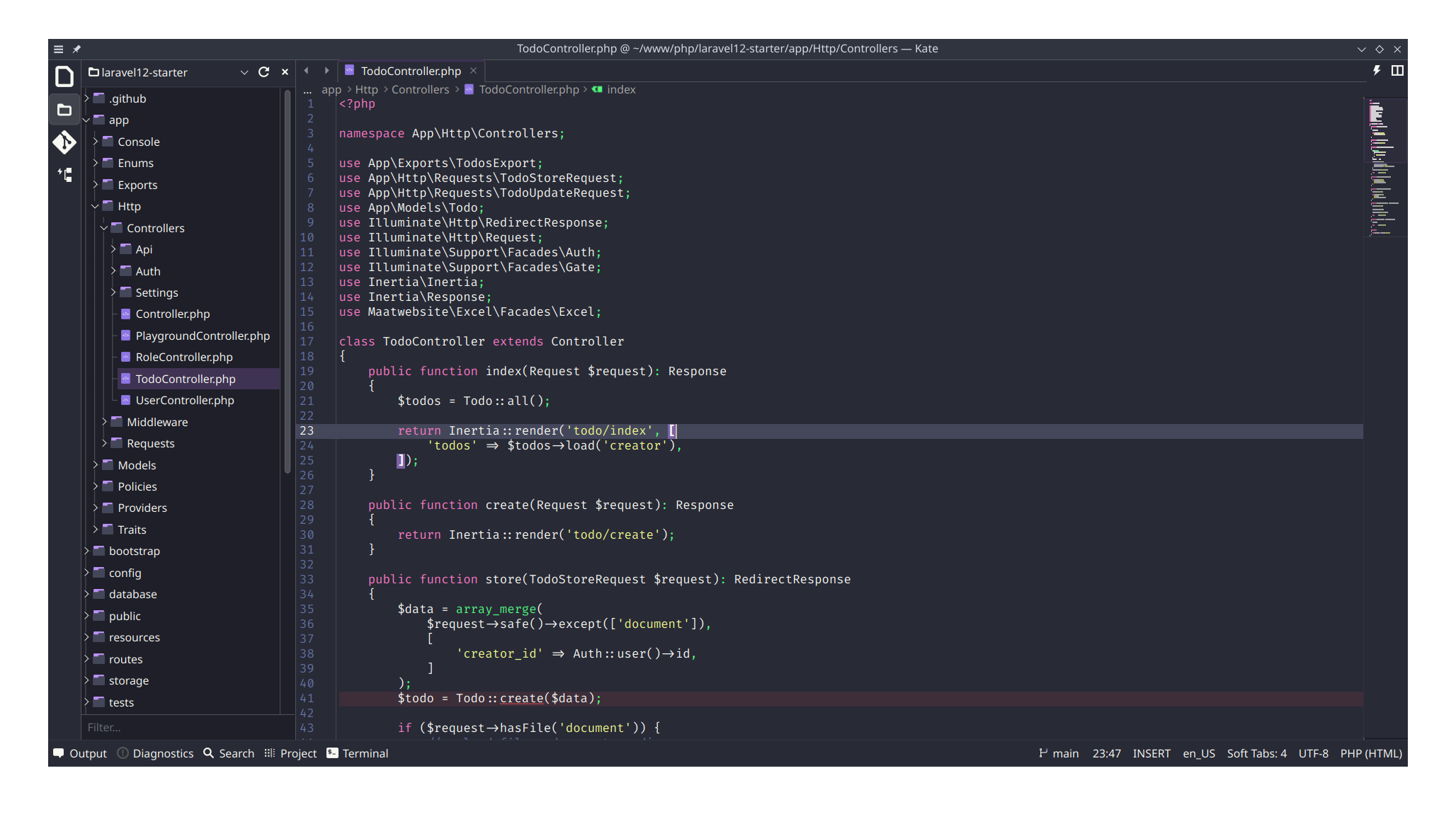
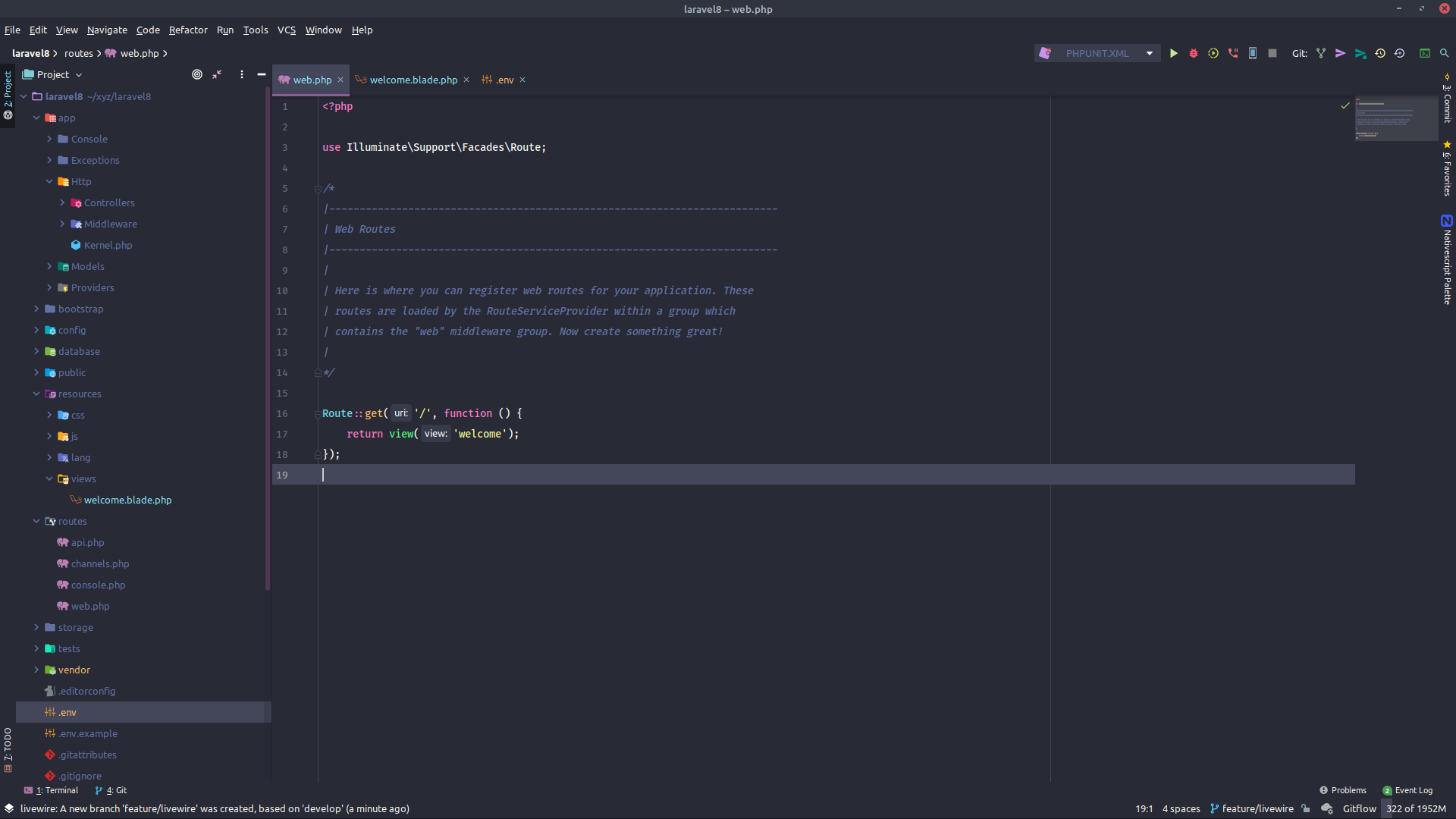
    After switching to Debian with KDE plasma, I tried Kate, KDE's default text editor. It has all the necessary features for a modern day text editor. I am not gonna talk about KDE's features or it's benefits. Visit their website to learn more about it or search online to know more.&nbsp;<a href="https://kate-editor.org/">https://kate-editor.org/</a>
  </p>

  <p>
    Kate has LSP client feature. You can install your desired LSP server(s) and configure Kate. When I was configuring I could not find many resources online on how to configure Kate for your desired language's LSP. So this is to help anyone looking for same issue and to my future self when I need to setup it up again. I know for a fact that my goldfish memory will not remember all this steps in few weeks time.
  </p>

    <figure class="post__image post__image--center">
      <img loading="lazy" src="https://yanlinnthor.github.io/media/posts/19/Screenshot_20250816_205647.png" height="1164" width="2056" alt="Kate Text Editor opening a Laravel project"  sizes="(max-width: 1920px) 100vw, 1920px" srcset="https://yanlinnthor.github.io/media/posts/19/responsive/Screenshot_20250816_205647-xs.png 640w ,https://yanlinnthor.github.io/media/posts/19/responsive/Screenshot_20250816_205647-sm.png 768w ,https://yanlinnthor.github.io/media/posts/19/responsive/Screenshot_20250816_205647-md.png 1024w ,https://yanlinnthor.github.io/media/posts/19/responsive/Screenshot_20250816_205647-lg.png 1366w ,https://yanlinnthor.github.io/media/posts/19/responsive/Screenshot_20250816_205647-xl.png 1600w ,https://yanlinnthor.github.io/media/posts/19/responsive/Screenshot_20250816_205647-2xl.png 1920w">
      <figcaption>Kate Text Editor opening a Laravel project</figcaption>
    </figure>

    <h2 id="andnbspdownload-and-install-kate">
      &nbsp;Download and install Kate
    </h2>

  <ul>
    <li><a href="https://kate-editor.org/get-it/">https://kate-editor.org/get-it/</a></li><li>There are Window and MacOS versions too</li>
  </ul>

    <h2 id="preparation">
      Preparation
    </h2>

  <ul>
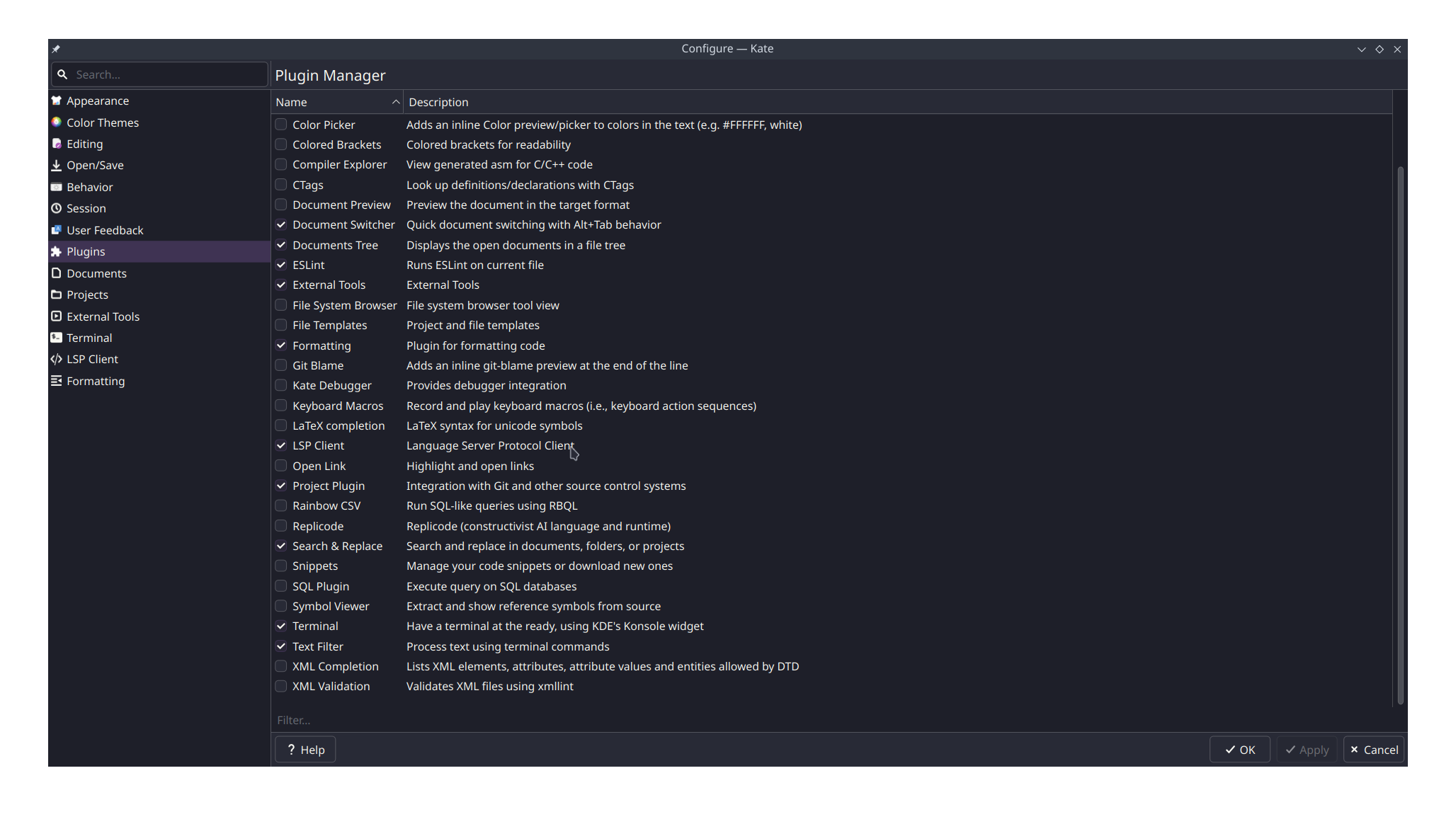
    <li>Create <code>.local/bin</code>&nbsp;sub-directory under your home directory</li><li>Add <code>$HOME/.local/bin/</code>&nbsp;to your PATH by adding <code>export PATH="$PATH:$HOME/.local/bin"</code>&nbsp;to .bashrc or .zshrc</li><li>Open Kate</li><li>Visit Settings - Kate Configuration</li><li>Update font, color scheme, formatting, editing etc</li><li>Visit Plugins</li><li>Make sure LSP client plugin is checked and turn on<br></li>
  </ul>

    <figure class="post__image post__image--center">
      <img loading="lazy" src="https://yanlinnthor.github.io/media/posts/19/Screenshot_20250816_211920.png" height="1164" width="2056" alt="Kate text editor plugin settings"  sizes="(max-width: 1920px) 100vw, 1920px" srcset="https://yanlinnthor.github.io/media/posts/19/responsive/Screenshot_20250816_211920-xs.png 640w ,https://yanlinnthor.github.io/media/posts/19/responsive/Screenshot_20250816_211920-sm.png 768w ,https://yanlinnthor.github.io/media/posts/19/responsive/Screenshot_20250816_211920-md.png 1024w ,https://yanlinnthor.github.io/media/posts/19/responsive/Screenshot_20250816_211920-lg.png 1366w ,https://yanlinnthor.github.io/media/posts/19/responsive/Screenshot_20250816_211920-xl.png 1600w ,https://yanlinnthor.github.io/media/posts/19/responsive/Screenshot_20250816_211920-2xl.png 1920w">
      <figcaption>Kate text editor plugin settings</figcaption>
    </figure>

    <h2 id="different-lsp-server-installationlessbrgreater">
      Different LSP Server Installation<br>
    </h2>

  <ul>
    <li><b style="font-family: var(--editor-font-family); font-size: 1em; background-color: ; font-style: ; font-variant-ligatures: ; font-variant-caps: ;">Bash</b></li><li>install shellcheck</li><li>https://github.com/koalaman/shellcheck</li><li><code>sudo apt install shellcheck</code></li><li>install bash-language-server</li><li>https://github.com/bash-lsp/bash-language-server</li><li>installed via npm <code>npm i -g bash-language-server</code><br><br></li><li><span style="color: var(--text-primary-color); font-family: var(--editor-font-family); font-size: 1em;"><b>CSS,HTML,JSON</b></span><br></li><li>install vscode-langservers-extracted</li><li>https://github.com/hrsh7th/vscode-langservers-extracted</li><li>install via npm <code>npm i -g&nbsp;vscode-langservers-extracted</code><br><br></li><li><span style="color: var(--text-primary-color); font-family: var(--editor-font-family); font-size: 1em;"><b>Markdown</b></span><br></li><li>marksman</li><li>https://github.com/artempyanykh/marksman</li><li>download pre-built binary from repo release</li><li><code>mv marksman-linux marksman &amp;&amp; chmod +x marksman</code><br></li><li><span style="color: var(--text-primary-color); font-family: var(--editor-font-family); font-size: 1em; font-weight: var(--font-weight-normal);"><code>cp marksman&nbsp;$HOME/.local/bin/</code><br><br></span></li><li><span style="color: var(--text-primary-color); font-family: var(--editor-font-family); font-size: 1em;"><b>JS/React/Typescript</b></span><br></li><li>typescript-language-server</li><li>https://github.com/typescript-language-server/typescript-language-serverc</li><li>install via npm <code>npm install -g typescript-language-server typescript</code><br><br></li><li><span style="color: var(--text-primary-color); font-family: var(--editor-font-family); font-size: 1em;"><b>PHP</b></span><br></li><li>phpactor</li><li>https://github.com/phpactor/phpactor<br></li><li>https://phpactor.readthedocs.io/en/master/usage/standalone.html<br></li><li><code>curl -Lo phpactor.phar https://github.com/phpactor/phpactor/releases/latest/download/phpactor.phar</code></li><li><code>chmod a+x phpactor.phar</code></li><li><code>mv phpactor.phar ~/.local/bin/phpactor</code></li>
  </ul>

    <h2 id="upate-kate-lsp-settings">
      Upate Kate LSP settings
    </h2>

  <ul>
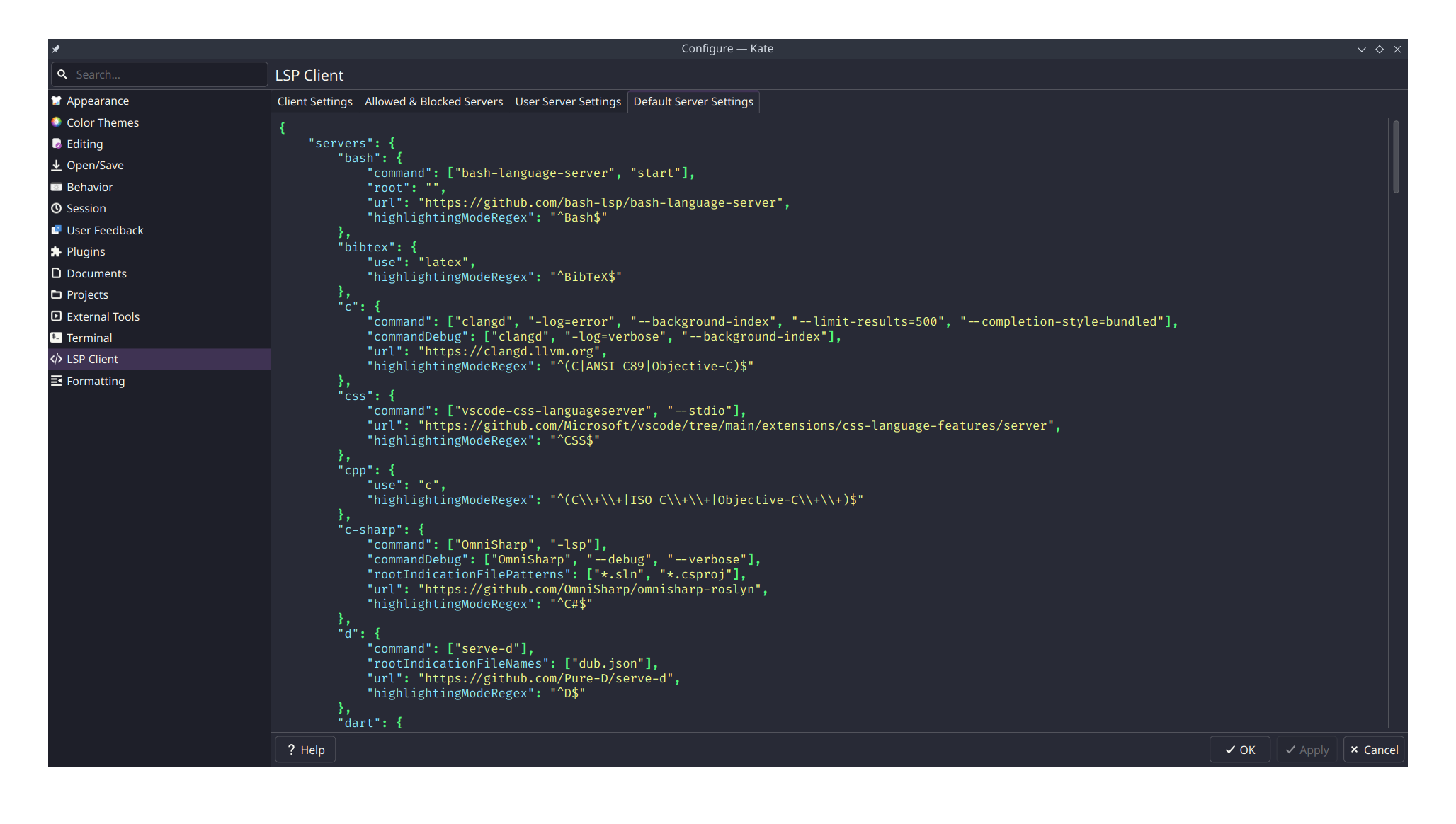
    <li>Visit Kate Settings - Configure Kate</li><li>LSP Client</li><li><span style="color: var(--text-primary-color); font-family: var(--editor-font-family); font-size: 1em; font-weight: var(--font-weight-normal);">Go to "User Server Settings" tab</span><br></li><li>You will see empty settings with Settings File placeholder text<br></li><li>Create "settings.json" file anywhere you want or follow the placeholder suggestion<br></li><li>Entered the created file full path in Settings File: field or select the file from Open file dialog button</li><li>Click Apply</li><li><span style="color: var(--text-primary-color); font-family: var(--editor-font-family); font-size: 1em; font-weight: var(--font-weight-normal);">Go to "Default Server Settings" tab</span><br></li><li>Copy all languages or desired languages settings<br></li><li>Go back to "Client Server Settings" tab</li><li>Paste your copied settings json</li><li>You will need to update the "command" attribute for each language with correct value<br></li><li>Click Apply</li><li>Reboot your computer<br></li>
  </ul>

    <figure class="post__image post__image--center">
      <img loading="lazy" src="https://yanlinnthor.github.io/media/posts/19/Screenshot_20250816_211124.png" height="1164" width="2056" alt="Kate text editor lsp client settings"  sizes="(max-width: 1920px) 100vw, 1920px" srcset="https://yanlinnthor.github.io/media/posts/19/responsive/Screenshot_20250816_211124-xs.png 640w ,https://yanlinnthor.github.io/media/posts/19/responsive/Screenshot_20250816_211124-sm.png 768w ,https://yanlinnthor.github.io/media/posts/19/responsive/Screenshot_20250816_211124-md.png 1024w ,https://yanlinnthor.github.io/media/posts/19/responsive/Screenshot_20250816_211124-lg.png 1366w ,https://yanlinnthor.github.io/media/posts/19/responsive/Screenshot_20250816_211124-xl.png 1600w ,https://yanlinnthor.github.io/media/posts/19/responsive/Screenshot_20250816_211124-2xl.png 1920w">
      <figcaption>Kate text editor lsp client settings</figcaption>
    </figure>

  <p>
    Open a PHP project or React project and right click a keyword (Class name, Component name, etc). You can try to "Go To - Definition" or "LSP Client - Find Implementation".
  </p>

  <p>
    For Laravel project, you need to install and setup laravel-ide-helper package. You will probably need to do custom configuration to phpactor as well.
  </p>
            ]]>
        </content>
    </entry>
    <entry>
        <title>2025 Dev Setup - Revised</title>
        <author>
            <name>yan</name>
        </author>
        <link href="https://yanlinnthor.github.io/2025-dev-setup-revised.html"/>
        <id>https://yanlinnthor.github.io/2025-dev-setup-revised.html</id>
        <media:content url="https://yanlinnthor.github.io/media/posts/18/Screenshot_20250810_212551.png" medium="image" />

        <updated>2025-08-10T21:26:36+06:30</updated>
            <summary>
                <![CDATA[
                        <img src="https://yanlinnthor.github.io/media/posts/18/Screenshot_20250810_212551.png" alt="" />
                    Debian 13 with KDE Plasma 6 Install base distro Download and install distro iso Download&hellip;
                ]]>
            </summary>
        <content type="html">
            <![CDATA[
                    <p><img src="https://yanlinnthor.github.io/media/posts/18/Screenshot_20250810_212551.png" class="type:primaryImage" alt="" /></p>
                <h1 id="debian-13-with-kde-plasma-6">Debian 13 with KDE Plasma 6</h1>
<h2 id="install-base-distro">Install base distro</h2>
<h3 id="download-and-install-distro-iso">Download and install distro iso</h3>
<p>Download Debian 13 minimal ISO</p><p><a href="https://cdimage.debian.org/debian-cd/current/amd64/iso-cd/debian-13.0.0-amd64-netinst.iso">https://cdimage.debian.org/debian-cd/current/amd64/iso-cd/debian-13.0.0-amd64-netinst.iso</a></p><p>Install Guide</p><p><a href="https://www.linuxtechi.com/how-to-install-debian-12-step-by-step/">https://www.linuxtechi.com/how-to-install-debian-12-step-by-step/</a></p><h3 id="update-packages">Update packages</h3>
<p>Fix sudo command not found</p><p><a href="https://linuxways.net/debian/fix-sudo-command-not-found-debian-12/">https://linuxways.net/debian/fix-sudo-command-not-found-debian-12/</a></p><p>Switch to root user</p><pre><code>su -
</code></pre>
<p>Install sudo </p><pre><code>apt install sudo -y
</code></pre>
<p>Add standard user to sudoer</p><pre><code>sudo usermod -aG sudo USERNAME_HERE
</code></pre>
<p>Update sources to avoid Myanmar ISP restrictions and for Nvidia drivers </p><p><a href="https://fostips.com/change-source-mirror-debian-12/">https://fostips.com/change-source-mirror-debian-12/</a></p><p><a href="https://cdn-aws.deb.debian.org/">https://cdn-aws.deb.debian.org/</a></p><p>Backup /etc/apt/sources.list </p><pre><code>sudo cp /etc/apt/sources.list /etc/apt/sources.list.backup
</code></pre>
<p>Edit /etc/apt/sources.list</p><pre><code>#deb cdrom:[Debian GNU/Linux 13.0.0 _Trixie_ - Official amd64 NETINST with firmware 20250809-11:20]/ trixie contrib main non-free-firmware

#deb http://mirrors.cloudforest.co.th/debian/ trixie main contrib non-free non-free-firmware
#deb-src http://mirrors.cloudforest.co.th/debian/ trixie main contrib non-free non-free-firmware
deb http://cdn-aws.deb.debian.org/debian/ trixie main contrib non-free non-free-firmware
deb-src http://cdn-aws.deb.debian.org/debian/ trixie main contrib non-free non-free-firmware

#deb http://security.debian.org/debian-security trixie-security main non-free-firmware
#deb-src http://security.debian.org/debian-security trixie-security main non-free-firmware
deb http://cdn-aws.deb.debian.org/debian-security trixie-security main contrib non-free non-free-firmware
deb-src http://cdn-aws.deb.debian.org/debian-security trixie-security main contrib non-free non-free-firmware

# trixie-updates, to get updates before a point release is made;
# see https://www.debian.org/doc/manuals/debian-reference/ch02.en.html#_updates_and_backports
deb http://cdn-aws.deb.debian.org/debian/ trixie-updates main contrib non-free non-free-firmware
deb-src http://cdn-aws.deb.debian.org/debian/ trixie-updates main contrib non-free non-free-firmware

# This system was installed using removable media other than
# CD/DVD/BD (e.g. USB stick, SD card, ISO image file).
# The matching &quot;deb cdrom&quot; entries were disabled at the end
# of the installation process.
# For information about how to configure apt package sources,
# see the sources.list(5) manual.
</code></pre>
<p>Update, upgrade and obtain kernel headers</p><pre><code>sudo apt update

sudo apt upgrade

sudo apt install linux-headers-amd64

sudo reboot now
</code></pre>
<p>Incase of broken or missing package install</p><pre><code>sudo apt --fix-broken install

sudo apt update --fix-missing
</code></pre>
<h2 id="install-drivers-and-kde">Install drivers and KDE</h2>
<h3 id="install-nvidia-drivers">Install Nvidia drivers</h3>
<p><a href="https://wiki.debian.org/NvidiaGraphicsDrivers#Debian_Testing_.22Trixie.22">https://wiki.debian.org/NvidiaGraphicsDrivers#Debian_Testing_.22Trixie.22</a></p><p><a href="https://neuronvm.com/docs/install-nvidia-drivers-on-debian/">https://neuronvm.com/docs/install-nvidia-drivers-on-debian/</a></p><pre><code>sudo apt install nvidia-kernel-dkms nvidia-driver firmware-misc-nonfree

sudo reboot now
</code></pre>
<h3 id="install-kde-plasma">Install KDE Plasma</h3>
<p><a href="https://wiki.debian.org/KDE#Installation">https://wiki.debian.org/KDE#Installation</a></p><p><a href="https://www.reddit.com/r/debian/comments/1640aaq/tutorial_how_to_make_a_clean_kde_plasma_install/">https://www.reddit.com/r/debian/comments/1640aaq/tutorial_how_to_make_a_clean_kde_plasma_install/</a></p><pre><code>sudo apt install kde-standard

sudo reboot now
</code></pre>
<p>Fix wifi not working issue by editing <code>/etc/network/interfaces</code> file and commenting or deleting the interface used during installation</p><pre><code>sudo nano /etc/network/interfaces

# The primary network interface
#allow-hotplug wlp0s20f3
#iface wlp0s20f3 inet dhcp
#       wpa-ssid WIFI_NAME
#       wpa-psk  WIFI_PASSWORD

sudo reboot now
</code></pre>
<h2 id="post-install">Post install</h2>
<h3 id="install-vpn">Install VPN</h3>
<p>Install outline vpn client</p><p><a href="https://support.google.com/outline/answer/15331527?hl=en">https://support.google.com/outline/answer/15331527?hl=en</a></p><pre><code>wget -qO- https://us-apt.pkg.dev/doc/repo-signing-key.gpg | sudo gpg --dearmor -o /etc/apt/trusted.gpg.d/gcloud-artifact-registry-us.gpg

echo &quot;deb [arch=amd64] https://us-apt.pkg.dev/projects/jigsaw-outline-apps outline-client main&quot; | sudo tee /etc/apt/sources.list.d/outline-client.list

sudo apt update
sudo apt install outline-client
</code></pre>
<h3 id="update-firefox-esr">Update Firefox ESR</h3>
<p><a href="https://support.mozilla.org/en-US/kb/install-firefox-linux">https://support.mozilla.org/en-US/kb/install-firefox-linux</a></p><pre><code>sudo install -d -m 0755 /etc/apt/keyrings

wget -q https://packages.mozilla.org/apt/repo-signing-key.gpg -O- | sudo tee /etc/apt/keyrings/packages.mozilla.org.asc &gt; /dev/null

echo &quot;deb [signed-by=/etc/apt/keyrings/packages.mozilla.org.asc] https://packages.mozilla.org/apt mozilla main&quot; | sudo tee -a /etc/apt/sources.list.d/mozilla.list &gt; /dev/null

echo &#39;
Package: *
Pin: origin packages.mozilla.org
Pin-Priority: 1000
&#39; | sudo tee /etc/apt/preferences.d/mozilla 

sudo apt update

sudo apt upgrade
</code></pre>
<h3 id="cleanup">Cleanup</h3>
<p>Connect to outline vpn (KDE app store Discover needs VPN)</p><p>Go to Discover &gt; Installed</p><p>Remove unused apps like KMail, KWrite etc</p><p>Go to Discover &gt; System Settings</p><p>Install Yakuake</p><p>Go to Multimedia &gt; Video Player</p><p>Install VLC</p><h3 id="skip-grub-loader-screen">Skip grub loader screen</h3>
<pre><code>sudo nano /etc/default/grub

GRUB_TIMEOUT=0

sudo update-grub

sudo reboot now
</code></pre>
<h2 id="development-env-setup">Development env setup</h2>
<h3 id="install-php">Install PHP</h3>
<p><a href="https://php.watch/articles/install-php82-ubuntu-debian">https://php.watch/articles/install-php82-ubuntu-debian</a></p><pre><code>sudo apt install curl libnss3-tools jq xsel openssl ca-certificates

sudo apt install apt-transport-https lsb-release ca-certificates wget -y

sudo wget -O /etc/apt/trusted.gpg.d/php.gpg https://packages.sury.org/php/apt.gpg 

sudo sh -c &#39;echo &quot;deb https://packages.sury.org/php/ $(lsb_release -sc) main&quot; &gt; /etc/apt/sources.list.d/php.list&#39;

sudo apt update

sudo apt install php8.2 php8.2-cli php8.2-curl php8.2-gd php8.2-mbstring php8.2-posix php8.2-xml php8.2-zip

sudo apt install php8.2-fpm

sudo a2enconf php8.2-fpm

# Uninstall apache2 (optional)
sudo apt remove --purge apache2* libapache*

# Change PHP version
sudo update-alternatives --config php

# Uninstall PHP version
sudo apt purge php8.X*
</code></pre>
<h3 id="install-composer">Install composer</h3>
<pre><code>curl -sS https://getcomposer.org/installer -o /tmp/composer-setup.php

sudo php /tmp/composer-setup.php --install-dir=/usr/local/bin --filename=composer

sudo nano .bashrc
# add at end of file
export PATH=&quot;$PATH:$HOME/.config/composer/vendor/bin&quot;

sudo reboot now
</code></pre>
<p>Fix curl error 28 connection time out issue or use VPN</p><p><a href="https://github.com/composer/composer/issues/7503#issuecomment-458173411">https://github.com/composer/composer/issues/7503#issuecomment-458173411</a></p><pre><code>composer config -g repo.packagist composer https://repo.packagist.org
</code></pre>
<h3 id="install-valet">Install valet</h3>
<pre><code>composer global require genesisweb/valet-linux-plus

cd

mkdir .valet

valet install

valet install --mariadb -vvv

sudo reboot now
</code></pre>
<h4 id="fix-domainexception-unable-to-determine-service-name">Fix [DomainException] Unable to determine service name.</h4>
<p><a href="https://github.com/valet-linux-plus/valet-linux-plus/issues/137">https://github.com/valet-linux-plus/valet-linux-plus/issues/137</a></p><pre><code>sudo apt install systemd-resolved

valet install --mariadb -vvv
</code></pre>
<h4 id="fix-domainexception-apt-was-unable-to-install-redis-server">Fix [DomainException] Apt was unable to install [redis-server].</h4>
<pre><code>sudo apt update --fix-missing

valet install --mariadb -vvv
</code></pre>
<h4 id="fix-sites-not-working-aka-service-unknown-error">Fix sites not working aka service unknown error</h4>
<p><a href="https://github.com/valet-linux-plus/valet-linux-plus/issues/130#issuecomment-2715924576">https://github.com/valet-linux-plus/valet-linux-plus/issues/130#issuecomment-2715924576</a></p><pre><code># Disable systemctl-resolved
sudo systemctl stop systemd-resolved 
sudo systemctl disable systemd-resolved

# Remove /etc/resolv.conf symlink
sudo rm /etc/resolv.conf

# Manually create /etc/resolv.conf
echo &quot;nameserver 127.0.0.1&quot; | sudo tee /etc/resolv.conf

# Restart dnsmasq
sudo systemctl restart dnsmasq
sudo systemctl enable  dnsmasq

# test
ping phpinfo.test
</code></pre>
<h4 id="fix-valet-nginx-fails-error">Fix Valet nginx fails error</h4>
<p><a href="https://github.com/valet-linux-plus/valet-linux-plus/issues/152">https://github.com/valet-linux-plus/valet-linux-plus/issues/152</a></p><pre><code>sudo nano ~/.config/valet/Nginx/mails.test

# listen 443 ssl;
# http2 on;

listen 443 ssl http2;
</code></pre>
<h3 id="install-nodejs">Install nodejs</h3>
<p>Install n</p><pre><code>curl -L https://bit.ly/n-install | bash

# or

curl -L https://raw.githubusercontent.com/mklement0/n-install/stable/bin/n-install | bash

# or

git clone https://github.com/mklement0/n-install.git
cd n-install/bin
bash n-install

sudo reboot now
</code></pre>
<h3 id="test">Test</h3>
<pre><code>php -v
node -v
npm -v

mkdir phpinfo
cd phpinfo
echo &quot;&lt;?php phpinfo();&quot; &gt;&gt; index.php
valet link
ping phpinfo.test
# or visit phpinfo.test in browser
</code></pre>
<h4 id="fix-service-not-found-when-visiting-sites">Fix service not found when visiting sites</h4>
<p>Change network setting by defining DNS servers</p><p>System Settings &gt; Wi-Fi &amp; Internet &gt; Wi-Fi &amp; Networking &gt; Select connection &gt; Select IPv4</p><p>Method : Automatic (Only addresses)</p><p>Servesr: 8.8.8.8,1.1.1.1</p><p>Apply</p><p>Restart</p><h2 id="essential-apps-and-customization">Essential apps and customization</h2>
<h3 id="essential-apps">Essential apps</h3>
<p>VS Code</p><p><a href="https://code.visualstudio.com/docs/?dv=linux64_deb">https://code.visualstudio.com/docs/?dv=linux64_deb</a></p><p>Download deb file</p><pre><code>sudo dpkg -i vscode.deb
</code></pre>
<p>Obsidian</p><p><a href="https://obsidian.md/download">https://obsidian.md/download</a></p><p>Use remotely sync to sync notes on dropbox</p><p>Publii</p><p><a href="https://getpublii.com/docs/install-publii.html">https://getpublii.com/docs/install-publii.html</a></p><p>Dropbox</p><p>Download deb </p><p><a href="https://www.dropbox.com/download?dl=packages/ubuntu/dropbox_2025.05.20_amd64.deb">https://www.dropbox.com/download?dl=packages/ubuntu/dropbox_2025.05.20_amd64.deb</a></p><p><a href="https://www.dropbox.com/install-linux">https://www.dropbox.com/install-linux</a></p><p><a href="https://www.reddit.com/r/chromeos/comments/1dcvy8t/how_to_install_dropbox/">https://www.reddit.com/r/chromeos/comments/1dcvy8t/how_to_install_dropbox/</a></p><pre><code>cd Downloads

sudo dpkg -i dropbox_2025.05.20_amd64.deb

sudo apt install python3-gi gobject-introspection gir1.2-gtk-3.0

sudo dropbox start -i
</code></pre>
<h3 id="setup-ssh-keys-and-git">Setup ssh keys and git</h3>
<p><a href="https://unix.stackexchange.com/questions/257590/ssh-key-permissions-chmod-settings">https://unix.stackexchange.com/questions/257590/ssh-key-permissions-chmod-settings</a></p><pre><code>chmod 700 ~/.ssh
chmod 600 ~/.ssh/*

git config --global init.defaultBranch main
git config --global user.email &quot;email@domain.com&quot;
git config --global user.name &quot;name&quot;
</code></pre>
<h3 id="setup-zsh-ohmyzsh-and-starship">Setup zsh, ohmyzsh and starship</h3>
<p>Install zsh</p><p><a href="https://github.com/ohmyzsh/ohmyzsh/wiki/Installing-ZSH">https://github.com/ohmyzsh/ohmyzsh/wiki/Installing-ZSH</a></p><p><a href="https://github.com/theborowski/pop-setup">https://github.com/theborowski/pop-setup</a></p><pre><code>sudo apt install zsh
zsh --version
chsh -s $(which zsh)
sudo reboot now

# When configuring the .zshrc file, choose an empty option, `ohmyzsh` will replace it.
</code></pre>
<p>Install ohmyzsh</p><pre><code>sh -c &quot;$(curl -fsSL https://raw.githubusercontent.com/ohmyzsh/ohmyzsh/master/tools/install.sh)&quot;

rm .zshrc.pre-oh-my-zsh
</code></pre>
<p>Update <code>~/.zshrc</code></p><pre><code>nano ~/.zshrc

# install plugins
plugins=(git common-aliases copyfile copypath extract ssh)

# copy exports from .bashrc

source ~/.zshrc
</code></pre>
<p><a href="https://www.nerdfonts.com/font-downloads">https://www.nerdfonts.com/font-downloads</a></p><p>copy fonts to <code>/.local/share/fonts/</code></p><p><a href="https://starship.rs/guide">https://starship.rs/guide</a></p><pre><code>curl -sS https://starship.rs/install.sh | sh

echo &#39;eval &quot;$(starship init zsh)&quot;&#39; &gt;&gt; ~/.zshrc

starship preset nerd-font-symbols -o ~/.config/starship.toml

# starship.toml file will be updated again when installing dracula theme
</code></pre>
<h3 id="use-dracula-themes-and-color">Use dracula themes and color</h3>
<p><a href="https://draculatheme.com/">https://draculatheme.com/</a></p><pre><code>mkdir dracula-themes
cd dracula-themes
</code></pre>
<p>konsole</p><pre><code>git clone https://draculatheme.com/konsole
cp konsole/Dracula.colorscheme ~/.local/share/konsole

Konsole &gt; Configuration &gt; Add new profile &gt; Color &gt; Dracula
</code></pre>
<p>yakuake</p><pre><code>git clone https://github.com/dracula/yakuake.git
cp -r yakuake ~/.local/share/yakuake/kns_skins/
cd ~/.local/share/yakuake/kns_skins
mv yakuake dracula

Yakuake &gt; Configuration &gt; Appearance
</code></pre>
<p>zsh</p><pre><code>git clone https://github.com/dracula/zsh.git

ln -s ~/dracula-themes/zsh/dracula.zsh-theme ~/.oh-my-zsh/themes/dracula.zsh-theme

nano ~/.zshrc

# comment out current theme
#ZSH_THEME=&quot;robbyrussell&quot;

# add following at the end
ZSH_THEME=&quot;dracula&quot;
</code></pre>
<p>starship</p><p>Edit <code>~/.config/starship.toml</code></p><p><a href="https://gist.github.com/mrlinnth/33d8dfbb0494c0e31dd4ab013a05831b">https://gist.github.com/mrlinnth/33d8dfbb0494c0e31dd4ab013a05831b</a></p><p>firefox</p><p><a href="https://addons.mozilla.org/en-US/firefox/addon/dracula-dark-colorscheme/">https://addons.mozilla.org/en-US/firefox/addon/dracula-dark-colorscheme/</a></p>
            ]]>
        </content>
    </entry>
    <entry>
        <title>2025 Development Setup</title>
        <author>
            <name>yan</name>
        </author>
        <link href="https://yanlinnthor.github.io/2025-development-setup.html"/>
        <id>https://yanlinnthor.github.io/2025-development-setup.html</id>

        <updated>2025-08-02T21:10:32+06:30</updated>
            <summary>
                <![CDATA[
                    OS (POP) cleanup and update sudo apt remove -purge libreoffice* sudo apt autoremove sudo apt&hellip;
                ]]>
            </summary>
        <content type="html">
            <![CDATA[
                <h2 id="os-pop">OS (POP)</h2>
<ol>
<li>cleanup and update<ul>
<li>sudo apt remove -purge libreoffice*</li>
<li>sudo apt autoremove</li>
<li>sudo apt update &amp;&amp; sudo apt upgrade</li>
</ul>
</li>
<li>create timeshift backup<ul>
<li><code>sudo apt install timeshift</code></li>
</ul>
</li>
<li>install/setup firefox<ul>
<li>sync firefox account</li>
<li>log in bitwarden</li>
<li>log in raindrop</li>
</ul>
</li>
<li>install telegram<ul>
<li><a href="https://desktop.telegram.org/">Telegram Desktop</a></li>
</ul>
</li>
<li>install AppImageLauncher<ul>
<li><a href="https://github.com/TheAssassin/AppImageLauncher/releases/tag/v2.2.0">Release Release build (v2.2.0) · TheAssassin/AppImageLauncher · GitHub</a></li>
</ul>
</li>
<li>install outline client<ul>
<li><a href="https://support.google.com/outline/answer/15331527?hl=en">Installing Outline Client on Linux - Outline Help by Jigsaw</a></li>
<li><code>wget -O ./outline-client.deb https://s3.amazonaws.com/outline-      releases/client/linux/stable/outline-client_amd64.deb</code></li>
<li><code>sudo apt install ./outline-client.deb</code></li>
</ul>
</li>
<li>create timeshift backup</li>
<li>install dropbox<ul>
<li>install using pop shop</li>
<li>import backup config from dropbox (optional)</li>
</ul>
</li>
<li>install obsidian<ul>
<li><a href="https://obsidian.md/download">https://obsidian.md/download</a></li>
</ul>
</li>
<li>setup zsh, ohmyzsh, nerdfonts, starship<ul>
<li><a href="https://github.com/ohmyzsh/ohmyzsh/wiki/Installing-ZSH">Installing ZSH · ohmyzsh/ohmyzsh Wiki · GitHub</a></li>
<li><a href="https://github.com/theborowski/pop-setup">GitHub - theborowski/pop-setup: a set of instructions to follow whenever setting up a new Pop!_OS installation</a></li>
<li><a href="https://www.nerdfonts.com/font-downloads">https://www.nerdfonts.com/font-downloads</a></li>
<li>cp fonts to <code>/.local/share/fonts/</code></li>
<li><a href="https://starship.rs/guide">https://starship.rs/guide</a></li>
<li><code>curl -sS https://starship.rs/install.sh | sh</code></li>
</ul>
</li>
<li>create timeshift backup</li>
<li>install php<ul>
<li><code>sudo apt install software-properties-common</code></li>
<li><code>sudo add-apt-repository ppa:ondrej/php</code></li>
<li><code>sudo apt update</code></li>
<li><code>sudo apt install php8.2 php8.2-cli php8.2-curl php8.2-mbstring php8.2-xml php8.2-zip php8.2-posix</code></li>
</ul>
</li>
<li>install composer<ul>
<li><code>curl -sS https://getcomposer.org/installer -o /tmp/composer-setup.php</code></li>
<li><code>sudo php /tmp/composer-setup.php --install-dir=/usr/local/bin --filename=composer</code></li>
<li>update .zshrc with following</li>
<li><code>export PATH=&quot;$PATH:$HOME/.config/composer/vendor/bin&quot;</code></li>
</ul>
</li>
<li>install valet linux plus<ul>
<li><code>sudo apt install curl libnss3-tools jq xsel openssl ca-certificates</code></li>
<li><code>composer global require genesisweb/valet-linux-plus</code></li>
<li><code>valet install</code></li>
<li><a href="https://github.com/valet-linux-plus/valet-linux-plus/issues/152">https://github.com/valet-linux-plus/valet-linux-plus/issues/152</a></li>
</ul>
</li>
<li>install n<ul>
<li><code>curl -L https://bit.ly/n-install | bash</code></li>
</ul>
</li>
<li>setup ssh keys and ssh config<ul>
<li><code>chmod 700 ~/.ssh</code></li>
<li><code>chmod 600 ~/.ssh/*</code></li>
<li><a href="https://unix.stackexchange.com/questions/257590/ssh-key-permissions-chmod-settings">https://unix.stackexchange.com/questions/257590/ssh-key-permissions-chmod-settings</a></li>
</ul>
</li>
<li>install vscode<ul>
<li><a href="https://code.visualstudio.com/docs/?dv=linux64_deb">Documentation for Visual Studio Code</a></li>
<li>use terminal to install <code>sudo dpkg -i vscode.deb</code></li>
</ul>
</li>
<li>install utilities apps<ul>
<li>install restricted codec</li>
<li><code>sudo apt install flameshot</code></li>
<li><code>sudo apt install peek</code> (out of date)</li>
<li><code>flatpak install flathub io.github.seadve.Kooha</code> (have issues)</li>
<li><a href="https://github.com/diodon-dev/diodon">https://github.com/diodon-dev/diodon</a></li>
<li><a href="https://github.com/henrywoo/kazam">https://github.com/henrywoo/kazam</a> (need pip/python)</li>
<li>install simplescreenrecorder</li>
</ul>
</li>
<li>install publii (optional)<ul>
<li><a href="https://getpublii.com/docs/install-publii.html">https://getpublii.com/docs/install-publii.html</a></li>
</ul>
</li>
<li>install sublime text (optional)<ul>
<li><code>wget -qO - https://download.sublimetext.com/sublimehq-pub.gpg | sudo tee /etc/apt/keyrings/sublimehq-pub.asc &gt; /dev/null</code></li>
<li><code>echo -e &#39;Types: deb\nURIs: https://download.sublimetext.com/\nSuites: apt/stable/\nSigned-By: /etc/apt/keyrings/sublimehq-pub.asc&#39; | sudo tee /etc/apt/sources.list.d/sublime-text.sources</code></li>
<li><code>sudo apt update &amp;&amp; sudo apt install sublime-text</code></li>
<li><a href="https://www.sublimetext.com/docs/linux_repositories.html">https://www.sublimetext.com/docs/linux_repositories.html</a></li>
</ul>
</li>
</ol>

            ]]>
        </content>
    </entry>
    <entry>
        <title>Using Laravel Filament</title>
        <author>
            <name>yan</name>
        </author>
        <link href="https://yanlinnthor.github.io/using-laravel-filament.html"/>
        <id>https://yanlinnthor.github.io/using-laravel-filament.html</id>
        <media:content url="https://yanlinnthor.github.io/media/posts/15/2022-09-28_23-34.png" medium="image" />
            <category term="Laravel"/>
            <category term="For A Programmer"/>

        <updated>2022-09-29T02:14:54+06:30</updated>
            <summary>
                <![CDATA[
                        <img src="https://yanlinnthor.github.io/media/posts/15/2022-09-28_23-34.png" alt="Using Laravel Filament " />
                    If you just wish to learn about Filament, please read their documentation and check their&hellip;
                ]]>
            </summary>
        <content type="html">
            <![CDATA[
                    <p><img src="https://yanlinnthor.github.io/media/posts/15/2022-09-28_23-34.png" class="type:primaryImage" alt="Using Laravel Filament " /></p>
                <h1 id="mcetoc_1ge8sgjjv1r3"></h1>
<div class="post__toc">
<h3>Table of Contents</h3>
<ul>
<li><a href="#mcetoc_1ge8sgjjv1r4">Intro</a></li>
<li><a href="#mcetoc_1ge8sgjjv1r5">Step 1 - First CRUD</a>
<ul>
<li><a href="#mcetoc_1ge8sgjjv1r6">Project Initiate</a></li>
<li><a href="#mcetoc_1ge8sgjjv1r7">Generate CRUD</a></li>
<li><a href="#mcetoc_1ge8sgjjv1r8">File upload</a></li>
<li><a href="#mcetoc_1ge8sgjjv1r9">Relationships</a></li>
<li><a href="#mcetoc_1ge8sgjjv1ra">View Resource</a></li>
</ul>
</li>
<li><a href="#mcetoc_1gf9c08qph">Step 2 - Roles Permissions</a>
<ul>
<li><a href="#mcetoc_1gf9c08qpi">Custom command</a></li>
<li><a href="#mcetoc_1gf9c08qpj">Filament Plugins</a></li>
<li><a href="#mcetoc_1gf9c08qpk">Settings Package</a></li>
</ul>
</li>
<li><a href="#mcetoc_1gf9c08qpm">Step 3 - JSON API</a>
<ul>
<li><a href="#mcetoc_1gf9c08qpn">Hero API end points</a></li>
</ul>
</li>
</ul>
</div>
<hr>
<blockquote>
<p id="mcetoc_1gf9c08qpg"><strong>If you just wish to learn about Filament, please read <a href="https://filamentphp.com/docs/2.x/admin/installation" title="filament-documentation">their documentation</a> and check their <a href="https://github.com/filamentphp/demo" title="filament-demo">demo repo</a>. It will be faster than following my post. </strong></p>
</blockquote>
<h1 id="mcetoc_1ge8sgjjv1r4">Intro</h1>
<p>I have used quite a few admin or CRUD generator kind of Laravel packages for rapid development in the past. Filament is youngest among them but it has quite a lot of things that I like about.</p>
<ul>
<li>open-source and free (unlike Nova or Backpack)</li>
<li>stay in Laravel ecosystem; TALL stack (unlike Orchid)</li>
<li>good documentation and active community</li>
<li>enough form fields to use for any type of project</li>
<li>easy to use table with filter, sorting</li>
<li>good support for Eloquent's relationships</li>
<li>come with navigation, pages, widgets, charts and notifications</li>
<li>plenty of plugins (not hundreds or thousands, still pretty good amount)</li>
<li>mainly it is easy to learn thanks to the documentation, demo project repo and existing plugins</li>
</ul>
<p>So I have decided to use Filament for my future Laravel projects. This post is my journal/guide/log/notes of my learning and experimenting with Filament. My aim is to use Filament together with other packages I normally use. So my project will have other packages for APIs development, APIs integration, deployment, logging and so on. (I have trouble installing Laravel Module package so I have removed it for now. I will try to install it again and use Filament from Module in future.)</p>
<p>I have setup a Github repo <a href="https://github.com/mrlinnth/laravel-filament-starter" title="mrlinnth/laravel-filament-starter">mrlinnth/laravel-filament-starter</a> for my project. If you are someone who prefer to read code instead of text, feel free to visit there instead. I update the README file with short to the point steps that I did.</p>
<p>I am gonna skip the followings in this post </p>
<ul>
<li>Setting up local environment for Laravel project on different OS</li>
<li>Setting up VS Code for Laravel project on different OS</li>
<li>Installing and setting up Laravel packages that I usually use</li>
</ul>
<p>I am not even going to write about installing and setting up Filament. If you are using my repo then it's already installed. I plan to write separate posts for those how to setup topics in future.</p>
<p>If you want to read and follow this post, you will need to </p>
<ol>
<li>clone my repo <a href="https://github.com/mrlinnth/laravel-filament-starter" title="mrlinnth/laravel-filament-starter">mrlinnth/laravel-filament-starter</a></li>
<li>checkout related branch for each step</li>
<li>update .env with your DB info</li>
<li>run <code>composer install</code></li>
<li>run <code>npm install</code></li>
<li>run <code>php artisan migrate</code></li>
<li>run <code>php artisan optimize</code></li>
</ol>
<h1 id="mcetoc_1ge8sgjjv1r5">Step 1 - First CRUD</h1>
<p><em>Branch : <a href="https://github.com/mrlinnth/laravel-filament-starter/tree/steps/01-first-crud" title="steps/01-crud">steps/01-first-crud</a></em></p>
<p>First I want to learn how to develop CRUD pages. I also want to see how Filament handles relationships. I decided to develop a <a href="https://www.superherodb.com/" title="superherodb.com">superherodb.com</a> inspired project since I am bored with Blog project.</p>
<p><strong>Requirements</strong></p>
<ul>
<li>User can create and update heroes.</li>
<li>A hero can have many skills.</li>
<li>A hero can belong to teams.</li>
<li>A hero can be a leader of a team.</li>
</ul>
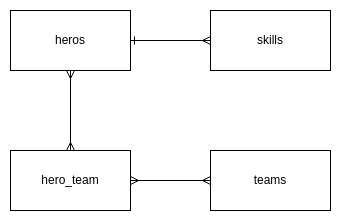
<p>When I have requirements, I decide a DB structure</p>
<figure class="post__image post__image--center"><img loading="lazy"  src="https://yanlinnthor.github.io/media/posts/15//heros-skills-teams.jpg" alt="heros-skills-teams" width="341" height="221" sizes="(max-width: 1920px) 100vw, 1920px" srcset="https://yanlinnthor.github.io/media/posts/15//responsive/heros-skills-teams-xs.jpg 640w ,https://yanlinnthor.github.io/media/posts/15//responsive/heros-skills-teams-sm.jpg 768w ,https://yanlinnthor.github.io/media/posts/15//responsive/heros-skills-teams-md.jpg 1024w ,https://yanlinnthor.github.io/media/posts/15//responsive/heros-skills-teams-lg.jpg 1366w ,https://yanlinnthor.github.io/media/posts/15//responsive/heros-skills-teams-xl.jpg 1600w ,https://yanlinnthor.github.io/media/posts/15//responsive/heros-skills-teams-2xl.jpg 1920w"></figure>
<h2 id="mcetoc_1ge8sgjjv1r6">Project Initiate</h2>
<p><strong>Generate model, factory, migration and seed files</strong></p>
<p><code>php artisan make:model -fms Hero</code></p>
<p><code>php artisan make:model -fms Skill</code></p>
<p><code>php artisan make:model -fms Team</code></p>
<p><strong>Generate pivot table migration for hero_team</strong></p>
<p><code>php artisan make:migration create_hero_team_table </code></p>
<p><strong>Update the migration files</strong></p>
<pre>        Schema::create('heroes', function (Blueprint $table) {<br>            $table-&gt;id();<br>            $table-&gt;string('name'); // text<br>            $table-&gt;text('history'); // textarea<br>            $table-&gt;string('species'); // dropdown<br>            $table-&gt;string('gender'); // radio button<br>            $table-&gt;integer('age'); // number<br>            $table-&gt;string('eye_color'); // color picker<br>            $table-&gt;json('traits'); // group of checkbox<br>            $table-&gt;timestamps();<br>        });<br><br>        Schema::create('skills', function (Blueprint $table) {<br>            $table-&gt;id();<br>            $table-&gt;string('name'); // text<br>            $table-&gt;foreignId('hero_id')-&gt;constrained(); // dropdown<br>            $table-&gt;integer('power')-&gt;default(50); // number<br>            $table-&gt;timestamps();<br>        });<br><br>        Schema::create('teams', function (Blueprint $table) {<br>            $table-&gt;id();<br>            $table-&gt;string('name'); // text<br>            $table-&gt;text('story'); // wysiwyg or rich text editor<br>            $table-&gt;foreignId('leader_id')<br>                    -&gt;constrained('heroes')<br>                    -&gt;onUpdate('cascade')<br>                    -&gt;onDelete('cascade');<br>            $table-&gt;timestamps();<br>        });<br><br>        Schema::create('hero_team', function (Blueprint $table) {<br>            $table-&gt;id();<br>            $table-&gt;foreignId('hero_id')-&gt;constrained();<br>            $table-&gt;foreignId('team_id')-&gt;constrained();<br>            $table-&gt;timestamps();<br>        });<br><br></pre>
<p>I write down the form field type so that I don't have to think when I setup CRUD form later.</p>
<p><strong>Run Migrate</strong></p>
<p><code>php artisan migrate</code></p>
<p>Hero has species and traits attributes. They will be predefined but instead of hard coding them directly at form fields we can use Enum class. Spatie Laravel Enum package is very useful.</p>
<p><strong>Generate and update Enum classes</strong></p>
<p><code>php artisan make:enum SpeciesEnum</code></p>
<pre>/**<br> * @method static self human()<br> * @method static self alien()<br> * @method static self god()<br> * @method static self robot()<br> * @method static self mutant()<br> * @method static self other()<br> */<br>final class SpeciesEnum extends Enum<br>{<br>}</pre>
<p><code>php artisan make:enum TraitsEnum</code></p>
<pre>/**<br> * @method static self intelligence()<br> * @method static self strength()<br> * @method static self speed()<br> * @method static self durability()<br> * @method static self power()<br> * @method static self combat()<br> */<br>final class TraitsEnum extends Enum<br>{<br>}<br><br></pre>
<p><strong>Update models with casts and relationship methods</strong></p>
<p>Hero.php</p>
<pre>&lt;?php<br><br>namespace App\Models;<br><br>use App\Enums\SpeciesEnum;<br>use App\Enums\TraitsEnum;<br>use Illuminate\Database\Eloquent\Factories\HasFactory;<br>use Illuminate\Database\Eloquent\Model;<br><br>class Hero extends Model<br>{<br>    use HasFactory;<br><br>    protected $casts = [<br>        'species' =&gt; SpeciesEnum::class,<br>        'traits' =&gt; TraitsEnum::class.':collection,nullable',<br>    ];<br><br>    /**<br>     * The attributes that aren't mass assignable.<br>     *<br>     * @var array<br>     */<br>    protected $guarded = [];<br><br>    /**<br>     * Get the skills of the hero.<br>     */<br>    public function skills()<br>    {<br>        return $this-&gt;hasMany(Skill::class);<br>    }<br><br>    /**<br>     * The teams that belong to the hero.<br>     */<br>    public function teams()<br>    {<br>        return $this-&gt;belongsToMany(Team::class);<br>    }<br><br>    /**<br>     * Get the teams the hero is leader of.<br>     */<br>    public function leaderTeams()<br>    {<br>        return $this-&gt;hasMany(Team::class, 'leader_id');<br>    }<br>}<br><br></pre>
<p>Skill.php</p>
<pre>&lt;?php<br><br>namespace App\Models;<br><br>use Illuminate\Database\Eloquent\Factories\HasFactory;<br>use Illuminate\Database\Eloquent\Model;<br><br>class Skill extends Model<br>{<br>    use HasFactory;<br><br>    /**<br>     * Get the hero that owns the skill.<br>     */<br>    public function hero()<br>    {<br>        return $this-&gt;belongsTo(Hero::class);<br>    }<br>}<br><br></pre>
<p>Team.php</p>
<pre>&lt;?php<br><br>namespace App\Models;<br><br>use Illuminate\Database\Eloquent\Factories\HasFactory;<br>use Illuminate\Database\Eloquent\Model;<br><br>class Team extends Model<br>{<br>    use HasFactory;<br><br>    /**<br>     * The heroes that belong to the team.<br>     */<br>    public function heroes()<br>    {<br>        return $this-&gt;belongsToMany(Hero::class);<br>    }<br><br>    /**<br>     * Get the leader that owns the team.<br>     */<br>    public function leader()<br>    {<br>        return $this-&gt;belongsTo(Hero::class, 'leader_id');<br>    }<br>}<br><br></pre>
<h2 id="mcetoc_1ge8sgjjv1r7">Generate CRUD</h2>
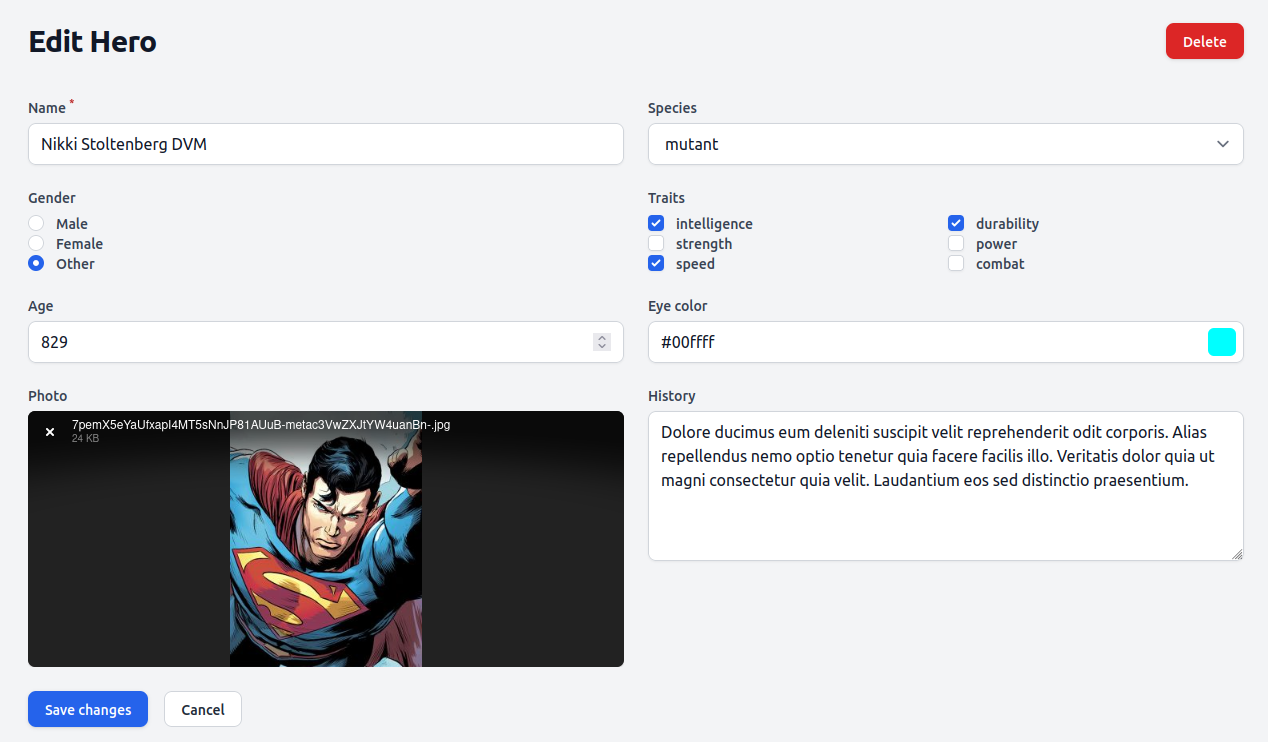
<p><strong>Filament resources</strong></p>
<p>Filament provide 3 options for generating CRUD. Filament address entity/model as resource so I will follow.</p>
<ol>
<li>default : You will need to define the form fields for create and edit pages and table columns for listing page. Create and edit form is separate page. Delete button is not showing at listing page. </li>
<li>simple : You still need to define the form fields and table columns. Create and edit form is a modal box now. Delete button exists at listing page. Good for resource with 2,3 small attributes. Not suitable for resource with many attributes or long text attribute.</li>
<li>generate : Form fields and table columns are auto generated. The rest is same as default. Useful if majority of the attributes are common type (eg: text, number). You won't need to create everything from scratch. You just need to update the generated code as you want. You need doctrine/dbal package for this.</li>
</ol>
<p><code>php artisan make:filament-resource Hero</code></p>
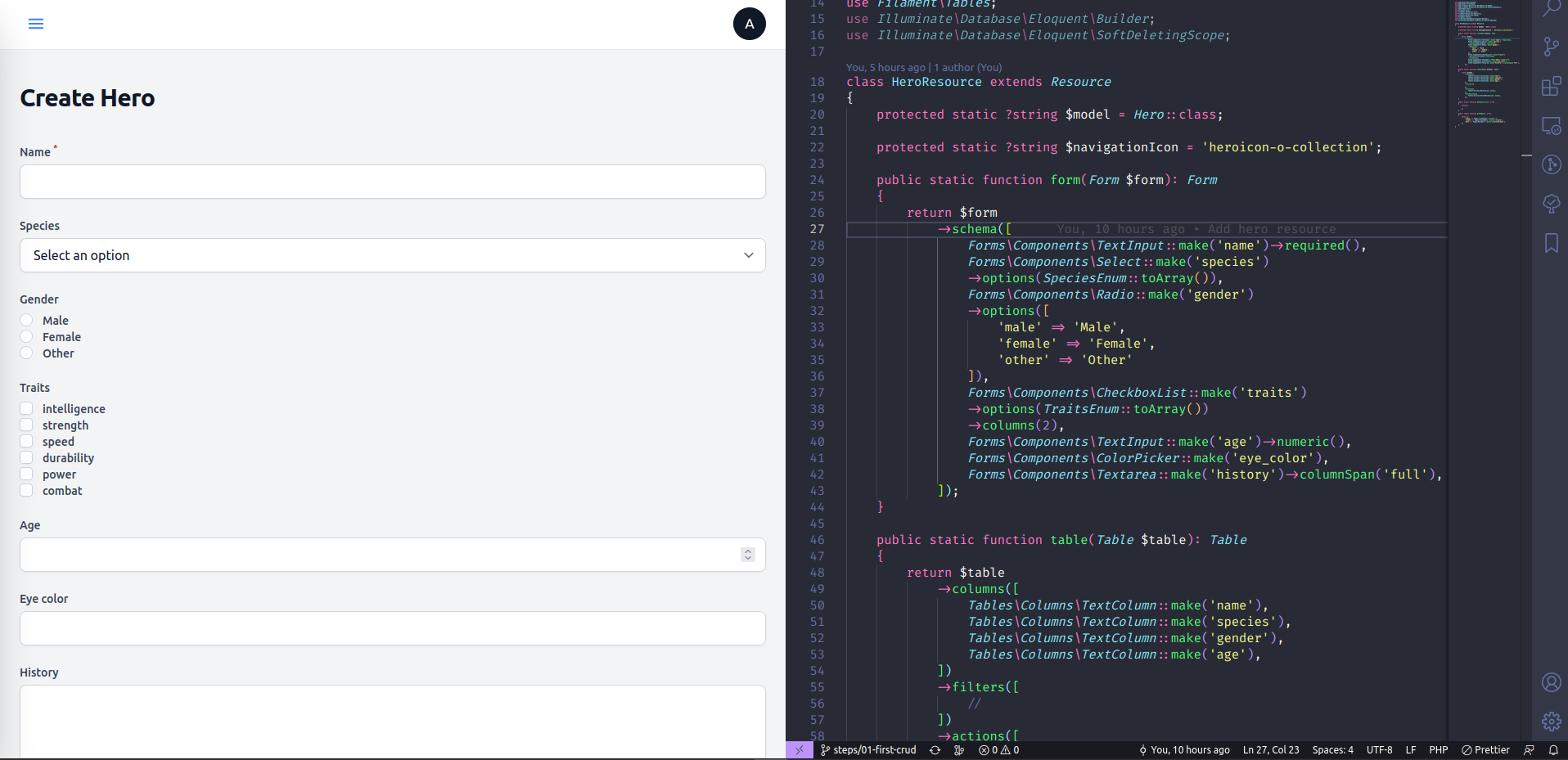
<pre>    public static function form(Form $form): Form<br>    {<br>        return $form<br>            -&gt;schema([<br>                Forms\Components\TextInput::make('name')-&gt;required(),<br>                Forms\Components\Select::make('species')<br>                -&gt;options(SpeciesEnum::toArray()),<br>                Forms\Components\Radio::make('gender')<br>                -&gt;options([<br>                    'male' =&gt; 'Male',<br>                    'female' =&gt; 'Female',<br>                    'other' =&gt; 'Other'<br>                ]),<br>                Forms\Components\CheckboxList::make('traits')<br>                -&gt;options(TraitsEnum::toArray())<br>                -&gt;columns(2),<br>                Forms\Components\TextInput::make('age')-&gt;numeric(),<br>                Forms\Components\ColorPicker::make('eye_color'),<br>                Forms\Components\Textarea::make('history')-&gt;columnSpan('full'),<br>            ]);<br>    }<br><br>    public static function table(Table $table): Table<br>    {<br>        return $table<br>            -&gt;columns([<br>                Tables\Columns\TextColumn::make('name'),<br>                Tables\Columns\TextColumn::make('species'),<br>                Tables\Columns\TextColumn::make('gender'),<br>                Tables\Columns\TextColumn::make('age'),<br>            ])<br>            -&gt;filters([<br>                //<br>            ])<br>            -&gt;actions([<br>                Tables\Actions\EditAction::make(),<br>            ])<br>            -&gt;bulkActions([<br>                Tables\Actions\DeleteBulkAction::make(),<br>            ]);<br>    }</pre>
<p><code>php artisan make:filament-resource Skill --simple</code></p>
<pre>    public static function form(Form $form): Form<br>    {<br>        return $form<br>            -&gt;schema([<br>                Forms\Components\TextInput::make('name')-&gt;required(),<br>                Forms\Components\Select::make('hero_id')-&gt;relationship('hero', 'name'),<br>                Forms\Components\TextInput::make('power')-&gt;numeric(),<br>            ]);<br>    }<br><br>    public static function table(Table $table): Table<br>    {<br>        return $table<br>            -&gt;columns([<br>                Tables\Columns\TextColumn::make('name'),<br>                Tables\Columns\TextColumn::make('hero.name'),<br>                Tables\Columns\TextColumn::make('power'),<br>            ])<br>            -&gt;filters([<br>                //<br>            ])<br>            -&gt;actions([<br>                Tables\Actions\EditAction::make(),<br>                Tables\Actions\DeleteAction::make(),<br>            ])<br>            -&gt;bulkActions([<br>                Tables\Actions\DeleteBulkAction::make(),<br>            ]);<br>    }</pre>
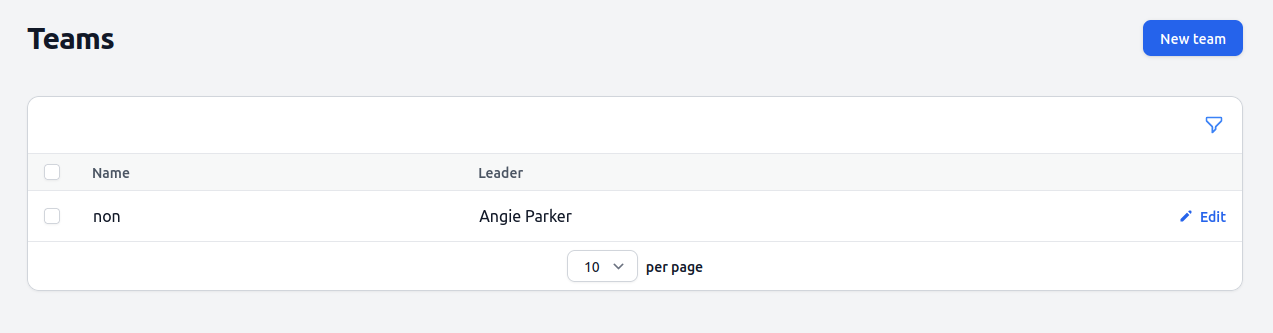
<p><code>php artisan make:filament-resource Team --generate</code></p>
<pre>    public static function form(Form $form): Form<br>    {<br>        return $form<br>            -&gt;schema([<br>                Forms\Components\TextInput::make('name')-&gt;required(),<br>                Forms\Components\Select::make('leader_id')-&gt;relationship('leader', 'name'),<br>                Forms\Components\RichEditor::make('story')-&gt;columnSpan('full'),<br>            ]);<br>    }<br><br>    public static function table(Table $table): Table<br>    {<br>        return $table<br>            -&gt;columns([<br>                Tables\Columns\TextColumn::make('name'),<br>                Tables\Columns\TextColumn::make('leader.name'),<br>            ])<br>            -&gt;filters([<br>                //<br>            ])<br>            -&gt;actions([<br>                Tables\Actions\EditAction::make(),<br>            ])<br>            -&gt;bulkActions([<br>                Tables\Actions\DeleteBulkAction::make(),<br>            ]);<br>    }</pre>
<ul>
<li>I update the generated fields and columns as I like.</li>
<li>I use <code>columnSpan('full')</code> method for the long text fields.</li>
<li>Skill and Team resources have hero as select drop down for the relationship. </li>
<li>Skill table actions() method has DeleteAction. So if we add it to other two resource, they will also show delete action at listing page.</li>
<li>Hero resource has radio buttons, checkbox group, color picker.</li>
<li>Team has rich text (wysiwyg) editor.</li>
</ul>
<p>You should be able to create, edit, delete the resources. But you will need to create user to login and access Filament admin dashboard. Or use my dummy data it already has test user account.</p>
<p><strong>Create user </strong></p>
<p><code>php artisan make:filament-user</code> and enter details</p>
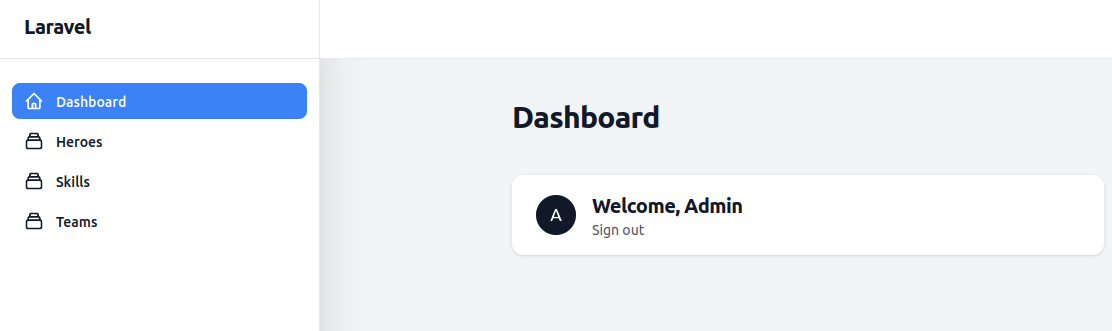
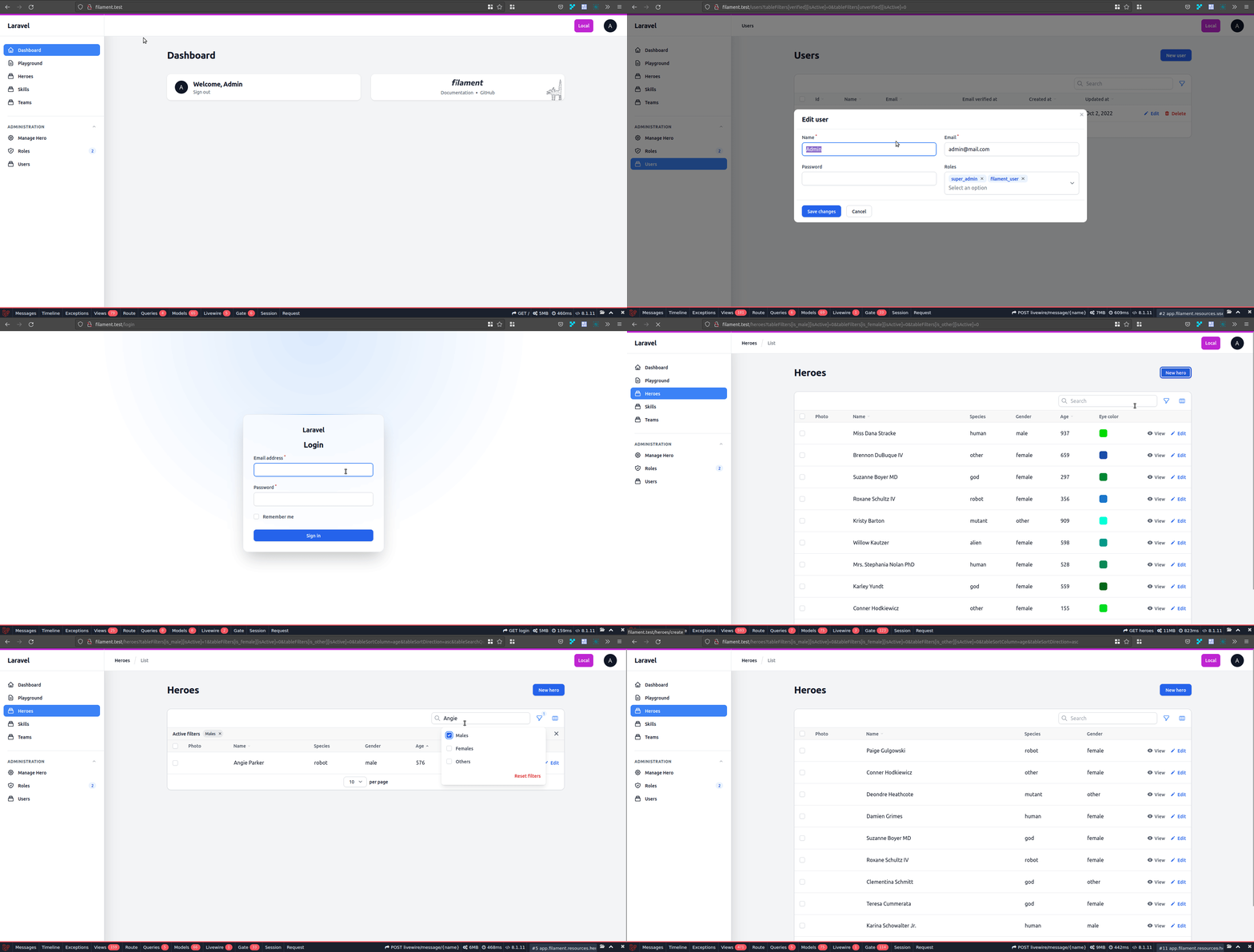
<p>Visit yourdomain/admin and login. You should see this.</p>
<figure class="post__image post__image--center"><img loading="lazy"  src="https://yanlinnthor.github.io/media/posts/15/2022-09-29_01-59.png" alt="filament-dashboard" width="1112" height="331" sizes="(max-width: 1920px) 100vw, 1920px" srcset="https://yanlinnthor.github.io/media/posts/15/responsive/2022-09-29_01-59-xs.png 640w ,https://yanlinnthor.github.io/media/posts/15/responsive/2022-09-29_01-59-sm.png 768w ,https://yanlinnthor.github.io/media/posts/15/responsive/2022-09-29_01-59-md.png 1024w ,https://yanlinnthor.github.io/media/posts/15/responsive/2022-09-29_01-59-lg.png 1366w ,https://yanlinnthor.github.io/media/posts/15/responsive/2022-09-29_01-59-xl.png 1600w ,https://yanlinnthor.github.io/media/posts/15/responsive/2022-09-29_01-59-2xl.png 1920w"></figure>
<p><strong>Dummy data</strong></p>
<p>I use Laravel's Factory and Seeder classes.</p>
<p>I update the HeroFactory, SkillFactory and TeamFactory.  I update TeamSeeder and SkillSeeder. Since TeamFactory will also generate Heroes, I don't use HeroSeeder.</p>
<p>I update DatabaseSeeder with test user and call TeamSeeder and SkillSeeder.</p>
<p>Run <code>php artisan migrate:fresh --seed</code> to clear the database, run migrations and seeders.</p>
<p>Visit yourdomain/admin and login</p>
<ul>
<li>username : <a href="mailto:admin@mail.com">admin@mail.com</a></li>
<li>password : password</li>
</ul>
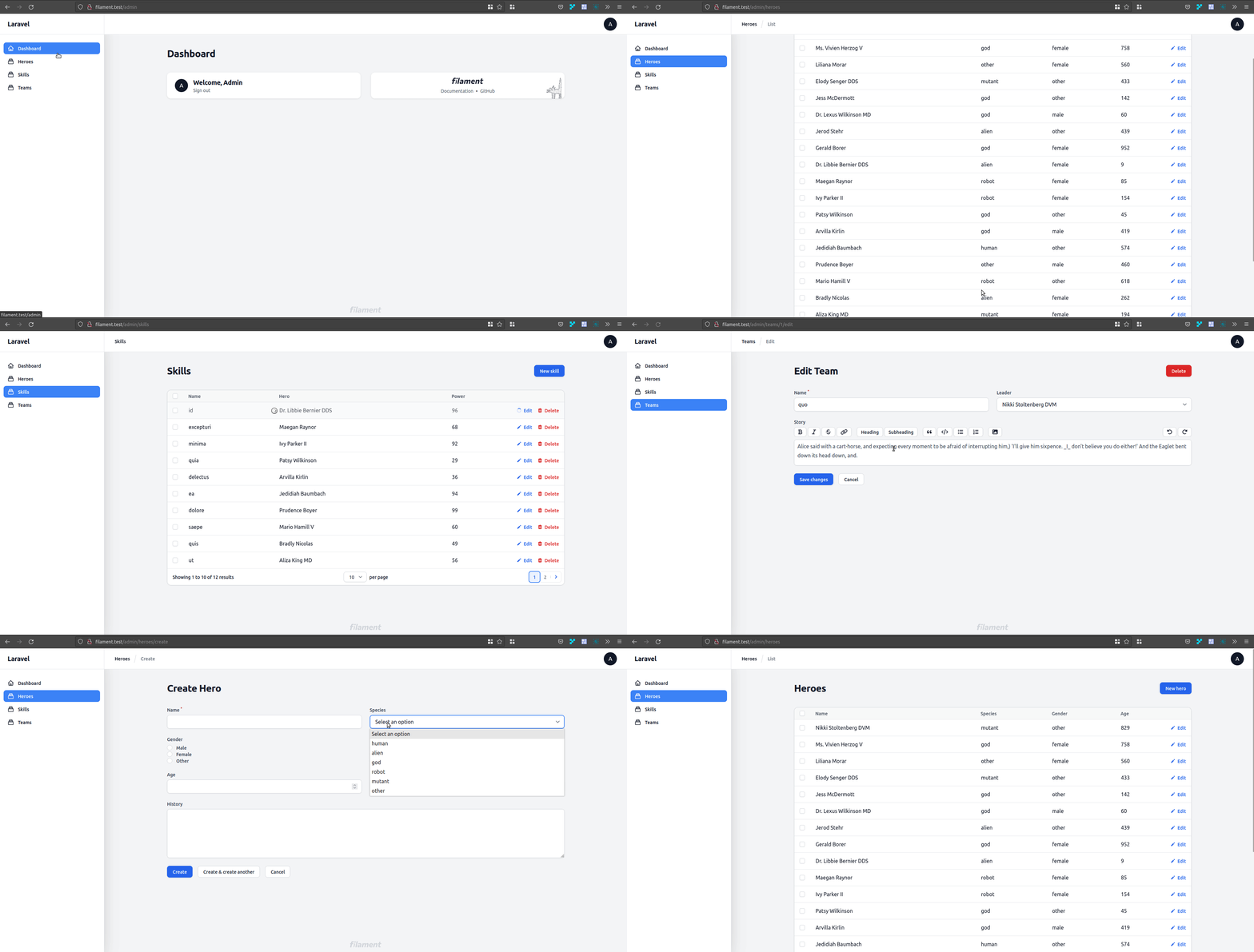
<p>You will see dummy data records for heroes, skills and teams.</p>
<figure class="post__image post__image--center"><img loading="lazy"  src="https://yanlinnthor.github.io/media/posts/15/Peek-2022-09-29-02-13.gif" alt="filament-with-dummy-data" width="1918" height="972"></figure>
<h2 id="mcetoc_1ge8sgjjv1r8">File upload</h2>
<p>Let's upload a photo for hero resource. With the help of Spatie Media Library package and Filament Media Library plugin package, we do not need to update hero table structure or anything.</p>
<p>To add file upload field to hero create/edit form, update <code>form()</code> method <code>$form-&gt;schema</code> parameter array in <code>HeroResource.php</code> with following</p>
<pre>Forms\Components\SpatieMediaLibraryFileUpload::make('photo')<br>-&gt;collection('hero'),</pre>
<p>It is better to define <code>collection()</code> parameter, since it is how we will associate the uploaded file with our resource.</p>
<p>To show the image in table column, update <code>table()</code> method <code>$table-&gt;columns</code> parameter array in <code>HeroResource.php</code> with following</p>
<pre>Tables\Columns\SpatieMediaLibraryImageColumn::make('photo')<br>-&gt;collection('hero'),</pre>
<figure class="post__image post__image--center"><img loading="lazy"  src="https://yanlinnthor.github.io/media/posts/15/2022-10-01_10-46.png" alt="file-upload" width="1268" height="742" sizes="(max-width: 1920px) 100vw, 1920px" srcset="https://yanlinnthor.github.io/media/posts/15/responsive/2022-10-01_10-46-xs.png 640w ,https://yanlinnthor.github.io/media/posts/15/responsive/2022-10-01_10-46-sm.png 768w ,https://yanlinnthor.github.io/media/posts/15/responsive/2022-10-01_10-46-md.png 1024w ,https://yanlinnthor.github.io/media/posts/15/responsive/2022-10-01_10-46-lg.png 1366w ,https://yanlinnthor.github.io/media/posts/15/responsive/2022-10-01_10-46-xl.png 1600w ,https://yanlinnthor.github.io/media/posts/15/responsive/2022-10-01_10-46-2xl.png 1920w"></figure>
<figure class="post__image post__image--center"><img loading="lazy"  src="https://yanlinnthor.github.io/media/posts/15/2022-10-01_10-45.png" alt="image-column" width="1246" height="161" sizes="(max-width: 1920px) 100vw, 1920px" srcset="https://yanlinnthor.github.io/media/posts/15/responsive/2022-10-01_10-45-xs.png 640w ,https://yanlinnthor.github.io/media/posts/15/responsive/2022-10-01_10-45-sm.png 768w ,https://yanlinnthor.github.io/media/posts/15/responsive/2022-10-01_10-45-md.png 1024w ,https://yanlinnthor.github.io/media/posts/15/responsive/2022-10-01_10-45-lg.png 1366w ,https://yanlinnthor.github.io/media/posts/15/responsive/2022-10-01_10-45-xl.png 1600w ,https://yanlinnthor.github.io/media/posts/15/responsive/2022-10-01_10-45-2xl.png 1920w"></figure>
<h2 id="mcetoc_1ge8sgjjv1r9">Relationships</h2>
<p><strong>One to many relationship</strong></p>
<p>Hero and skill have one to many relationship. Since a skill can only belong to one hero, we need to select hero when a skill is created. Relationship name is <code>hero</code> and foreign key column is <code>hero_id</code>.</p>
<p>Same with Hero and Team. A team can only have one hero as leader so we need to select leader when creating a team. Relationship name is <code>leader</code> and foreign key column is <code>leader_id</code>.</p>
<p>Necessary codes are already added in previous step while updating the generated resource files.</p>
<p>In <code>SkillResource.php</code></p>
<pre>Forms\Components\Select::make('hero_id')-&gt;relationship('hero', 'name'),</pre>
<p>In <code>TeamResource.php</code></p>
<pre>Forms\Components\Select::make('leader_id')-&gt;relationship('leader', 'name'),</pre>
<p>To show relationship object's attribute in table, you can just use relationship method name with <code>.</code> dot notation. Check the leader name column in <code>TeamResource.php</code>.</p>
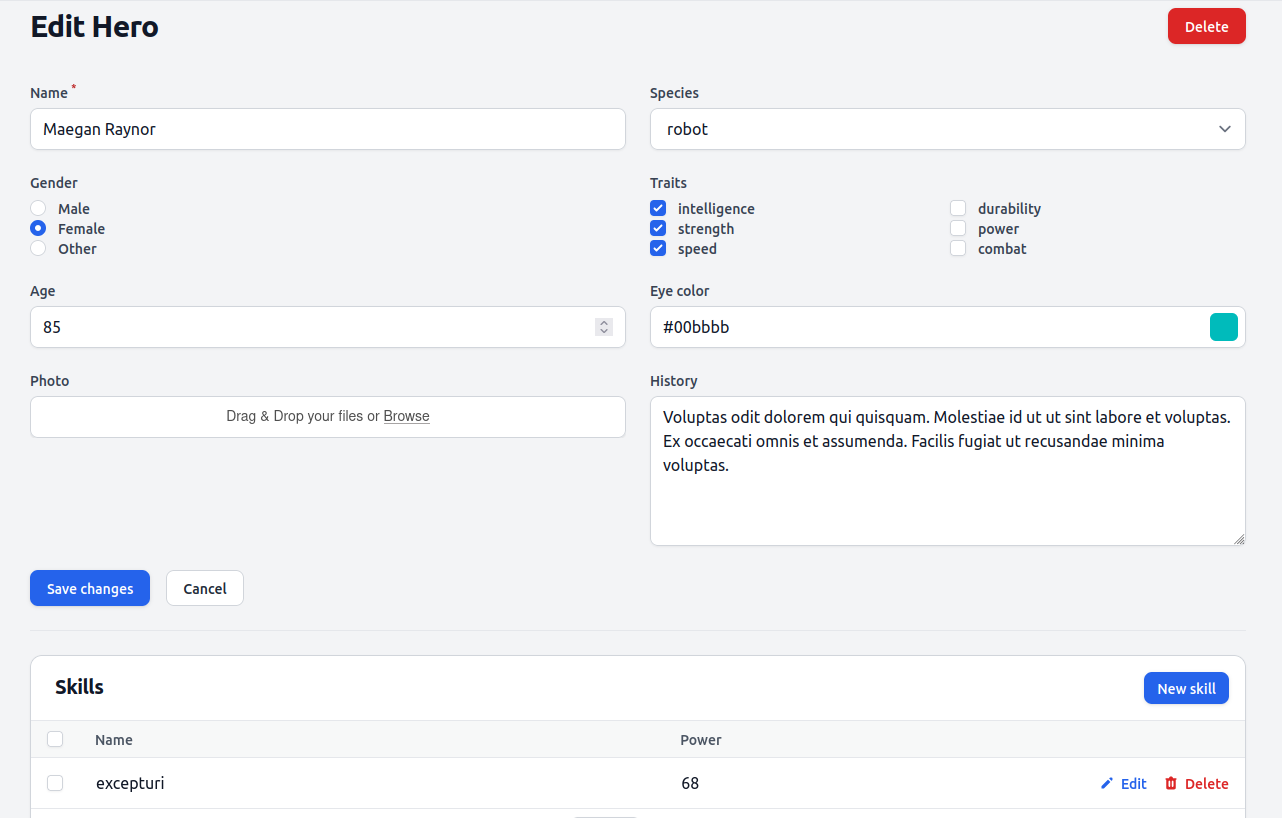
<p>It is not very convenient for user to create hero and then create many skills for the hero one by one at different page. Creating all the skills of the hero while creating the hero provides a better user experience.</p>
<p>We can use Filament relation manger feature for that. We will need skill relation manager for the hero resource.</p>
<p><strong>Relation manager</strong></p>
<p><code>php artisan make:filament-relation-manager HeroResource skills name</code></p>
<pre>class SkillsRelationManager extends RelationManager<br>{<br>    protected static string $relationship = 'skills';<br><br>    protected static ?string $recordTitleAttribute = 'name';<br><br>    public static function form(Form $form): Form<br>    {<br>        return $form<br>            -&gt;schema([<br>                Forms\Components\TextInput::make('name')<br>                    -&gt;required()<br>                    -&gt;maxLength(255),<br>                Forms\Components\TextInput::make('power')-&gt;numeric(),<br>            ]);<br>    }<br><br>    public static function table(Table $table): Table<br>    {<br>        return $table<br>            -&gt;columns([<br>                Tables\Columns\TextColumn::make('name'),<br>                Tables\Columns\TextColumn::make('power'),<br>            ])<br>            -&gt;filters([<br>                //<br>            ])<br>            -&gt;headerActions([<br>                Tables\Actions\CreateAction::make(),<br>            ])<br>            -&gt;actions([<br>                Tables\Actions\EditAction::make(),<br>                Tables\Actions\DeleteAction::make(),<br>            ])<br>            -&gt;bulkActions([<br>                Tables\Actions\DeleteBulkAction::make(),<br>            ]);<br>    }<br>}</pre>
<p>After generating and updating the relation manager, we need to update <code>getRelations()</code> method of hero resource as well.</p>
<pre>    public static function getRelations(): array<br>    {<br>        return [<br>            RelationManagers\SkillsRelationManager::class,<br>        ];<br>    }</pre>
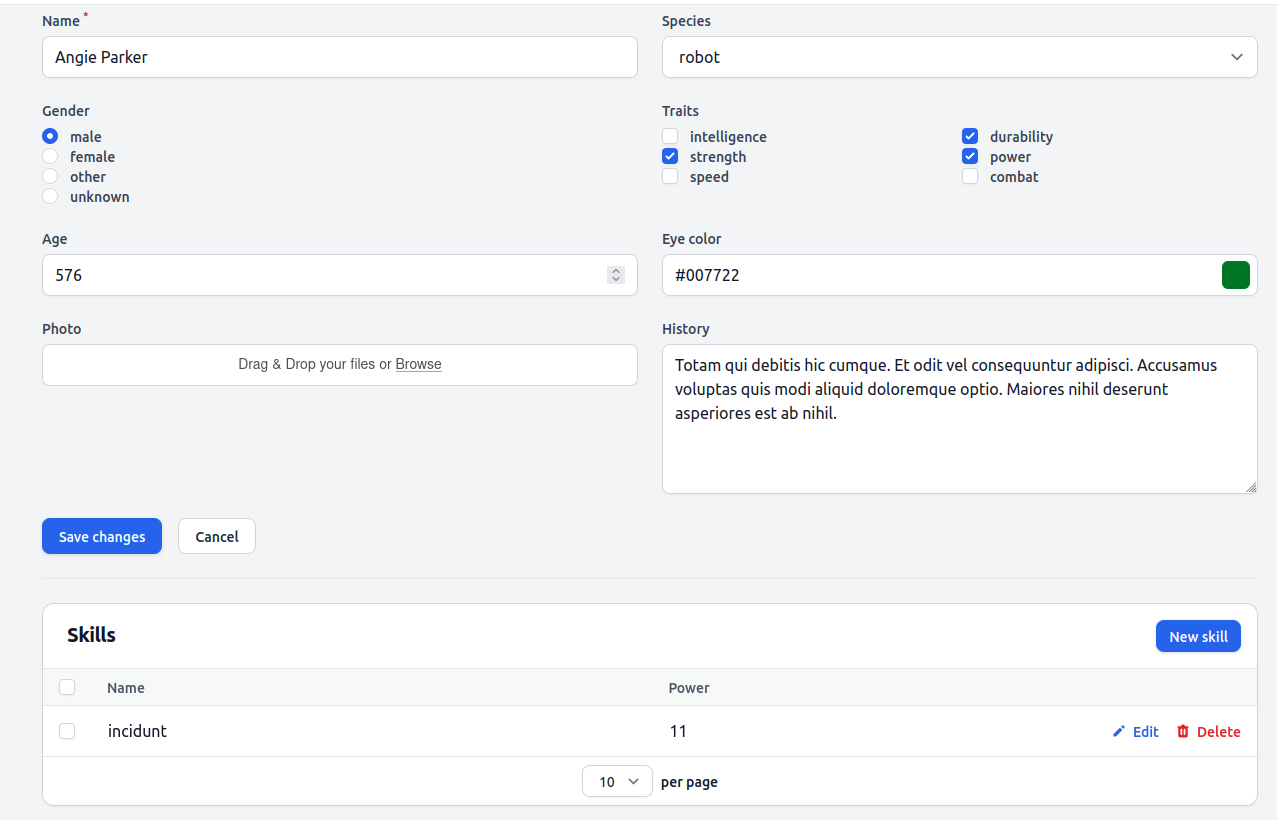
<p>A skills table and new skill button will appear at hero create/edit form.</p>
<figure class="post__image post__image--center"><img loading="lazy"  src="https://yanlinnthor.github.io/media/posts/15/2022-10-01_10-21.png" alt="relation-manager" width="1282" height="818" sizes="(max-width: 1920px) 100vw, 1920px" srcset="https://yanlinnthor.github.io/media/posts/15/responsive/2022-10-01_10-21-xs.png 640w ,https://yanlinnthor.github.io/media/posts/15/responsive/2022-10-01_10-21-sm.png 768w ,https://yanlinnthor.github.io/media/posts/15/responsive/2022-10-01_10-21-md.png 1024w ,https://yanlinnthor.github.io/media/posts/15/responsive/2022-10-01_10-21-lg.png 1366w ,https://yanlinnthor.github.io/media/posts/15/responsive/2022-10-01_10-21-xl.png 1600w ,https://yanlinnthor.github.io/media/posts/15/responsive/2022-10-01_10-21-2xl.png 1920w"></figure>
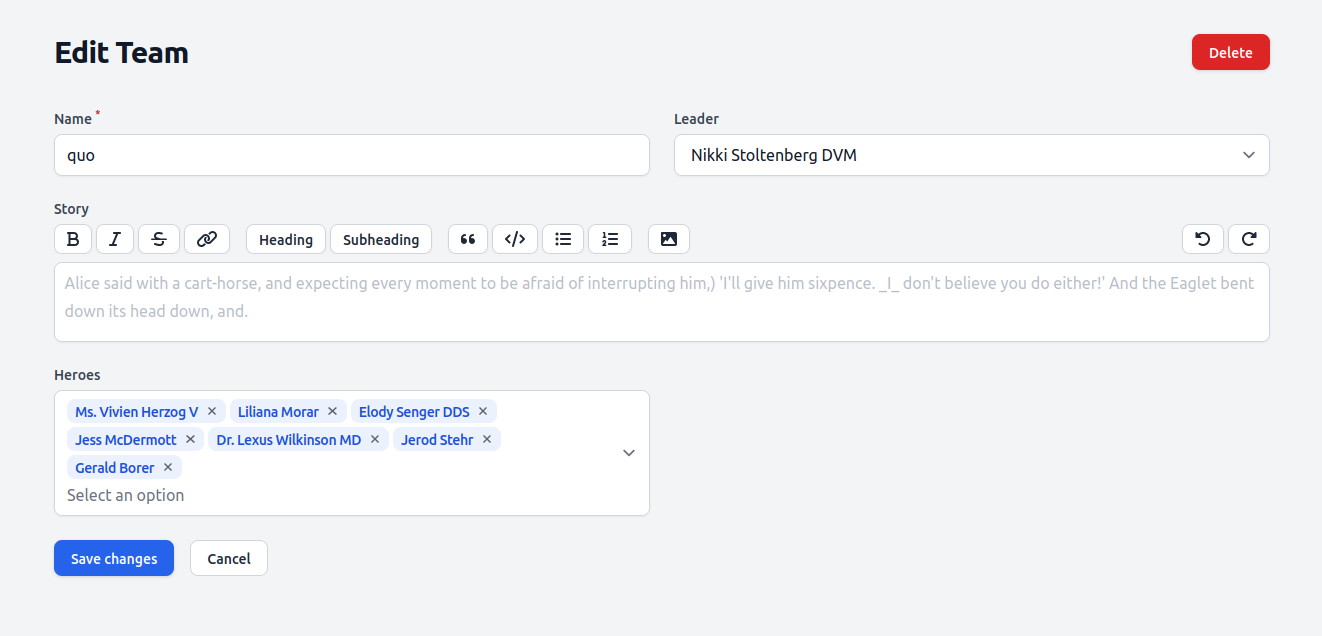
<p><strong>Many to many relationship</strong></p>
<p>Team and hero have many to many relationship. We can either</p>
<ul>
<li>add hero to one or more teams at hero create/edit form or</li>
<li>assign heroes at team create/edit form</li>
</ul>
<p>I like the later because most of the time we will be creating hero before creating team.</p>
<p>We just update <code>TeamResource.php</code> </p>
<pre>public static function form(Form $form): Form<br>{<br>    return $form<br>        -&gt;schema([<br>            //...<br>            Forms\Components\MultiSelect::make('heroes')<br>            -&gt;relationship('heroes', 'name')<br>        ]);<br>}</pre>
<div>
<div>New heroes multi-select field will appear at Team create/edit form</div>
<div> </div>
<div><figure class="post__image post__image--center"><img loading="lazy"  src="https://yanlinnthor.github.io/media/posts/15/2022-10-01_10-02.png" alt="many-to-many" width="1322" height="636" sizes="(max-width: 1920px) 100vw, 1920px" srcset="https://yanlinnthor.github.io/media/posts/15/responsive/2022-10-01_10-02-xs.png 640w ,https://yanlinnthor.github.io/media/posts/15/responsive/2022-10-01_10-02-sm.png 768w ,https://yanlinnthor.github.io/media/posts/15/responsive/2022-10-01_10-02-md.png 1024w ,https://yanlinnthor.github.io/media/posts/15/responsive/2022-10-01_10-02-lg.png 1366w ,https://yanlinnthor.github.io/media/posts/15/responsive/2022-10-01_10-02-xl.png 1600w ,https://yanlinnthor.github.io/media/posts/15/responsive/2022-10-01_10-02-2xl.png 1920w"></figure></div>
<h2 id="mcetoc_1ge8sgjjv1ra">View Resource</h2>
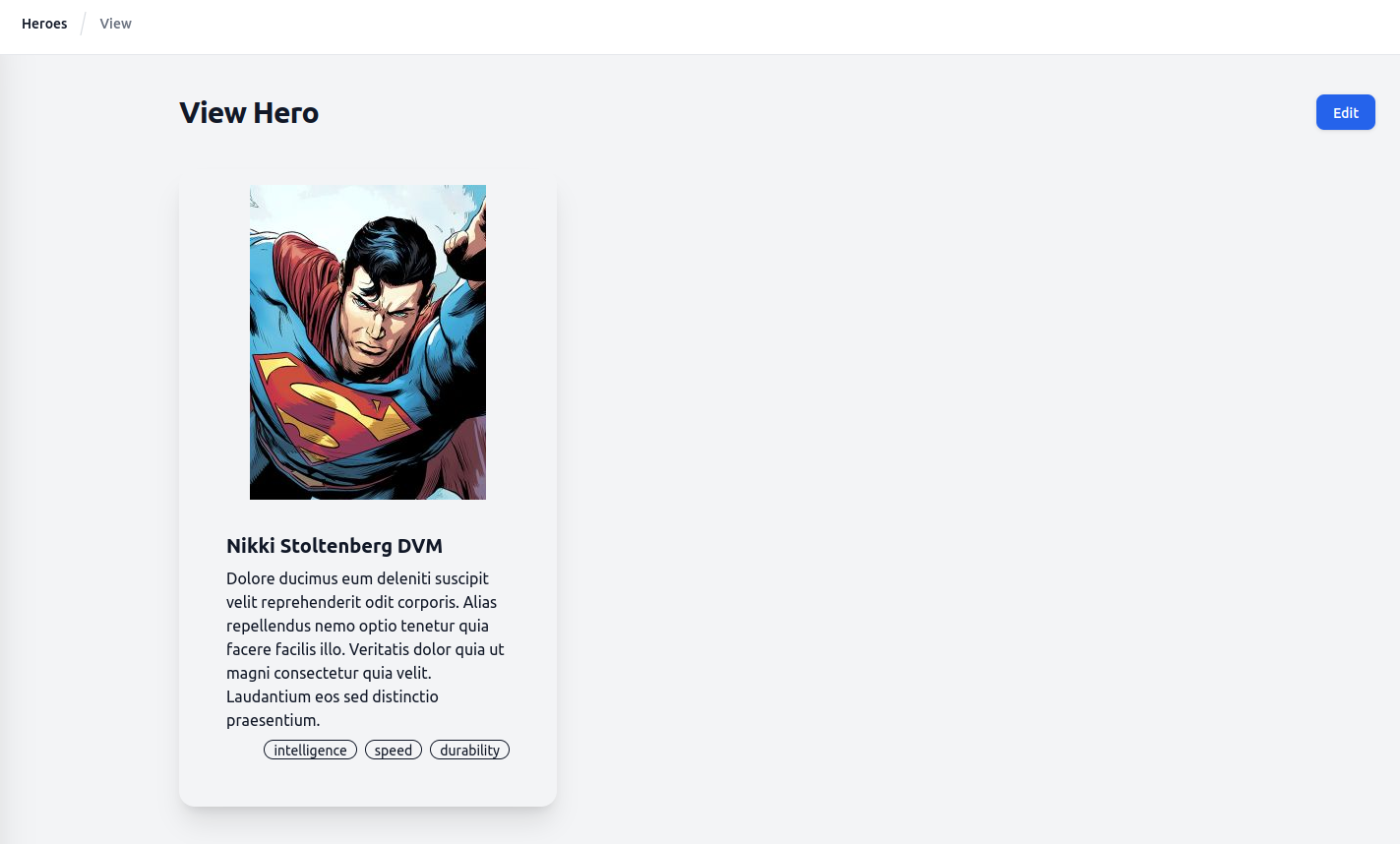
<p>By default Filament doesn't generate view page since we will see all data at edit form anyway. If you want separate view page, you have to mention it during resource generation command. Or run generate view page command for existing resource.</p>
<p>I will create own view page for hero resource.</p>
<p><strong>Generate view page and update</strong></p>
<p><code>php artisan make:filament-page ViewHero --resource=HeroResource --type=ViewRecord</code></p>
<p>You will get a new <code>ViewHero.php</code> file under <code>HeroResource\pages\</code> directory.</p>
<p>You need to add the view page to <code>getPages()</code> method in <code>HeroResource.php</code></p>
<pre>    public static function getPages(): array<br>    {<br>        return [<br>            'index' =&gt; Pages\ListHeroes::route('/'),<br>            'create' =&gt; Pages\CreateHero::route('/create'),<br>            'view' =&gt; Pages\ViewHero::route('/{record}'),<br>            'edit' =&gt; Pages\EditHero::route('/{record}/edit'),<br>        ];<br>    }</pre>
<p>Now when you click on a hero record, it will not bring you to edit form. You will still see all attributes in read-only state in form layout. </p>
<p>To design your own custom view page, define <code>$view</code> property in <code>ViewHero.php</code> and create your own custom blade for the view.</p>
<pre>class ViewHero extends ViewRecord<br>{<br>    protected static string $resource = HeroResource::class;<br><br>    protected static string $view = 'filament.resources.heroes.pages.view';<br>}</pre>
<p>You can use <code>$record</code> variable to get the resource object data in the blade file.</p>
<pre>&lt;x-filament::page&gt;<br>    &lt;div class="card w-96 shadow-xl p-4"&gt;<br>        &lt;figure&gt;&lt;img src="{{ $record-&gt;getFirstMediaUrl('hero') }}" alt="{{ $record-&gt;name }}" /&gt;<br>        &lt;/figure&gt;<br>        &lt;div class="card-body"&gt;<br>            &lt;h2 class="card-title"&gt;{{ $record-&gt;name }}&lt;/h2&gt;<br>            &lt;p&gt;{{ $record-&gt;history }}&lt;/p&gt;<br>            &lt;div class="justify-end card-actions"&gt;<br>                @foreach ($record-&gt;traits as $trait)<br>                    &lt;div class="badge badge-outline"&gt;{{ $trait }}&lt;/div&gt;<br>                @endforeach<br>            &lt;/div&gt;<br>        &lt;/div&gt;<br>    &lt;/div&gt;<br>&lt;/x-filament::page&gt;</pre>
<p>And you will get your custom view page for the hero.</p>
<figure class="post__image post__image--center"><img loading="lazy"  src="https://yanlinnthor.github.io/media/posts/15/2022-10-01_10-49.png" alt="custom-view" width="1423" height="858" sizes="(max-width: 1920px) 100vw, 1920px" srcset="https://yanlinnthor.github.io/media/posts/15/responsive/2022-10-01_10-49-xs.png 640w ,https://yanlinnthor.github.io/media/posts/15/responsive/2022-10-01_10-49-sm.png 768w ,https://yanlinnthor.github.io/media/posts/15/responsive/2022-10-01_10-49-md.png 1024w ,https://yanlinnthor.github.io/media/posts/15/responsive/2022-10-01_10-49-lg.png 1366w ,https://yanlinnthor.github.io/media/posts/15/responsive/2022-10-01_10-49-xl.png 1600w ,https://yanlinnthor.github.io/media/posts/15/responsive/2022-10-01_10-49-2xl.png 1920w"></figure>
<h1 id="mcetoc_1gf9c08qph">Step 2 - Roles Permissions</h1>
<p><em>Branch : <a href="https://github.com/mrlinnth/laravel-filament-starter/tree/steps/02-roles-permissions" title="steps/02-roles-permissions">steps/02-roles-permissions</a></em></p>
<p>Let's add common features that every project has such as roles, permission, log in, register, impersonate, settings, etc.</p>
<h2 id="mcetoc_1gf9c08qpi">Custom command</h2>
<p>There will be time you found that your database has many unclean data, bad data and want to reset. It is always better to have a command to help you with that.</p>
<p>You can reset the database tables, seed data, delete test uploaded files, cache files, clear log and any other things that you want in the command.</p>
<p>Generate a custom command class <code>php artisan make:command Project\FactoryReset</code></p>
<pre>class FactoryReset extends Command<br>{<br>    /**<br>     * The name and signature of the console command.<br>     *<br>     * @var string<br>     */<br>    protected $signature = 'project:factory-reset';<br><br>    /**<br>     * The console command description.<br>     *<br>     * @var string<br>     */<br>    protected $description = 'Drop tables, migrate, seed, delete uploaded files, clear cache and log';<br><br>    /**<br>     * Execute the console command.<br>     *<br>     * @return int<br>     */<br>    public function handle()<br>    {<br>        $this-&gt;call('migrate:fresh', ['--seed'=&gt;true]);<br>        Storage::deleteDirectory('public');<br>        Storage::disk('public')-&gt;put('.gitignore', "*\n!.gitignore\n");<br>        $this-&gt;info('Uploaded files deleted');<br>        $this-&gt;call('optimize:clear');<br>        $logFilePath = storage_path('logs/laravel.log');<br>        system('truncate -s 0 ' . $logFilePath);<br>        $this-&gt;info('Log file truncated');<br>        $this-&gt;call('shield:install', ['--fresh'=&gt;true]);<br>        return Command::SUCCESS;<br>    }<br>}</pre>
<h2 id="mcetoc_1gf9c08qpj">Filament Plugins</h2>
<p>I use few plugins for user authentication and authorization. Using Filament plugins is pretty straightforward and same as using any other Laravel or composer package. </p>
<p><a href="https://github.com/pxlrbt/filament-environment-indicator" title="Environment indicator plugin">Environment indicator</a> : so we will not be mistaken between dev and prod environments</p>
<p><a href="https://github.com/bezhanSalleh/filament-shield" title="Filament shield">Filament shield</a> : for roles and permissions management. It is basically ready made CRUD resources for the famous <a href="https://github.com/spatie/laravel-permission" title="Spatie's permission package">Spatie's permission package</a></p>
<p><a href="https://github.com/stechstudio/filament-impersonate" title="Filament impersonate">Filament impersonate</a> : to impersonate as other user</p>
<p><a href="https://github.com/jeffgreco13/filament-breezy" title="Filament breezy">Filament breezy</a> : for log in, register, profile pages with optional 2FA</p>
<p>Install the packages, follow installation instructions, publish config files and update as needed. </p>
<h2 id="mcetoc_1gf9c08qpk">Settings Package</h2>
<p>The repo already has <a href="https://filamentphp.com/docs/2.x/spatie-laravel-settings-plugin/installation" title="Filament settings plugin">Filament settings plugin</a> which uses <a href="https://github.com/spatie/laravel-settings" title="Spatie's Settings package">Spatie's Settings package</a>. Follow the package installation instruction and publish config files. Let's create hero gender options as setting instead of hard coded values.</p>
<p>Create a new class for the setting <code>HeroSettings.php</code></p>
<pre>&lt;?php<br><br>namespace App\Settings;<br><br>use Spatie\LaravelSettings\Settings;<br><br>class HeroSettings extends Settings<br>{<br>    public string $gender_options;<br><br>    public static function group(): string<br>    {<br>        return 'hero';<br>    }<br>}</pre>
<p>Update <code>settings</code> array in <code>config/settings.php</code> </p>
<pre>    'settings' =&gt; [<br>        App\Settings\HeroSettings::class,<br>    ],</pre>
<p>Generate migration for the setting with default values</p>
<p><code>php artisan make:settings-migration CreateHeroSettings</code></p>
<p>Setting migration file will be generated in <code>database/settings</code> directory</p>
<pre>&lt;?php<br><br>use Spatie\LaravelSettings\Migrations\SettingsMigration;<br><br>class CreateHeroSettings extends SettingsMigration<br>{<br>    public function up(): void<br>    {<br>        $this-&gt;migrator-&gt;add('hero.gender_options', 'male, female, other');<br>    }<br>}</pre>
<p>Run <code>php artisan migrate</code></p>
<p>Generate Filament setting page</p>
<p><code>php artisan make:filament-settings-page ManageHero HeroSettings</code></p>
<p>Update <code>Pages/ManageHero.php</code></p>
<pre>class ManageHero extends SettingsPage<br>{<br>    protected static ?string $navigationIcon = 'heroicon-o-cog';<br><br>    protected static string $settings = HeroSettings::class;<br><br>    protected static ?string $navigationGroup = 'Administration';<br><br>    protected function getFormSchema(): array<br>    {<br>        return [<br>            TextInput::make('gender_options')<br>            -&gt;helperText('Separate each option with comma (,)')<br>            -&gt;required(),<br>        ];<br>    }<br>}</pre>
<p>To use the setting in hero form, update <code>form()</code> method in <code>Resources/HeroResource.php</code></p>
<pre>    public static function form(Form $form): Form<br>    {<br>        $heroSettings = new HeroSettings();<br>        $genderOptions = str_replace(', ', ',', $heroSettings-&gt;gender_options);<br>        $genderOptions = explode(',', $genderOptions);<br>        $genderOptions = array_combine($genderOptions, $genderOptions);<br>        return $form<br>            -&gt;schema([<br>                // ...<br>                Forms\Components\Radio::make('gender')<br>                -&gt;options($genderOptions),<br>                // ...<br>            ]);<br>    }</pre>
<p>Listing table filter, sort and search</p>
<p>Update <code>table()</code> method in <code>Resources/HeroResource.php</code></p>
<pre>    public static function table(Table $table): Table<br>    {<br>        return $table<br>            -&gt;columns([<br>                Tables\Columns\SpatieMediaLibraryImageColumn::make('photo')<br>                -&gt;collection('hero')<br>                -&gt;conversion('thumb'),<br>                Tables\Columns\TextColumn::make('name')-&gt;sortable()-&gt;searchable(),<br>                Tables\Columns\TextColumn::make('species')-&gt;searchable(),<br>                Tables\Columns\TextColumn::make('gender'),<br>                Tables\Columns\TextColumn::make('age')-&gt;sortable()-&gt;toggleable(),<br>                Tables\Columns\ColorColumn::make('eye_color')-&gt;toggleable(),<br>            ])<br>            -&gt;filters([<br>                Tables\Filters\Filter::make('is_male')<br>                -&gt;label('Males')<br>                -&gt;query(fn (Builder $query): Builder =&gt; $query-&gt;where('gender', 'male')),<br>                Tables\Filters\Filter::make('is_female')<br>                -&gt;label('Females')<br>                -&gt;query(fn (Builder $query): Builder =&gt; $query-&gt;where('gender', 'female')),<br>                Tables\Filters\Filter::make('is_other')<br>                -&gt;label('Others')<br>                -&gt;query(fn (Builder $query): Builder =&gt; $query-&gt;where('gender', 'other')),<br>            ])<br>            -&gt;actions([<br>                Tables\Actions\ViewAction::make(),<br>                Tables\Actions\EditAction::make(),<br>            ])<br>            -&gt;bulkActions([<br>                Tables\Actions\DeleteBulkAction::make(),<br>            ]);<br>    }</pre>
<h1 id="mcetoc_1gf9c08qpl"><figure class="post__image post__image--center"><img loading="lazy"  src="https://yanlinnthor.github.io/media/posts/15/Peek-2022-10-14-01-11.gif" alt="02-roles-permission" width="1918" height="972"></figure></h1>
<h1 id="mcetoc_1gf9c08qpm">Step 3 - JSON API</h1>
<p><em>Branch : <a href="https://github.com/mrlinnth/laravel-filament-starter/tree/steps/03-json-api" title="steps/03-json-api">steps/03-json-api</a></em></p>
<p>The project already has <a href="https://laraveljsonapi.io/docs/2.0" title="Laravel JSON API package">Laravel JSON API package</a> installed for developing APIs. Make sure package config file is publish and Exception handler is updated.</p>
<h2 id="mcetoc_1gf9c08qpn">Hero API end points</h2>
<p>Generate new API server <code>php artisan jsonapi:server v1</code></p>
<p>Update servers array in <code>config/jsonapi.php</code></p>
<pre>    'servers' =&gt; [<br>       'v1' =&gt; \App\JsonApi\V1\Server::class,<br>    ],</pre>
<p>Generate API schema for heroes <code>php artisan jsonapi:schema heroes</code></p>
<p>Generate skills schema <code>php artisan jsonapi:schema skills</code></p>
<p>Generate teams schema <code>php artisan jsonapi:schema teams</code></p>
<p>Update  <code>V1/Server.php</code> </p>
<pre>    protected function allSchemas(): array<br>    {<br>        return [<br>            HeroSchema::class,<br>            SkillSchema::class,<br>            TeamSchema::class,<br>        ];<br>    }</pre>
<p>Update <code>V1/HeroSchema.php</code></p>
<pre>    public function fields(): array<br>    {<br>        return [<br>            ID::make(),<br>            Str::make('name')-&gt;sortable(),<br>            Str::make('history'),<br>            Str::make('species'),<br>            Str::make('gender'),<br>            Number::make('age')-&gt;sortable(),<br>            Str::make('eyeColor'),<br>            ArrayList::make('traits'),<br>            HasMany::make('skills')-&gt;readOnly(),<br>            HasMany::make('leaderTeams')-&gt;type('teams')-&gt;readOnly(),<br>            BelongsToMany::make('teams')-&gt;readOnly(),<br>            DateTime::make('createdAt')-&gt;sortable()-&gt;readOnly(),<br>            DateTime::make('updatedAt')-&gt;sortable()-&gt;readOnly(),<br>        ];<br>    }</pre>
<p>Update <code>V1/SkillSchema.php</code></p>
<pre>    public function fields(): array<br>    {<br>        return [<br>            ID::make(),<br>            Str::make('name'),<br>            Number::make('power'),<br>            BelongsTo::make('hero')-&gt;readOnly(),<br>            DateTime::make('createdAt')-&gt;sortable()-&gt;readOnly(),<br>            DateTime::make('updatedAt')-&gt;sortable()-&gt;readOnly(),<br>        ];<br>    }</pre>
<p>Update <code>V1/TeamSchema.php</code></p>
<pre>    public function fields(): array<br>    {<br>        return [<br>            ID::make(),<br>            Str::make('name'),<br>            Str::make('name')-&gt;on('leader'),<br>            Str::make('story'),<br>            BelongsTo::make('leader')-&gt;readOnly(),<br>            BelongsToMany::make('heroes')-&gt;readOnly(),<br>            DateTime::make('createdAt')-&gt;sortable()-&gt;readOnly(),<br>            DateTime::make('updatedAt')-&gt;sortable()-&gt;readOnly(),<br>        ];<br>    }</pre>
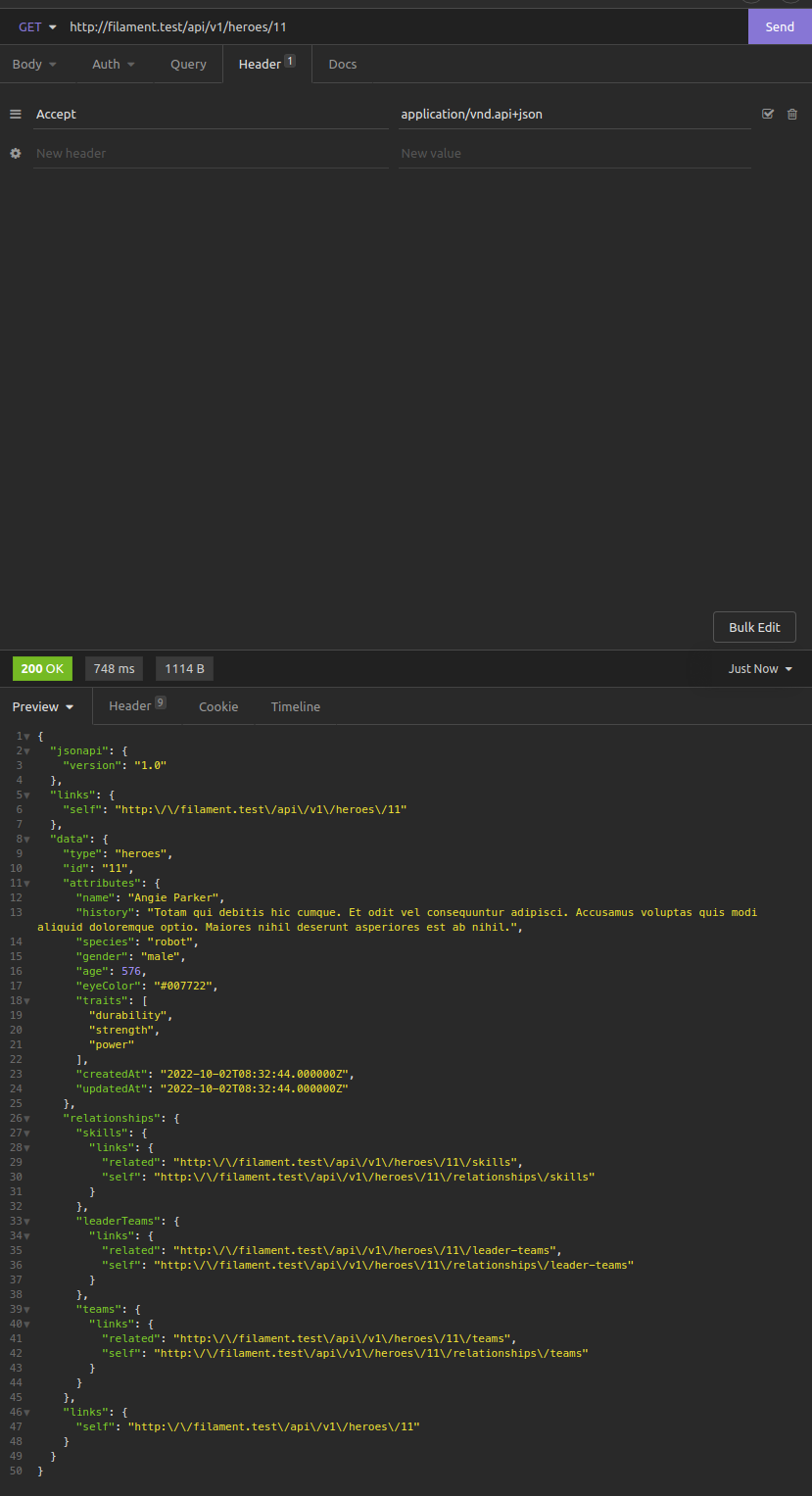
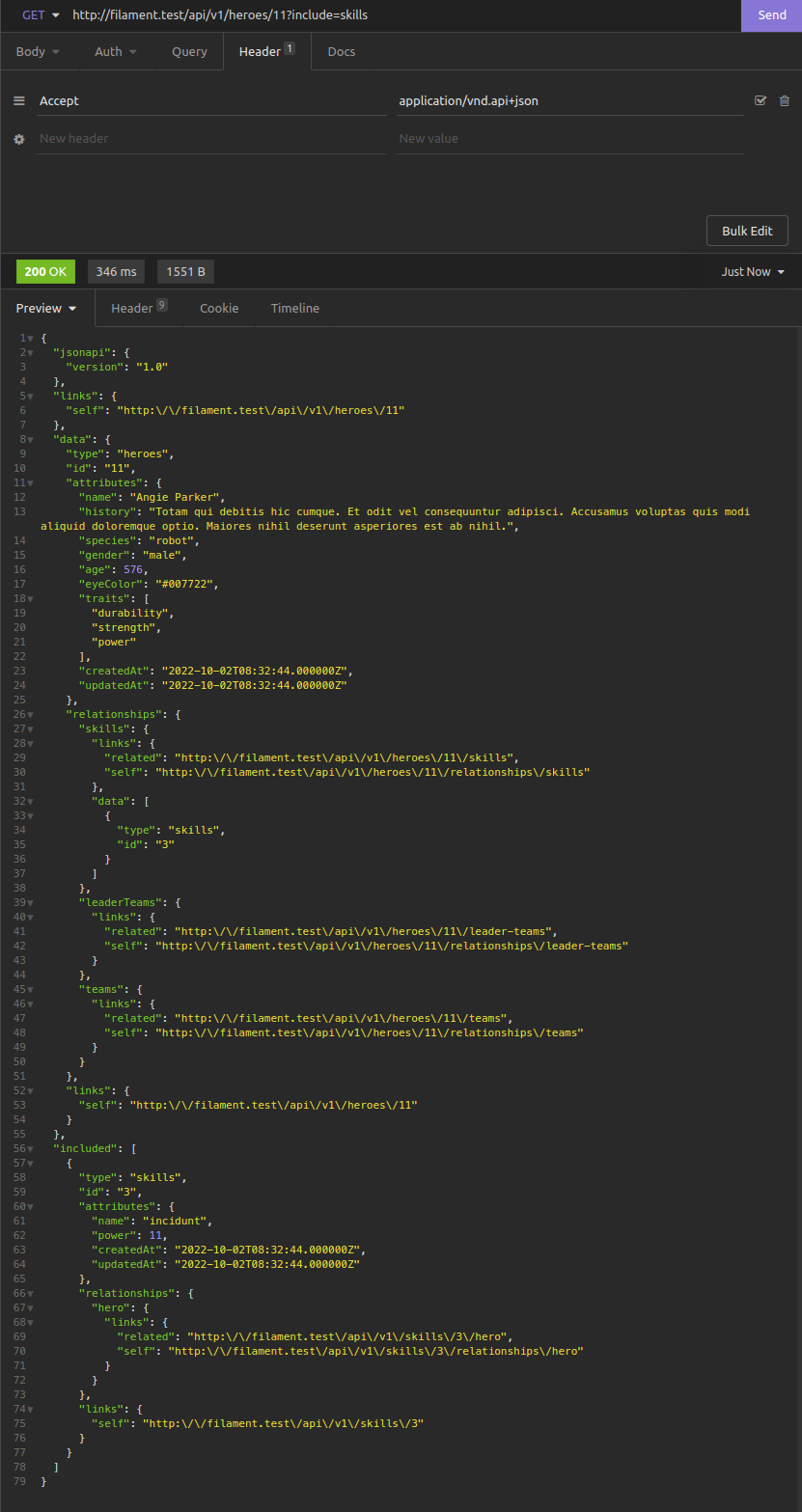
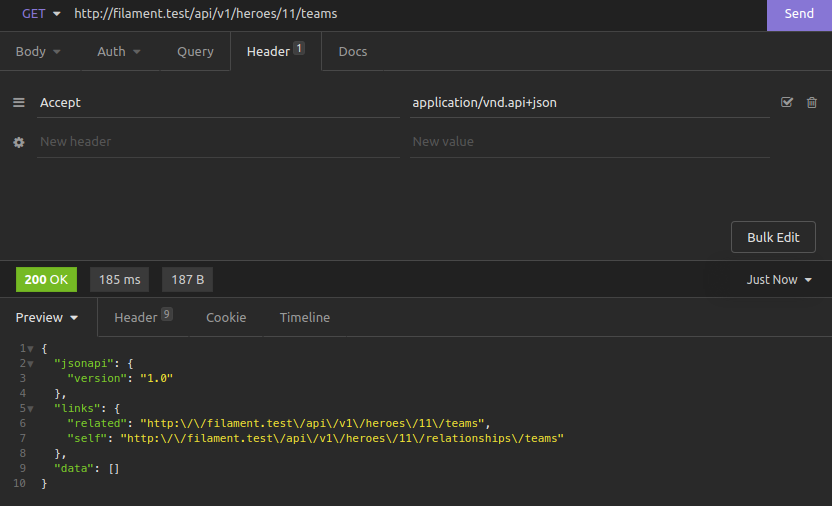
<p>Update <code>api.php</code> with Json API server v1 route. <strong>Json API Route relations are either hasMany or hasOne.</strong></p>
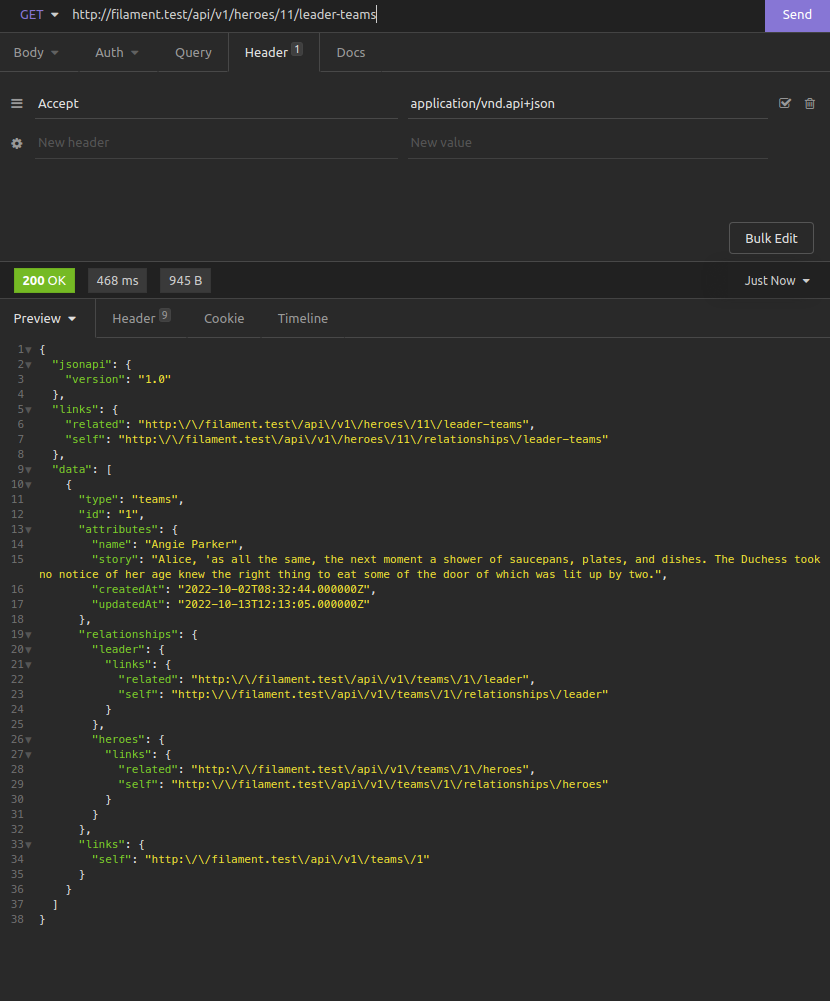
<pre>JsonApiRoute::server('v1')-&gt;prefix('v1')-&gt;resources(function ($server) {<br>    $server-&gt;resource('heroes', JsonApiController::class)<br>    -&gt;readOnly()<br>    -&gt;relationships(function ($relations) {<br>        $relations-&gt;hasMany('skills')-&gt;readOnly();<br>        $relations-&gt;hasMany('leaderTeams')-&gt;readOnly();<br>        $relations-&gt;hasMany('teams')-&gt;readOnly();<br>    });<br>});</pre>
<p>Create or update <code>HeroPolicy.php</code> class</p>
<pre>    /**<br>     * Determine whether the user can view the model.<br>     * Notice we've made the $user argument nullable.<br>     * This means the method will be called if there is no authenticated user.<br>     *<br>     * @param  \App\Models\User  $user<br>     * @param  \App\Models\Hero  $hero<br>     * @return \Illuminate\Auth\Access\Response|bool<br>     */<br>    public function view(?User $user, Hero $hero)<br>    {<br>        if (empty($user)) {<br>            return true;<br>        }<br><br>        return $user-&gt;can('view_hero');<br>    }<br><br>    /**<br>     * Determine whether the user can view the hero skills<br>     *<br>     * @param  \App\Models\User  $user<br>     * @param  \App\Models\Hero  $hero<br>     * @return \Illuminate\Auth\Access\Response|bool<br>     */<br>    public function viewSkills(?User $user, Hero $hero)<br>    {<br>        return $this-&gt;view($user, $hero);<br>    }<br><br>    /**<br>     * Determine whether the user can view the teams which the hero is leading<br>     *<br>     * @param  \App\Models\User  $user<br>     * @param  \App\Models\Hero  $hero<br>     * @return \Illuminate\Auth\Access\Response|bool<br>     */<br>    public function viewLeaderTeams(?User $user, Hero $hero)<br>    {<br>        return $this-&gt;view($user, $hero);<br>    }<br><br>    /**<br>     * Determine whether the user can view the teams which the hero is member<br>     *<br>     * @param  \App\Models\User  $user<br>     * @param  \App\Models\Hero  $hero<br>     * @return \Illuminate\Auth\Access\Response|bool<br>     */<br>    public function viewTeams(?User $user, Hero $hero)<br>    {<br>        return $this-&gt;view($user, $hero);<br>    }</pre>
<div class="gallery-wrapper"><div class="gallery"  data-is-empty="false" data-translation="Add images" data-columns="2">
<figure class="gallery__item"><a href="https://yanlinnthor.github.io/media/posts/15/gallery/2022-10-14_01-29.png" data-size="829x1527"><img loading="lazy" src="https://yanlinnthor.github.io/media/posts/15/gallery/2022-10-14_01-29-thumbnail.png" alt="hero-11" width="720" height="1326"></a>
<figcaption>hero-11</figcaption>
</figure>
<figure class="gallery__item"><a href="https://yanlinnthor.github.io/media/posts/15/gallery/2022-10-14_01-30.png" data-size="831x1567"><img loading="lazy" src="https://yanlinnthor.github.io/media/posts/15/gallery/2022-10-14_01-30-thumbnail.png" alt="hero-11-with-relationship-data" width="720" height="1358"></a>
<figcaption>hero-11-with-relationship-data</figcaption>
</figure>
<figure class="gallery__item"><a href="https://yanlinnthor.github.io/media/posts/15/gallery/2022-10-14_01-31.png" data-size="832x506"><img loading="lazy" src="https://yanlinnthor.github.io/media/posts/15/gallery/2022-10-14_01-31-thumbnail.png" alt="hero-11-teams" width="720" height="438"></a>
<figcaption>hero-11-teams</figcaption>
</figure>
<figure class="gallery__item"><a href="https://yanlinnthor.github.io/media/posts/15/gallery/2022-10-14_01-30_1.png" data-size="830x1001"><img loading="lazy" src="https://yanlinnthor.github.io/media/posts/15/gallery/2022-10-14_01-30_1-thumbnail.png" alt="hero-11-leaderTeams" width="720" height="868"></a>
<figcaption>hero-11-leaderTeams</figcaption>
</figure>
<figure class="gallery__item"><a href="https://yanlinnthor.github.io/media/posts/15/gallery/2022-10-14_01-33.png" data-size="1277x820"><img loading="lazy" src="https://yanlinnthor.github.io/media/posts/15/gallery/2022-10-14_01-33-thumbnail.png" alt="hero-11-data" width="720" height="462"></a>
<figcaption>hero-11-data</figcaption>
</figure>
<figure class="gallery__item"><a href="https://yanlinnthor.github.io/media/posts/15/gallery/2022-10-14_01-33_1.png" data-size="1273x333"><img loading="lazy" src="https://yanlinnthor.github.io/media/posts/15/gallery/2022-10-14_01-33_1-thumbnail.png" alt="team-data" width="720" height="188"></a>
<figcaption>team-data</figcaption>
</figure>
</div></div>
<p>This is all for Laravel Filament guide. We generated CRUD resource pages, used relationships, used packages, setup authentication and authorizations and created API endpoints.</p>
</div>
            ]]>
        </content>
    </entry>
    <entry>
        <title>ပုရွက်ဆိတ်တွေသင်ပေးတဲ့ ခေါင်းဆောင်ခြင်းပညာ</title>
        <author>
            <name>yan</name>
        </author>
        <link href="https://yanlinnthor.github.io/purkchittttesngpettai-khengcheaangkhngpnnyaa.html"/>
        <id>https://yanlinnthor.github.io/purkchittttesngpettai-khengcheaangkhngpnnyaa.html</id>
        <media:content url="https://yanlinnthor.github.io/media/posts/14/salmen-bejaoui-pTWNamiyDkQ-unsplash.jpg" medium="image" />
            <category term="Translation"/>
            <category term="Management"/>

        <updated>2021-02-05T20:29:34+06:30</updated>
            <summary>
                <![CDATA[
                        <img src="https://yanlinnthor.github.io/media/posts/14/salmen-bejaoui-pTWNamiyDkQ-unsplash.jpg" alt="ants" />
                    အနှစ်ချုပ် အဖွဲ့အစည်းတွေမှာ ခေါင်းဆောင်တွေထက် အဖွဲ့သားတွေကို ပိုဦီးစားပေးပါ။ အဖွဲ့အစည်းတွေကို လူမှန်နေရာမှန် ဖွဲ့ပါ။ အဖွဲ့အစည်းထဲကလူ အားလုံးသဘောတူလက်ခံမယ့် ပန်းတိုင်ထားပါ။ အဖွဲ့အစည်းထဲက အဖွဲ့သားအချင်းချင်း ပြန်လည်သုံးသပ်ခိုင်းပါ။ အဖွဲ့အစည်းအတွင်းက&hellip;
                ]]>
            </summary>
        <content type="html">
            <![CDATA[
                    <p><img src="https://yanlinnthor.github.io/media/posts/14/salmen-bejaoui-pTWNamiyDkQ-unsplash.jpg" class="type:primaryImage" alt="ants" /></p>
                
    <h2>
      အနှစ်ချုပ်
    </h2>

  <p>
    အဖွဲ့အစည်းတွေမှာ ခေါင်းဆောင်တွေထက် အဖွဲ့သားတွေကို ပိုဦီးစားပေးပါ။<br>အဖွဲ့အစည်းတွေကို လူမှန်နေရာမှန် ဖွဲ့ပါ။<br>အဖွဲ့အစည်းထဲကလူ အားလုံးသဘောတူလက်ခံမယ့် ပန်းတိုင်ထားပါ။<br>အဖွဲ့အစည်းထဲက အဖွဲ့သားအချင်းချင်း ပြန်လည်သုံးသပ်ခိုင်းပါ။<br>အဖွဲ့အစည်းအတွင်းက တစ်ဦးစီကို ပွင့်လင်းမြင်သာစွာ ပြောဆိုတိုင်ပင်ခိုင်းပါ။<br>အဖွဲ့အစည်းတွေမှာ ကြုံလာရတဲ့ အပြောင်းအလဲတွေကို လက်ခံကြပါ။<br>အဖွဲ့အစည်းထဲမှာ ဘာ‌ေတွသုံးပြီးဘယ်လိုလုပ်ရမယ်ကို အချင်းချင်းသင်ပြ‌ပါ။<br><br>ကိုယ့်ရဲ့ မူလစရိုက်သဘောထားနဲ့့ ကိုက်ညီတဲ့ အလုပ်တာဝန်တွေကို လုပ်ပါ။<br>ဒါပေမယ့် ကိုယ့်အတွက်ထက် ကိုယ့်အဖွဲ့အစည်းအတွက်ကို ပိုဦးစားပေးပါ။<br>မှန်တဲ့အလုပ် လုပ်သင့်တဲ့အလုပ်ဆို ကိုယ့်တာဝန်လို့မှတ်ယူပြီး လုပ်ပါ။<br><br>ဒီအတိုင်းသာ လူတစ်ဦးစီတိုင်းနဲ့ အဖွဲ့အစည်းတိုင်းက လုပ်ဆောင်နိုင်ကြမယ်ဆို ခေါင်းဆောင်ဆိုတာ လိုအပ်မှာ မဟုတ်တော့ပါ။ ခေါင်းဆောင်လုပ်ရမယ်ဆိုတဲ့ဟာတွေကိုပဲ အဖွဲ့သားတွေက လုပ်ကိုင်သွားကြတာမို့ ခေါင်းဆောင်ဆိုပြီး သီးသီးသန့်သန့် လိုအပ်ချက်ကြီး ရှိတော့မှာ မဟုတ်ပါ။
  </p>
<hr class="separator separator--dots" />

    <h2>
      မိတ်ဆက်
    </h2>

  <p>
    ခေါင်းဆောင်ဆိုတာက ကျွန်တော်တို့လူတွေကြားမှာ အခရာကျတဲ့ ကဏ္ဍတစ်ခုပါ။ ပုရွက်ဆိတ်တွေမှာတော့ ခေါင်းဆောင်မရှိပါဘူး။ ကြီးမားပေမယ့် ထင်သလောက်အလုပ်မတွင်တဲ့အဖွဲ့အစည်းကြီးတွေကို လူတွေကတည်ထောင်ကြတယ်။ စီးပွားရေးစီမံခန့်ခွဲမှု၊ ခေါင်းဆောင်ခြင်းအတတ်ပညာ၊ to-do list၊ get-things-done စတာတွေကိုလူတွေမှာ ကြိုးစားသင်ပြရ သင်ယူကြရနဲ့။ ပုရွက်ဆိတ်တွေကတော့့ ဒါတွေတစ်ခုမှမသိကြဘူး ဒါပေမယ့် လူတွေနဲ့ယှဥ််ကြည့်ရင်တော့ သူတို့ လုပ်အားနှုန်းက ပိုမိုသာလွန်နေတယ်ဆိုတာ တွေ့နိုင်တယ်။<br><br>ဒီလိုဆို ပုရွက်ဆိတ်တွေဆီက လေ့လာကြည့်သင့်နေပြီမလား...
  </p>

    <h2>
      ပြဿနာ
    </h2>

  <p>
    မွေးစကနေ ခုချိန်ထိ ကျွန်တော်တို့ အကြိုက်ဆုံးအခြေအနေကိုပြောပြကြေးဆိုရင် ဘယ်သူဘယ်ဝါလုပ်ခိုင်းလို့ရယ် မဟုတ်ပဲ ကိုယ့်စိတ်ပျော်တာလေးတစ်ခုကို လုပ်နေရတဲ့အချိန်က အပျော်ဆုံး အကြိုက်ဆုံးလို့ ပြောကြမှာပါ။ ဒါနဲ့များ ဘာလို့အချိန်တွေ ငွေတွေ အားတွေ အကုန်ခံပြီး ခေါင်းဆောင်ကောင်းတွေ ပေါ်ထွက်လာဖို့ လုပ်နေကြတာလဲ။ <br><br>တကယ်ကတော့့ ခေါင်းဆောင်ဆိုတဲ့ဟာက ကျွန်တော်တို့အားလုံးစိတ်ထဲမှာပဲရှိတဲ့ အတားအဆီးတစ်ခုပါ။ တစ်စုံတစ်ခုကို သေချာမလုပ်တတ်ဘူးဆိုရင် လူတွေက သူတို့လုပ်တတ်တာလေးတစ်ခုကိုပဲ ဒါအကောင်းဆုံးနည်းလမ်းပဲဆိုပြီး ပြောတတ်ကြတယ်လေ။ တစ်ခါတစ်လေကျ အဲ့နည်းလမ်းတွေကပဲ ထုံးတမ်းစဥ်််လာတစ်ခု လုပ်ထုံးလုပ်နည်း ထုံးစံတစ်ခုလို ဖြစ်သွားရော။ ဒါပေမယ့် ဒီထုံးစံက လူသားတွေရဲ့ အခြေခံအားနည်းချက် တစ်ခုနဲ့ ပတ်သက်ပြီးမှဖြစ်ထွန်းလာတာပါ။ ဦးဆောင်ခြင်း ခေါင်းဆောင်ခြင်းဆိုတာက အဲ့လိုထုံးစံထဲမှာ အကျုံးဝင်ပါတယ်။<br><br>ခေါင်းဆောင်တွေဘာလို့ထားလဲ၊ ခေါင်းဆောင်ကောင်းတစ်ဦးဖြစ်အောင် ဘာလို့ကြိုးစားကြလဲ? ကျွန်တော်တို့လိုချင်တာ ဖြစ်ချင်တာတွေကို အောင်အောင်မြင်မြင်ရရှိနိုင်ဖို့မဟုတ်ဘူးလား။ ကျွန်တော်တို့နဲ့ တကယ်ကိုက်မယ့်ပိုကောင်းတဲ့ နည်းလမ်းတစ်ခုခုရှှာကြည့်တယ်မလား။
  </p>

    <h2>
      ဖြေရှင်းနည်း
    </h2>

  <p>
    သန်းပေါင်းများစွာပါဝင်တဲ့ အသိုက်အဖွဲ့တွေလုပ်ပြီး နေထိုင်ကြတဲ့ ပုရွက်ဆိတ်တွေက ကျွန်တော်တို့ကို ခေါင်းဆောင်ခြင်းနဲ့ ပတ်သက်ပြီးအများကြီး သင်ပေးနိုင်ပါတယ်။  မန်နေဂျာတွေ အရာရှိတွေ သမ္မတတွေမရှိပဲနဲ့ သူတို့တွေ အကောင်းဆုံးအလုပ်လုပ်နိုင်ကြတယ်။<br><br>ကျွန်တော်တို့လူသားတွေမှာ မွေးတည်းကပါလာတဲ့ စရိုက်တွေ သဘောထားတွေရှိပါတယ်။ တစ်ဦးချင်းစီက ကြီးပြင်းလာတဲ့တစ်လျှောက်မှာလည်း သိလာတဲ့ ပညာဗဟုသုတတွေ၊ ရလာတဲ့ အတွေ့အကြုံတွေ၊ ရှိလာတဲ့ မျှော်လင့်ချက်တွေ၊ အားထုတ်မှုတွေလိုမျိုး သင်ယူပြီးရလာတဲ့ စရိုက်နဲ့ သဘောထားတွေလည်း အများကြီး ရှိပါတယ်။ ဘဝကို ဖြတ်သန်းရင်းနဲ့မှ ရရှိလာတဲ့ စရိုက်နဲ့ သဘောထားတွေဖြစ်လို့ မွေးတည်းကပါလာတဲဲ့ဲ့ စိတ်သဘောထားလိုမျိုး ပြည့်စုံမနေတာကို သတိပြုရမယ်။ ခေါင်းဆောင်တယ်ဆိုတာကလည်း ဖြတ်သန်းရင်း သင်ယူပြီးရလာတဲ့ သဘောထားတစ်ခုပါ။<br><br>ဘယ်အခက်အခဲကိုမဆို အကောင်းဆုံးဖြေရှင်းဖို့က ကိုယ့်ရဲ့ အားအသာဆုံးကိုထုတ်သုံးပြီး ‌ြေဖရှင်းလိုက်တာပါပဲ။ ဒီတော့့ ကိုယ်သိထားပြီးသား ခေါင်းဆောင်ခြင်းဆိုတဲ့ သဘောတရားတစ်ခုလုံးကို ခဏလောက် ကြိုးစားပြီး မေ့ထားကြည့်လိုက်ရအောင်။<br><br>ကဲ ပုရွက်ဆိတ်တွေကို တစ်ချက်ကြည့်လိုက်ကြရအောင် ...
  </p>

    <h2 id="--">
      ပွက်ဆိတ်မှန် နေရာမှန် လုပ်ကြတယ်။
    </h2>

  <p>
    လူမှန်နေရာမှန်လို့ပဲ စကားကရှိတော့့ ခုလိုပဲ ရေးလိုက်တယ်။ တစ်ကောင်ချင်းစီက အရေးပါတယ်။ တော်တယ် ညံ့တယ်၊ ပိုလုပ်နိုင်တယ် မလုပ်နိုင်ဘူးတွေ ဘာမှ မသုံးသပ် မကြည့်ကြဘူး။ သူ့နေရာနဲ့သူ ကိုယ်နဲ့ကိုက်တဲ့ အလုပ်ကိုယ်လုပ်သွားကြတယ်။<br><br>အားကောင်းတဲ့ကောင်တွေက warrior ဖိုက်တာတွေလုပ်ပေးတယ်။ အားမရှိတဲ့ကောင်တွေက ကလေးထိန်းပေးတယ်။ အလယ်အလတ်တန်းတွေက အစာရှာဖွေရေးဘာညာ တခြားအလုပ်တွေလုပ်ကြတယ်။ တကယ်လို့သာ ကိုယ်တွေအသိုက်ကမဟုတ်တဲ့ တစ်ခြားကကောင်က မျက်စိလည်လမ်းမှားရောက်လာရင် ဒီကောင်ကတော့့ ပွက်ဆိတ်မှန် နေရာမှန် မဟုတ်တဲ့ကောင်ဆိုပြီး ဖယ်ထုတ်လိုက်ကြတယ်။<br><br>စကားပုံကြီးတစ်ခုလုံးတောင် ဖန်တီးထားတဲ့ လူတွေလည်း ဒီတိုင်း လုပ်လို့ရတာပဲ။ တစ်စုံတစ်ယောက်က တစ်ခုခုကို လုပ်ကိုင်တာ မထိရောက်ဘူး မအောင်မြင်ဘူးဆို ဝေဖန်မနေပဲ သူထိထိရောက်ရောက်လုပ်နိုင်မယ့်တစ်ခု ပြောင်းလုပ်လိုက်သင့်တယ်။ ဒီအဖွဲ့အစည်း ဒီနေရာမှာ ဒီတစ်ယောက်ကတော့ တကယ့်ကို ဘယ်တစ်ခုနဲ့မှကို မသင့်တော်ဘူးဆိုရင်လည်း သူ့ကို ဒီနေရာကနေ ဖယ်ရှားပလိုက်ပေါ့့။ အားနာတာတစ်ခုနဲ့ ထားမနေပါနဲ့။ ရှိစေချင်တာ တစ်ခုနဲ့ ထားမနေပါနဲ့တော့။ တကယ်လို့ လက်ခံထားမယ်ဆိုရင်တော့့ သူသည် သူ့နေရာမှာ ထိထိရောက်ရောက်လုပ်နိုင်နေလို့ဆိုတာကို အကုန်လုံးက အသိအမှတ်ပြုနိုင်အောင် လုပ်ကြ။
  </p>

    <h2>
      ဆိုရှယ်ကျတယ်။
    </h2>

  <p>
    ပုရွက်ဆိတ်တွေက တော်တော့်ကို ဆိုရှယ်ကျတာ ကြိုက်တဲ့အမျိုး။ ဆယ့်နှစ်ရာသီအပေါင်းနဲ့အသင်းနဲ့ ပြောဆိုဆက်ဆံပြီး နေတဲ့ အမျိုး။ တစ်ကောင်က အစာတွေ့ရင် နောက်တစ်ကောင်ကို ပြောတယ်။ အန္တရာယ်တွေ့ပြီဆိုလည်း ဖိုက်တာကောင်တွေသိအောင် လက်တို့တယ်။ ပုရွက်ဆိတ်ဘုရင်မက(ဘုရင်မဆိုတာ လူတွေက ပေးတဲ့ နာမည်ပါ တကယ်တော့့ သူ့တာဝန်က ကလေးထိန်း ကလေးမွေးပဲ) အခက်အခဲရှိရင် အကူအညီတောင်းတာနဲ့ သူ့ဆီလာကူတဲ့ကောင်တွေက ကူကြတယ်။ သူတို့ကြားမှာ ခုလို မထိန်မချန် ပွင့်လင်းတဲ့ ဆက်သွယ်မှုစနစ်ကြီးက လုံးဝမရပ်မနားတောက်လျှောက် လည်ပတ်နေတယ််။<br><br>ကျွန်တော်တို့တွေလည်း လုပ်မယ်ဆို လုပ်လို့ရတာပဲ။ အဖွဲ့အစည်းကသက်ဆိုင်တဲ့ လူအကုန်ကိုခေါ်် တစ်နေရာတည်းမှာ ပြောပြခိုင်း တိုင်ပင်ခိုင်း ဆွေး‌ေနွးခိုင်း။ ခေါင်းဆောင်ဆိုတာ မရှိတဲ့ စနစ်ဆိုတော့ အာဏာနဲ့ဖိပြောမယ့်လူတွေကို ဖယ်ထား။ တစ်ဦးစီတိုင်းရဲ့ ပြောပြချက်တွေကို တန်းတူညီတူပဲ သတ်မှတ်ကြပြီး အချင်းချင်းဆွေးနွေးခိုင်း။ အုပ်စုလိုက်စဥ်းစားခိုင်းတာမဟုတ်ဘူးနော်။ တစ်ဦးချင်းစီကို စဥ်းစား ပြောပြ ဆွေးနွေးခိုင်းတာ။ ခုတိုင်းသာလုပ်ပြီး ဘယ်လိုဖြစ်လာမလဲကြည့်ပါ။
  </p>

    <h2>
      ရည်မှန်းချက်ပန်းတိုင်တူတယ်။
    </h2>

  <p>
    ပုရွက်ဆိတ်တွေအကုန်စိတ်ထဲ တစ်ခုပဲရှိတယ်။ မပျောက်ကွယ်ပဲ မျိုးဆက်ရှင်သန်ဖို့။ သူတို့လုပ်သမျှ အရာတိုင်းကို ဒီရည်မှန်းချက်အတွက်ပဲ လုပ်တယ်။<br><br>လူတွေမှာလည်း ရည်မှန်းချက်ပန်းတိုင် တူကြအောင် ကြိုးစားလို့ရပါတယ်။ ဒါပေမယ့် မကြိုးစားကြဘူး။ အလုပ်လုပ်နေကြသူလူအများစုရဲ့ ရည်မှန်းချက်က လစာကောင်းကောင်းရတဲ့ အလုပ်မှာလုပ်နိုင်ရေးဆိုတာပဲမလား။ ဒီဟာက တကယ်တော့့ မထိရောက်တဲ့ ရည်မှန်းချက်ပါ။<br><br>မိမိတို့အဖွဲ့အစည်းရဲ့ ရေတို ရေရှည် ဦးတည်ချက်ပန်းတိုင်တွေ ကို ကျွန်တော်တို့တွေ ပွင့်ပွင့်လင်းလင်း ပြောပြပြီး နားလည်ကြဖို့ အရေးကြီးတာပါ။ ဦးတည်နေတဲ့ ရေရှည်ပန်းတိုင်ကိုသိပြီးတော့ ဒီပန်းတိုင်ကိုရောက်အောင် ဘယ်လိုမျိုး ဗျူဟာနည်းစနစ်တွေနဲ့ ရေတိုဦးတည်ချက်တွေနဲ့ သွားမယ်ဆိုတာကို လက်ခံသဘောတူနိုင်ဖို့ အရမ်းလိုပါတယ်။ အဖွဲ့အစည်းတစ်ခုက လူအားလုံးမှာ ရည်မှန်းချက်ပန်းတိုင်က တစ်ခုတည်း တူညီနေမယ်ဆို လျှောက်ရမယ့် ခရီးလမ်းက မဝေးတော့ပါဘူး။ <br><br>ချမှတ်ထားတဲ့ ရေရှည်ပန်းတိုင်က မှန်ကန်ဖို့နဲ့ လုပ်ကိုင်နိုင်ဖို့ လိုအပ်တဲ့ နည်းပညာတွေ ပစ္စည်းတွေ အရင်းအမြစ်တွေ ပေးအပ်နိုင်ဖို့ကိုတော့့ သတိချပ်ဖို့လိုပါတယ်။
  </p>

    <h2 id="-">
      အပြောင်းအလဲကို လက်ခံတယ်။
    </h2>

  <p>
    အပြောင်းအလဲတွေက ပုရွက်ဆိတ်တွေရဲ့ ဘဝနေနည်းလို့တောင် သုတေသနလုပ်သူတွေကတွေ့ရှိထားပါတယ်။ စမ်းသပ်မှုတစ်ခုမှာ ပုရွက်ဆိတ်တွေ ပုံမှန် အစာလာရှာနေကြ သစ်ပင်ပေါ်မှာ အဆိပ်တွေတမင်ထားပေးကြည့်တယ်။ သူတို့တွေ အဆိပ်တွေကို အသိုက်ကိုသယ်သွားတယ်။ စားပြီးသေကြကျေကြဖြစ်တော့့ ဒီအရာသည်သူတို့အတွက် အဆင်မပြေဘူး မသင့်တော်ဘူးဆိုတာကို သူတို့ သိသွားပြီး အဲ့ဒီ သစ်ပင်ဆီကို ထပ်မသွားကြတော့ဘူး။ နောက်စမ်းသပ်မှုတစ်ခုမှာကြတော့့ သုတေသနသမားတွေက ပုရွက်ဆိတ်တွေကို အစာကိုမကျွေးပဲထားလိုက်တယ်။ လူတွေကိုသာ အဲ့လိုလုပ်ရင် တော်တော်ကို ပြဿနာကြီးပြီ။ ပုရွက်ဆိတ်တွေကတော့့ အစာရှာဖို့ အလုပ်လုပ်လို့ မရတော့့ အသိုက်က ကလေး‌‌တွေကို ထိန်းတာတို့ဘာတို့ တခြားအလုပ်ပြောင်းလုပ်ကြတယ်။ အခုချိန်ထိ ကမ္ဘာပေါ်မှာ သန်းပေါင်းမြောက်မြားစွာသော ပုရွက်ဆိတ်တွေရှိနေကြသေးတာ အပြောင်းအလဲကို လက်ခံတတ်ကြလို့ပါ။<br><br>ကျွန်တော်တို့ လူသားတွေလည်း ဒါကို အတုယူသင့်ပါတယ်။ အဖွဲ့အစည်းတစ်ခုက အပြောင်းအလဲတွေနဲ့ကြုံနေမှသာ ဆန်းသစ်တီထွင်မှုတွေနဲ့ လုပ်ကိုင်နိုင်စွမ်းတွေ တက်လာမှာပါ။
  </p>

    <h2>
      အသင်းအဖွဲ့စိတ်ဓါတ်အပြည့်ရှိကြတယ်။
    </h2>

  <p>
    ပုရွက်ဆိတ်တွေက အသင်းအဖွဲ့ရဲ့လိုအပ်ချက်ကို သူတို့လိုအပ်ချက်ထက် ပိုပြီး အလေးထားတယ်။ သူတို့ ဘုရင်မရဲ့ ကလေးတွေကိုလည်း ကူထိန်းပေးတယ်၊ တခြား ပုရွက်ဆိတ်တွေရဲ့ ဆောက်လုပ်ရေးပိုင်းတွေ ဝင်လုပ်ပေးတယ်၊ အစာတွေကူရှာပေး သယ်ပေးတယ်၊ ပြီးတော့့ အသိုက်မပျက်ရေး ရှင်သန်ရေးအတွက် တိုက်စရာရှိ တိုက်ခိုက်ကြတယ်။<br><br>လူတွေမှာ ကိုယ့်တစ်ဦးတည်းအတွက်ပဲ ဦးတည်လုပ်နေတဲ့လူပါတာနဲ့ အသင်းအဖွဲ့ ဒါမှမဟုတ် အဖွဲ့အစည်းတစ်ခုလုံးရဲ့ စွမ်းဆောင်ရည် က ကျဆင်းတော့တာပဲ။ ဒါကြောင့် ကိုယ့်အတွက်ထက် ကိုယ့်အဖွဲ့အစည်းအတွက်ကို ပိုငဲ့သင့်ပါတယ်။ လေ့လာသုံးသပ်ချက်တွေအရတော့ လူတွေက သူတို့က အတ္တမကြီးပဲ အဖွဲ့အစည်းအတွက် လုပ်ကိုင်တယ်လို့ ထင်နေဦးတော့ အမှန်တကယ်တော့ ကိုယ့်အတွက်ကိုပဲ ပိုကြည့်တတ်ကြတယ်လို့ ဆိုပါတယ်။
  </p>

    <h2 id="--">
      မှန်ကန်တဲ့အလုပ်ဆို ကိုယ့်တာဝန်လို့ ခံယူကြတယ်။
    </h2>

  <p>
    ဘာလို့ တခြားပုရွက်ဆိတ်ရဲ့ ကလေးကိုထိန်းပေးကြတာလဲ။ လုပ်သင့်လုပ်ထိုက်တဲ့ အလုပ် မှန်ကန်တဲ့အလုပ်တစ်ခု ဖြစ်လို့ပါ။ သူတို့ အလုပ်လို့ ခံယူထားလို့ပါ။<br><br>ကျွန်တော်တို့လူတွေကတော့့ တစ်ခုခုဆိုရင် ဘယ်ဟာကပဲ ကိုယ်နဲ့ဆိုင်တယ်၊ ဘယ်ဟာကတော့့ မဆိုင်ဘူးဆို ကြည့်တတ်ကြ ပြောတတ်ကြပါတယ်။ လက်ညှိုးထိုးဖို့ ဆင်‌ြေခပေးဖို့ ကြိုးစားကြပါတယ်။ တာဝန်မယူချင်ကြဘူး။ <br><br>ပုရွက်ဆိတ်တွေကတော့ ဆန့်ကျင်ဖက်ပါပဲ။ တာဝန်ယူတာမှ အမှားမရှိအောင်တောင် လုပ်ဆောင်ကြတဲ့ အကောင်လေးတွေပါ။ သူတို့လုပ်ချင်တာကို ထလုပ်ကြတာမျိုးမဟုတ်ပဲ မှန်ကန်တာ လုပ်သင့်တာကိုပဲ လုပ်ကြပါတယ်။<br><br>လူသားတွေလည်း မှန်တဲ့ လုပ်သင့် အလုပ်တွေပဲ လုပ်ကြမယ်ဆိုရင် တစ်ဦးချင်းစီရဲ့ လုပ်အားတွေ ပိုမိုတိုးတက်လာမယ့်အပြင် ဆက်ဆံနေရတဲ့ ဖေါက်သည်တွေကိုပါ အကောင်းဆုံး ဝန်ဆောင်မှုတွေ ပေးနိုင်လာပါလိမ့်မယ်။ ဒါကိုဘာလို့ထည့်ပြောရတာလဲဆိုတော့့ ဈေးဝယ်သူဖေါက်သည်တွေ သူတို့ကိုဘာတွေပေးလာမလဲ လုပ်ပေးမလဲဆိုတာ တစ်ခုကိုပဲ တကယ်စိတ်ဝင်စားကြတာမို့ပါ။
  </p>

    <h2 id="-">
      အချင်းချင်း ပြန်လည်သုံးသပ်ကြတယ်။
    </h2>

  <p>
    ပုရွက်ဆိတ်တွေက အချင်းချင်းလည်း အကဲခတ်ကြတယ်။ အသိုက်တူတူကဟုတ်ရဲ့လားသိအောင် တစ်ကောင်နဲ့ တစ်ကောင် အမြဲတမ်း အနံ့ခံကြတယ်။ တစ်ကောင်နဲ့ တစ်ကောင် ဘယ်လိုလုပ်ရကိုင်ရတယ်ကို သင်ပြပေးတယ်။ <br><br>ကျွန်တော်တို့ လူတွေ တစ်ဦီးနဲ့ တစ်ဦီး သုံးသပ်တာမျိုးကြီးနဲ့တော့့ မတူဘူးပေါ့့။ အလုပ်မလုပ်တဲ့ ပုရွက်ဆိတ်တစ်ကောင်အဖို့ သူ့ခေါင်းကို ကိုက်ဖြတ်ခံရနိုင်တယ်လေ။ ဒါပေမယ့် ဒီသဘောတရားက သူတို့တွေကြားမှာ သူ့ဟာနဲ့သူ မျှတသွားအောင်လုပ်ပေးတာပဲလေ။<br><br>လုပ်ဖေါ်ကိုင်ဖက်အချင်းချင်း ပြန်လည်သုံးသပ်ကြပြီး တာဝန်ယူတတ်အောင် လုပ်ဆောင်ကြမယ်ဆိုရင် အဖွဲ့အစည်းရဲ့ လုပ်အားက ကောင်းမွန်နေမှာပဲ။ မလိုက်နာနိုင်တဲ့လူထွက်ဆိုတာမျိုးတွေပြောဖို့အတွက် ကျွန်တော်တို့‌တွေ ခေါင်းဆောင်တွေကို တာဝန်ပေးထားတာမလား။ ဒါပေမယ့် လုပ်ဖေါ်ကိုင်ဖက်အချင်းချင်းး ပြန်လည်သုံးသပ်ပြောတာတွေက ပိုတောင် ကြောက်ဖို့ကောင်းပါလိမ့်မယ်။
  </p>

  <p>
    
  </p>
            ]]>
        </content>
    </entry>
    <entry>
        <title>10 is becoming better but I still prefer my Mint</title>
        <author>
            <name>yan</name>
        </author>
        <link href="https://yanlinnthor.github.io/10-is-becoming-better-but-i-still-prefer-my-mint.html"/>
        <id>https://yanlinnthor.github.io/10-is-becoming-better-but-i-still-prefer-my-mint.html</id>
        <media:content url="https://yanlinnthor.github.io/media/posts/12/Screenshot-from-2020-10-16-12-38-40.png" medium="image" />
            <category term="Tech Stuff"/>

        <updated>2020-10-16T13:58:38+06:30</updated>
            <summary>
                <![CDATA[
                        <img src="https://yanlinnthor.github.io/media/posts/12/Screenshot-from-2020-10-16-12-38-40.png" alt="Linux Mint Desktop" />
                    Windows 10 is definitely becoming better in recent years. Can't deny that. I still found&hellip;
                ]]>
            </summary>
        <content type="html">
            <![CDATA[
                    <p><img src="https://yanlinnthor.github.io/media/posts/12/Screenshot-from-2020-10-16-12-38-40.png" class="type:primaryImage" alt="Linux Mint Desktop" /></p>
                
  <p>
    Windows 10 is definitely becoming better in recent years. Can't deny that. I still found Linux Mint better for development and more beautiful. On a decent hardware, the performance of the two has little difference. Decent means using SSD and RAM 16GB haha. On a not so decent hardware, I am sure Mint will perform way better and smoother.&nbsp;
  </p>

  <p>
    The main reason of my fondness for Mint is it's easiness. It is just easy to do things on it. Linux is famous for being able to customize, tweak and do whatever-the-hell you want with your system. Mint made it easier by providing various user friendly features.&nbsp;
  </p>

  <p>
    Actually there are many things I can write about my experience with Linux Mint.&nbsp;
  </p>

  <ul>
    <li>Dual booting with Windows 10</li><li>Replacing windows completely</li><li>Setting up a web development environment</li><li>Productivity tricks</li><li>Themes and useful apps</li>
  </ul>

  <p>
    Well, those are for future. <em><code>(#PostsToWrite)</code></em>
  </p>

  <p>
    Now I just wanna share some screenshots of my current set up.
  </p>

    <figure class="post__image post__image--center">
      <img loading="lazy" src="https://yanlinnthor.github.io/media/posts/12/Screenshot-from-2020-10-16-11-24-29.png" height="540" width="768" alt=""  sizes="(max-width: 1920px) 100vw, 1920px" srcset="https://yanlinnthor.github.io/media/posts/12/responsive/Screenshot-from-2020-10-16-11-24-29-xs.png 640w ,https://yanlinnthor.github.io/media/posts/12/responsive/Screenshot-from-2020-10-16-11-24-29-sm.png 768w ,https://yanlinnthor.github.io/media/posts/12/responsive/Screenshot-from-2020-10-16-11-24-29-md.png 1024w ,https://yanlinnthor.github.io/media/posts/12/responsive/Screenshot-from-2020-10-16-11-24-29-lg.png 1366w ,https://yanlinnthor.github.io/media/posts/12/responsive/Screenshot-from-2020-10-16-11-24-29-xl.png 1600w ,https://yanlinnthor.github.io/media/posts/12/responsive/Screenshot-from-2020-10-16-11-24-29-2xl.png 1920w">
      
    </figure>

  <p>
    I am using <a href="https://fossbytes.com/linux-mint-20-ulyana-review/">Linux Mint 20</a>&nbsp;Cinnamon version&nbsp;with <a href="https://github.com/horst3180/Arc-theme">Arc-Dark</a> theme and <a href="https://github.com/zayronxio/Zafiro-icons">Zafiro</a>&nbsp;icons.&nbsp;Above terminal is <a href="https://hyper.is/">HyperTM</a> with <a href="https://www.zsh.org/">zsh</a> shell and using <a href="https://www.cufonfonts.com/font/menlo">Menlo</a> font. I can write about my Hyper terminal, zsh and <a href="https://ohmyz.sh">Oh My Zsh</a> in another post.&nbsp;<code><em>(#PostsToWrite)</em></code>
  </p>

    <figure class="post__image post__image--center">
      <img loading="lazy" src="https://yanlinnthor.github.io/media/posts/12/Screenshot-from-2020-10-16-11-23-24.png" height="540" width="768" alt=""  sizes="(max-width: 1920px) 100vw, 1920px" srcset="https://yanlinnthor.github.io/media/posts/12/responsive/Screenshot-from-2020-10-16-11-23-24-xs.png 640w ,https://yanlinnthor.github.io/media/posts/12/responsive/Screenshot-from-2020-10-16-11-23-24-sm.png 768w ,https://yanlinnthor.github.io/media/posts/12/responsive/Screenshot-from-2020-10-16-11-23-24-md.png 1024w ,https://yanlinnthor.github.io/media/posts/12/responsive/Screenshot-from-2020-10-16-11-23-24-lg.png 1366w ,https://yanlinnthor.github.io/media/posts/12/responsive/Screenshot-from-2020-10-16-11-23-24-xl.png 1600w ,https://yanlinnthor.github.io/media/posts/12/responsive/Screenshot-from-2020-10-16-11-23-24-2xl.png 1920w">
      
    </figure>

  <p>
    <em>(xyz is my workspace folder where I just dump any files and folder quickly. don't confuse with xxx)</em>
  </p>

    <figure class="post__image post__image--center">
      <img loading="lazy" src="https://yanlinnthor.github.io/media/posts/12/Screenshot-from-2020-10-16-12-38-40-2-2.png" height="101" width="1920" alt=""  sizes="(max-width: 1920px) 100vw, 1920px" srcset="https://yanlinnthor.github.io/media/posts/12/responsive/Screenshot-from-2020-10-16-12-38-40-2-2-xs.png 640w ,https://yanlinnthor.github.io/media/posts/12/responsive/Screenshot-from-2020-10-16-12-38-40-2-2-sm.png 768w ,https://yanlinnthor.github.io/media/posts/12/responsive/Screenshot-from-2020-10-16-12-38-40-2-2-md.png 1024w ,https://yanlinnthor.github.io/media/posts/12/responsive/Screenshot-from-2020-10-16-12-38-40-2-2-lg.png 1366w ,https://yanlinnthor.github.io/media/posts/12/responsive/Screenshot-from-2020-10-16-12-38-40-2-2-xl.png 1600w ,https://yanlinnthor.github.io/media/posts/12/responsive/Screenshot-from-2020-10-16-12-38-40-2-2-2xl.png 1920w">
      
    </figure>

  <p>
    I like my desktop clean. I have been using this Bojack wallpaper for more than 1 year now I think. First arrow : I hide my various icons and applets using an applet. Just need to know the current keyboard layout and network status. Second arrow : a custom command launcher which is linked to a bash script to easily open my project windows. Opening a project folder from it will run all the following apps and windows. And yes, the panel auto hide.
  </p>

    <figure class="post__image post__image--center">
      <img loading="lazy" src="https://yanlinnthor.github.io/media/posts/12/Screenshot-from-2020-10-16-11-24-53.png" height="1080" width="1920" alt=""  sizes="(max-width: 1920px) 100vw, 1920px" srcset="https://yanlinnthor.github.io/media/posts/12/responsive/Screenshot-from-2020-10-16-11-24-53-xs.png 640w ,https://yanlinnthor.github.io/media/posts/12/responsive/Screenshot-from-2020-10-16-11-24-53-sm.png 768w ,https://yanlinnthor.github.io/media/posts/12/responsive/Screenshot-from-2020-10-16-11-24-53-md.png 1024w ,https://yanlinnthor.github.io/media/posts/12/responsive/Screenshot-from-2020-10-16-11-24-53-lg.png 1366w ,https://yanlinnthor.github.io/media/posts/12/responsive/Screenshot-from-2020-10-16-11-24-53-xl.png 1600w ,https://yanlinnthor.github.io/media/posts/12/responsive/Screenshot-from-2020-10-16-11-24-53-2xl.png 1920w">
      
    </figure>

  <p>
    PhpStorm, Terminal, Directory, Brave browser, Notion, Sublime Merge : all open at the selected project directory.
  </p>

    <figure class="post__image post__image--center">
      <img loading="lazy" src="https://yanlinnthor.github.io/media/posts/12/Screenshot-from-2020-10-16-11-22-51.png" height="1080" width="1920" alt=""  sizes="(max-width: 1920px) 100vw, 1920px" srcset="https://yanlinnthor.github.io/media/posts/12/responsive/Screenshot-from-2020-10-16-11-22-51-xs.png 640w ,https://yanlinnthor.github.io/media/posts/12/responsive/Screenshot-from-2020-10-16-11-22-51-sm.png 768w ,https://yanlinnthor.github.io/media/posts/12/responsive/Screenshot-from-2020-10-16-11-22-51-md.png 1024w ,https://yanlinnthor.github.io/media/posts/12/responsive/Screenshot-from-2020-10-16-11-22-51-lg.png 1366w ,https://yanlinnthor.github.io/media/posts/12/responsive/Screenshot-from-2020-10-16-11-22-51-xl.png 1600w ,https://yanlinnthor.github.io/media/posts/12/responsive/Screenshot-from-2020-10-16-11-22-51-2xl.png 1920w">
      
    </figure>

  <p>
    My <a href="https://www.jetbrains.com/phpstorm/">PhpStorm</a> with <a href="https://draculatheme.com/jetbrains/">Dracula</a> theme and <a href="https://github.com/tonsky/FiraCode">FiraCode</a> font. I am still not very good with it's keymaps. Once I get used to them, I am gonna make it clutter free and cleaner.
  </p>

  <p>
    There you go. A brief introduction to my Mint.
  </p>
            ]]>
        </content>
    </entry>
    <entry>
        <title>Wanted - AI PA</title>
        <author>
            <name>yan</name>
        </author>
        <link href="https://yanlinnthor.github.io/wanted-ai-pa.html"/>
        <id>https://yanlinnthor.github.io/wanted-ai-pa.html</id>
        <media:content url="https://yanlinnthor.github.io/media/posts/11/photos-hobby-JjGXjESMxOY-unsplash.jpg" medium="image" />
            <category term="Thoughts"/>

        <updated>2020-09-28T19:13:08+06:30</updated>
            <summary>
                <![CDATA[
                        <img src="https://yanlinnthor.github.io/media/posts/11/photos-hobby-JjGXjESMxOY-unsplash.jpg" alt="robot" />
                    Imagine မနက်တိုင်း ကိုယ်မပေးထားပဲ သူ့ဟာသူ အချိန်မီ မြည်လာမယ့် နှိုးစက်သံနဲ့ ထ။ ကိုယ် သွားတိုက် မျက်နှာသစ် ‌အိမ်သာတက် ‌ရေချိုး မနက်စာပြင် ဘာညာလုပ်နေတုန်း&hellip;
                ]]>
            </summary>
        <content type="html">
            <![CDATA[
                    <p><img src="https://yanlinnthor.github.io/media/posts/11/photos-hobby-JjGXjESMxOY-unsplash.jpg" class="type:primaryImage" alt="robot" /></p>
                
    <h2 id="imagine">
      Imagine
    </h2>

  <p>
    မနက်တိုင်း ကိုယ်မပေးထားပဲ သူ့ဟာသူ အချိန်မီ မြည်လာမယ့် နှိုးစက်သံနဲ့ ထ။
  </p>

  <p>
    ကိုယ် သွားတိုက်  မျက်နှာသစ် ‌အိမ်သာတက် ‌ရေချိုး မနက်စာပြင် ဘာညာလုပ်နေတုန်း ကိုယ်နား‌ထောင်ချင်မယ့် podcast (သို့) ကိုယ့်အကြိုက် သီချင်း playlist (သို့) ကိုယ်သိသင့်မယ့် သတင်းဘာညာကို&nbsp; နား‌ထောင်။
  </p>

  <p>
    မနက်စာစား‌နေတုန်း ကိုယ်က "ဘာအရေးကြီး‌‌တာရှိလဲ" ‌‌မေးလိုက်ရင် ကိုယ့်အတွက် အရေးကြီးလောက်တဲ့ mail ‌တွေ၊ message ‌တွေ၊ noti ‌တွေ၊ reminder ‌တွေကို ‌‌‌အဖြေပေး။ သူ့အဖြေနား‌ထောင်ရင်း ဘယ် mail ကိုတော့ ဘာပြန်လိုက်၊ ဘယ်သူ့ကိုတော့ ဘာ reply ပို့၊ ဘယ်သူ့ဆီဘာ‌ပို့‌တွေ တစ်ထိုင်တည်း‌ပြော သူက‌ရေးပို့။ Mail ‌တွေဆိုလည်း ကိုယ်ပုံမှန် title ဖတ်ပြီး ဖျက်နေကြ ဆိုလည်း ဖျက်ထား၊ ကိုယ် archive လုပ်နေကြဟာ‌တွေဆိုလည်း လုပ်ထား ပြီး&nbsp; ကိုယ့်ကို ဘယ်က ဘယ်က ဟာ‌တွေတော့ archive ‌တွေ delete ‌တွေ လုပ်ထားတယ်လောက်ပဲ ‌ပြော‌ပြ။ Reminder ‌တွေဆိုလည်း ‌‌ဘေလ်ဆောင်ဖို့ ဘာညာဆို တစ်ခါတည်း သူ့ဟာသူ ‌ဆောင်ပေး။ ကိုယ့် ‌ငွေအကောင့်တွေထဲ နည်း‌နေပြီဆိုလည်း တစ်ခါတည်း‌သတိပေး။ ‌နောက်တစ်ခါတည်း ဒီနေ့&nbsp; ဘယ်အချိန်ကျရင် ဘယ်သူ့ကို ဘာအတွက် ကိုယ်တိုင်ဖုန်းဆက်ရမယ် (သို့) စာပို့ဖို့ရှိတယ် သတိပေးပါလို့ ‌ပြောရင် သူက reminder မှတ်ထား။
  </p>

  <p>
    တစ်လက်စတည်း ဒီနေ့ ဘယ်သူနဲ့တွေ့ဖို့ ဘယ်သွားဖို့ရှိတာ ‌မေး။ သွားဖို့အဆင်မပြေတာ ဘာညာ တစ်ခါတည်း ‌သူ့ကိုပြော။ ‌သူက နောက်နေ့ ချိန်းဖို့ လုပ်။ တစ်ခြား သူပြောတဲ့ထဲ မပါတဲ့ ‌တွေ့စရာ သွားစရာ‌တွေ သူ့ကိုသိအောင်ပြော။ တက္ကစီ စီးပြီးသွားဖို့ လိုတာဘာညာဆို သူက တစ်ခါတည်း grab booking ပါ တစ်နေ့လုံးစာ ကြိုလုပ်‌ပေးထား။ ကိုယ်နဲ့တွေ့မယ့် လူတွေကိုလည်း ‌တွေ့ဖို့ အချိန်နဲ့နေရာ အသိ‌ပေးစရာ mail ‌တွေ message ‌တွေ သင့်တော်ရာပို့ပေးထား။
  </p>

  <p>
    အလုပ်ခုံမှာ ထိုင်ပြီဆို ဦးစား‌ပေး လုပ်စရာအလုပ်တွေ ကိုယ့်ရှေ့ချပေး။ ကိုယ်က ဘယ်ဟာ‌နောက်မှ လုပ်မယ် ဘာညာ‌ရွှေ့ရင် သူကမှတ်ထား။ အလုပ်လုပ်နေရင်း သီချင်းနား‌ထောင်ချင်တယ်‌ပြောရင် ကိုယ်ကြိုက်လောက်မယ့် playlist ဖွင့်ပေး။ အလုပ်လုပ်နေတဲ့အချိန် ဖုန်း‌တွေ noti ‌တွေကို အရမ်းအရေးကြီးတယ်ထင်မှ ကိုယ့်ကို အသိပေး။ အရေးမကြီး‌လောက်တာ‌တွေတော့ အလုပ်နားတဲ့ အချိန်ထိ ကိုယ်က မကြည့်ဖြစ်သေးမှ သတိပေး။ ကိုယ့်ကို သတိပေးပါ ‌ပြောထားတဲ့ reminder ‌တွေကိုတော့ အချိန်ရောက်ရင် သူက သတိပေး။&nbsp;
  </p>

  <p>
    အလုပ်လုပ်နေရင်းလည်း လုပ်နေတာနဲ့ ဆက်စပ်ပြီး ‌‌ပေါ်လာတဲ့ မှတ်စရာ‌တွေ သူ့ကိုမှတ်ခိုင်း။ အင်တာနက်မှာ၊ ကိုယ့်စက်ထဲမှာ၊ ကိုယ့် mail ‌တွေ storage ‌တွေ၊ work application ‌တွေမှာ ရှာစရာဘာညာ ရှိရင် သူ့ကို ‌ကူရှာခိုင်း။ ကိုယ့်စက်တွေ တစ်ခုနဲ့ တစ်ခုထဲ ဟိုဟာပို့ချင် ဒီကာကူးချင်ရင်လည်း သူ့ပေးလိုက် သူကကူး‌ပေး။ အများနဲ့လုပ်နေတဲ့ အလုပ်တွေထဲက ကိုယ်ကပြီးတာရှိတာနဲ့ သူက သက်ဆိုင်ရာလူတွေကို အသိပေးသင့်တဲ့ ‌‌နေရာက အသိပေး။
  </p>

  <p>
    တစ်နေ့ တစ်နေ့ ဝယ်ချင်တာ လိုအပ်တာ ‌ပေါ်လာရင် သူ့ကို‌ပြောထား။ သူက ‌တွေ့တာ‌တွေ စုပြီး ကိုယ်က ‌ရွေးပြီး confirm တာကို သူက ဝယ်ပေး။ တစ်ချို့ ပုံမှန်ဝယ်နေကြဘာညာဆိုရင်တော့ ကိုယ်က ကုန်နေပြီပြောရင် သူက သူ့ဟာသူ ‌အော်ဒါမှာ‌ပေးထား။ တစ်ချို့ ကိုယ်ကြိုက်တဲ့အရာ‌တွေ promo ချ၊ discount ချရင်လည်း သူက ကိုယ့်ကို ‌ပြောပြ။&nbsp;အနားယူတဲ့အချိန် ဖတ်စရာ သတင်း ‌ဆောင်းပါး စာအုပ်၊ ကြည့်စရာ ရုပ်ရှင်၊ အွန်လိုင်း ဗီဒီယိုတွေ လည်း သူကရှာထားပြီး&nbsp; ကိုယ်ကအဆင်သင့် ဖတ်ရုံ ကြည့်ရုံ။&nbsp;
  </p>

  <p>
    ညရောက်လို့ ကိုယ်အိပ်သွားရင် ကိုယ့်တစ်နေ့တာလုပ်ဆောင်တာတွေကို သူက ပြန် check၊ မှတ်စုမှတ်၊ ‌ကိုယ့် mail ‌တွေစစ်၊ ‌နောက်နေ့ ကိုယ့်ကို ‌ပြောဖို့ဟာ‌တွေ ပြဖို့ဟာ‌တွေ ပြင်ဆင်၊ နောက်နေ့အတွက် alarm ‌ပေး။
  </p>
            ]]>
        </content>
    </entry>
    <entry>
        <title>For A Programmer - Keep A Notebook</title>
        <author>
            <name>yan</name>
        </author>
        <link href="https://yanlinnthor.github.io/for-a-programmer-keep-a-notebook.html"/>
        <id>https://yanlinnthor.github.io/for-a-programmer-keep-a-notebook.html</id>
        <media:content url="https://yanlinnthor.github.io/media/posts/10/ali-yahya-9zFa3XvxFx4-unsplash.jpg" medium="image" />
            <category term="Programming Related"/>
            <category term="For A Programmer"/>

        <updated>2020-08-02T13:10:56+06:30</updated>
            <summary>
                <![CDATA[
                        <img src="https://yanlinnthor.github.io/media/posts/10/ali-yahya-9zFa3XvxFx4-unsplash.jpg" alt="Tip For A Programmer - Keep A Notebook" />
                    နယ်ပယ်တစ်ခုမှာ ဆယ်စုနှစ်တစ်ခုကြာ ကျင်လည်လာပြီးနောက်တော့ ထိုနယ်ပယ်နဲ့ ပတ်သက်လို့ ပြောပြစရာတွေလည်း အတိုင်းအတာတစ်ခုအထိတော့ ရှိလာတာပါပဲ။ ထို့ကြောင့်မို့ ပရိုဂရမ်မာကောင်းတစ်ယောက်လို့ မိမိကိုယ်ကို မခံယူနိုင်သေးသော်ငြား ပရိုဂရမ်မာတွေကိုတော့ ပြောပြမျှဝေပေးချင်တာလေးတွေ အတိုင်းအတာတစ်ခုထိ&hellip;
                ]]>
            </summary>
        <content type="html">
            <![CDATA[
                    <p><img src="https://yanlinnthor.github.io/media/posts/10/ali-yahya-9zFa3XvxFx4-unsplash.jpg" class="type:primaryImage" alt="Tip For A Programmer - Keep A Notebook" /></p>
                
    <blockquote class="blockquote">
      နယ်ပယ်တစ်ခုမှာ ဆယ်စုနှစ်တစ်ခုကြာ ကျင်လည်လာပြီးနောက်တော့ ထိုနယ်ပယ်နဲ့ ပတ်သက်လို့ ပြောပြစရာတွေလည်း အတိုင်းအတာတစ်ခုအထိတော့ ရှိလာတာပါပဲ။ ထို့ကြောင့်မို့ ပရိုဂရမ်မာကောင်းတစ်ယောက်လို့ မိမိကိုယ်ကို မခံယူနိုင်သေးသော်ငြား ပရိုဂရမ်မာတွေကိုတော့ ပြောပြမျှဝေပေးချင်တာလေးတွေ အတိုင်းအတာတစ်ခုထိ ရှိနေပါတယ်။ မျှဝေတာတွေကို လက်ခံတာ လက်မခံတာကတော့ စာဖတ်သူ ပရိုဂရမ််မာရဲ့ တာဝန်ပေါ့။ ဒါကြောင့် For A Programmer ဆိုပြီး Series နဲ့ ရေးဖို့ စိတ်ကူးရှိပေမယ့် ဘယ်နှစ်ပုဒ်ရေးဖြစ်မယ်တော့ မသိသေးဘူး။ (ဘလောဂ့်မှာ တစ်လတစ်ပုဒ် အနည်းဆုံး ရေးဖို့ ကြံထားတာတောင် ဇူလိုင်လအတွက် မရေးဖြစ်အောင် စာရေးကပျင်းတယ်။) ဘာပြောပြော ခု တစ်ပုဒ်ကတော့ ပထမခြေလှမ်းပေါ့။
    </blockquote>

  <p>
    ပထမဦးဆုံးစပြီး ပရိုဂရမ်မာတွေကို ပြောပြချင်တာကတော့ <strong>မှတ်စုစာအုပ်နဲ့ မှတ်စုမှတ်တဲ့ အလေ့အထ</strong>ရှိစေချင်တာပါ။ မှတ်စုမှတ်တဲ့ အလေ့အထမဟုတ်ဘူးနော်။ တော်တော်များများမှာ ဟိုမှတ် ဒီမှတ်လုပ်တဲ့ အကျင့်ကတော့ ရှိပြီးသား။ အနည်းဆုံး မှတ်စုစာအုပ်နဲ့ မှတ်စေချင်တာပါ။ အဖြစ်ချင်စေဆုံးကတော့ မှတ်စုစာအုပ်မှာတောင် နည်းစနစ်တကျ မှတ်တာပဲ။ နည်းစနစ်တကျ မှတ်စုစာအုပ်မှာ မှတ်ရင်ရမယ့် အကျိုးကျေးဇူးတွေကတော့
  </p>

    <h2 id="-----">
      ၁။ များပြားလှတဲ့ အကြောင်းအရာ အချက်အလက်တွေကို မပျောက်မပျက် ထားနိုင်မယ်
    </h2>

  <p>
    ပရိုဂရမ်မာတစ်လောက်အဖို့ တစ်နေ့ တစ်နေ့ ထိတွေ့ရတဲ့ data &amp; information တွေက အရမ်းများပါတယ်။ လုပ်ငန်းခွင်ဝင်တဲ့ လူမပြောနဲ့၊ ပရိုဂရမ်မင်းကိုလေ့လာနေသူတစ်ဦးအတွက်တောင် တစ်နေ့တာမှာ သင်ခန်းစာတွေကဖြစ်ဖြစ်၊ ဆရာကပြောတာကဖြစ်ဖြစ်၊ ဆောင်းပါးတွေဖတ်ရင်းကဖြစ်ဖြစ် မှတ်သားစရာတွေ အမျိုးမျိုးရှိနေတာပါ။ တကယ့် လုပ်ငန်းခွင်မှာဆိုရင်တော့ ပြောမနေပါနဲ့တော့။ ကိုယ်လုပ်နေရတဲ့ project နဲ့ ပတ်သက်လို့ clients တွေပြောတာတွေ၊ အထက်လူကြီးတွေ လိုချင်တာတွေ အကုန်လုံးကို မှတ်ထားဖို့ မဖြစ်နိုင်တောင် အရေးကြီးတာတွေကိုတော့ မမေ့မလျော့ မှတ်ကိုမှတ်ထားရတာပါ။ Project ကို အစည်းအဝေးမှတ်တမ်းတွေ၊ documentation တွေ၊ project requirements တွေနဲ့ စနစ်တကျလုပ်ထားဦးတော့ ရံဖန်ရံခါမှာ phone ပြောနေရင်းကနေ စကားစပ်မိလို့ "ဟိုနေရာလေးကို ဒီလိုလုပ်ထားပေးဦး" ဆိုတာမျိုး၊ viber/whatsapp/slack/messenger/email တွေကနေ screenshot လေးပို့ပြီး "ဒါလေးမှားနေတာ ပြင်ပေးပါ" ဆိုတာမျိုး၊ အလုပ်ကလူတွေနဲ့ ဘီယာဆိုင်ထိုင်နေရင်းကနေ "ဟေ့ရောင် client ကတော့ မပြောထားဘူး၊ ဒါပေမယ့် ဒီ _ _ _ feature ထည့်ထားတာကောင်းမယ်၊ အခုမတောင်းလည်း နောက်တောင်းမှာ ငါသိတယ်" ဆိုတာမျိုးတွေကိုလည်း တစ်နည်းမဟုတ် တစ်နည်း မှတ်ထားဖို့လိုလာပါလိမ့်မယ်။&nbsp;
  </p>

  <p>
    ဒါ့အပြင် လုပ်ငန်းခွင်ဝင်နေရလို့ လေ့လာစရာ သင်ယူစရာ မလိုတော့ဘူးဆိုတာမျိုး ပရိုဂရမ်မာတွေအတွက် မရှိပါဘူး။ အလုပ်မှာ google နဲ့ stackoverflow မသုံးတဲ့နေ့ ရှိလား ပြော။ ကိုယ်မသိသေးတာတွေကို နေ့စဥ်ကို ကြုံတွေ့နေရတာပါ။ "အင်းလေ google နဲ့ stackoverflow ရှိတာပဲ။ ကိုယ့်ဟာကို ဘာလို့မှတ်နေမှာလဲ။ လိုတိုင်းရှာပြီး ဖတ်လို့ရနေတာပဲ" လို့ ခံယူထားတဲ့လူတွေလည်း ရှိနိုင်ပါတယ်။ ကိုယ် search ရမယ့် keyword နဲ့ ဖတ်ရမယ့် link ကို တစ်ချိန်ချိန်မှာ မမေ့ဘူးလို့ သေချာရင်တော့ ကောင်းတာပေါ့။ "လိုတိုင်းရှာပြီး ဖတ်လို့ရတယ်" ဆိုတဲ့စကားမှာ "ကိုယ်ဘာလိုချင်တာ" ရယ် "ကိုယ်ဘာဖတ်ရမှာ" ရယ်က အရေးကြီးပါတယ်။ Google search result, stackoverflow answer တွေကနေ Github repo တွေဆီလည်း ရောက်သွားနိုင်တယ်၊ Gist တွေ Snippet တွေဆီလည်း ရောက်သွားနိုင်တယ်၊ ပဝေသဏီက ရှိခဲ့တဲ့ အင်တာနက်ဖိုရမ်တစ်ခုကိုလည်း ရောက်သွားနိုင်တယ်။ မှတ်စုစာအုပ်မှာသာ ကိုယ်ရှာနေတဲ့ အဖြေနံါ ဒီအဖြေကို ဘယ်သူက ဘယ်မှာ ပြောသွားတာလဲကို မှတ်ထားလိုက်ရင် နောင်တစ်ချိန် အလားတူ ပြဿနာ အခက်အခဲတွေ့ရင် ကိုယ့်မှတ်စုထဲမှာပဲ လွယ်လွယ်ကူကူ မြန်မြန်ဆန်ဆန် ကြည့်လို့ရတာပေါ့။
  </p>

    <h2 id="-">
      ၂။ ခေါင်းရှုပ်သက်သာပါတယ်
    </h2>

  <p>
    ကျွန်တော်ကတော့ ဦးနှောက်ဆိုတာ အရေးကြီးတာတွေပဲ မှတ်ထားသင့်တယ်လို့ လက်ခံသူပါ။ ဒါကြောင့်မို့ အကြောင်းအရာတစ်ခုကို စိတ်ထဲခေါင်းထဲမှာ ၏သည်မလွဲမှတ်ထားဖို့ထက် ဘယ်လိုဘယ်ပုံဆိုတဲ့ သဘောတရားကိုပဲ ကျေညက်အောင် နားလည်လက်ခံနိုင်အောင် ကြိုးစားဖြစ်ပါတယ်။ ဘယ်လို အခက်အခဲအမျိုးအစားဆို ဘယ်လို tools မျိုးနဲ့ ဖြေရှင်းသင့်တယ်ဆိုတာမျိုးကို လေ့လာသင်ယူပြီး မှတ်သားဖြစ်ပေမယ့် ဒီ tool တစ်ခုက ဘယ်ပုံဘယ်နည်း အလုပ်လုပ်တာ ခရေစေ့တွင်းကျပြောပြပါဆို ကျွန်တော့်မှာ ပြောနိုင်စွမ်းမရှိပါဘူး။ ဘယ်ပုံဘယ်နည်း အလုပ်လုပ်တာသိချင်ရင် ဘယ် manual ကိုဖတ်ရမယ်တို့ documentation က ဘယ် ခေါင်းစဥ်မှာ ရှိတယ်တို့တော့ ကျွန်တော်သိတယ်။ နောက်တစ်ခါ ဒီ tool နဲ့ ပတ်သက်တဲ့ အသုံးဝင်တဲ့ shortcut တွေ၊ hack တွေ၊ ကိုတော့ မှတ်စုထဲက ပြန်ကြည့်ပြီး လုပ်ပေးတတ်တယ်။ ကျွန်တော့်ရဲ့ ပင်ကိုယ် မှတ်မိနိုင်စွမ်းကလည်း နည်းတာမို့ မှတ်ဉာဏ်ထဲမှာ အများကြီး မှတ်ရတာ ကြိုက်ကို မကြိုက်သလို မှတ်လည်း မမှတ်နိုင်ပါဘူး။ ဒါကြောင့် မှတ်စုစာအုပ်မှာ လိုအပ်တာတွေကို စနစ်တကျ မှတ်ထားခြင်းက ကျွန်တော့်အတွက်တော့ တော်တော့်ကို အသုံးဝင်ပါတယ်။
  </p>

  <p>
    မှတ်ဉာဏ်အရမ်းကောင်းကြသူတွေကိုလည်း ကျွန်တော်ကတော့ မှတ်စုထားစေချင်တာပါပဲ။ တန်ဖိုးရှိတဲ့ မှတ်ဉာဏ်ကို အရေးကြီး အသုံးဝင် အဖိုးမဖြတ်နိုင်တဲ့ ပညာဗဟုသုတတွေနဲ့ပဲ ပြည့်အောင်ဖြည့်တင်းတာ မကောင်းဘူးလား။ Project တစ်ခုမှာ ဖိုင်ပေါင်း ဘယ်၂ခုပါတာ၊ ဘယ်ဖိုင်မှာ ဘာ function ပါတာ၊ ဘယ် function ကို ဘယ်ဖိုင်တွေက ခေါ်သုံးတာတွေကို မှတ်မိအောင်လုပ်ပြီး မှတ်ဖို့ထက် ဒီ project ကို ဘယ်နည်းစနစ်နဲ့ တည်ဆောက်ထားလဲဆိုတာကို မှတ်ဖို့က ပို အရေးကြီးတာ မဟုတ်ဘူးလား။ ဒါပေမယ့် တစ်ခါတစ်လေတော့လည်း ခုနကပြောတဲ့ ဘယ် function မှာ ဘာပါတယ်ဆိုတာမျိုးလေးက လွယ်လင့်တစ်ကူ ပြန်ကြည့်လို့ရအောင် တစ်နေရာရာမှာ သိမ်းထားဖို့လိုမျိုး ဖြစ်လာရင်မှ မှတ်စုစာအုပ်လေးထဲ မှတ်ထားလိုက်ပေါ့။&nbsp;
  </p>

  <p class="msg msg--highlight">
    Programming is problem solving လို့ ကျွန်တော်က အဓိပ္ပါယ်ဖွင့်ဖြစ်တယ်။ တစ်ခုမဟုတ်တစ်ခု အဖြေထုတ်နေရမယ့် ခေါင်းတစ်လုံးက တည်ငြိမ်ရှင်းလင်းနေမှ အလုပ်ကောင်းကောင်းလုပ်နိုင်မှာပါ။
  </p>

    <h2 id="---">
      ၃။ နေ့စဥ်မှတ်တမ်း အဖြစ် အသုံးဝင်ပါတယ်
    </h2>

  <p>
    Daily report တွေ diary တွေလူတိုင်းတောင် မလုပ်နိုင်တာ ပရိုဂရမ်မာတွေဆို ပိုတောင်မလုပ်ကြဖို့ သေချာပါတယ်။ နောက် ကိုယ်ပိုင်ရော တွေ့ဖူးတဲ့ အတွေ့အကြုံရောအရ ကျွန်တော်တို့ ပရိုဂရမ်မာအများစုသည် ကုဒ်ကလွဲရင် တခြားသောစာအမျိုးအစားတွေ ရေးရတာပျင်းကြတယ်။ နဂိုတည်းကိုကလည်း ပျင်းကြသူတွေ။ (ပျင်းလို့လည်းပဲ ဒီနယ်ပယ်ရောက်လာတာပဲမလား ဒီအကြောင်းနောက်မှ စာတစ်ပုဒ်သပ်သပ်ရေးချင်သေးတယ်။) ဒါပေမယ့် ကိုယ်ပျင်းခဲ့တဲ့ ဒုက္ခကြောင့် အနာဂတ်မှာ အခက်ကြုံရတာကလည်း ကိုယ်ပါပဲ။&nbsp;ဘာကိုပြောချင်တာလဲဆိုရင်&nbsp;ပရိုဂရမ်မာကောင်းတစ်ယောက်ဖြစ်ဖို့အတွက် documentation ပြုစုတတ်ဖို့က မရှိမဖြစ် အရည်အချင်းတစ်ခုပါ။ စာအုပ်တွေနဲ့ ဖိုင်သီးသန့်နဲ့ပဲ လုပ်လုပ်၊ ကိုယ်ရေးတဲ့ ကုဒ် မှာ comment တွေနဲ့ပဲ လုပ်လုပ် documentation လုပ်ထားမှသာလျှင် တခြားလူတွေအတွက် အထောက်အကူပြုမှာပါ။ ဟာ ကျွန်တော်က ကျွန်မက တစ်ယောက်တည်း အလုပ်လုပ်တာ။ ဒီလောက်လုပ်ဖို့ မလိုဘူးလို့ ထင်ရင် လွန်ခဲ့တဲ့ တစ်နှစ်လောက်က အဲဒီ ကျွန်တော် ကျွန်မ ရေးခဲ့ဖူးတဲ့ project တစ်ခုခု၊ function တစ်ခုခုကို အခုဖတ်ကြည့်ရင် ချက်ချင်းသိလား ကိုယ်ဘာလုပ်ခဲ့တယ်ဆိုတာ။ (hello world project တွေတော့ မပါဘူးနော်) မညာကြေးဗျ။ ကျွန်တော်ဆို တစ်နှစ်မပြောနဲ့ ပြီးခဲ့တဲ့လ က ရေးထားတာတွေကိုတောင် သေချာပြန်ဖတ်မှ သဘောပေါက်တာမျိုး။
  </p>

  <p>
    ကဲထားပါတော့ Documentation လုပ်ဦးတော့ ကိုယ်လုပ်ခဲ့တာက ဘယ် variable တွေလက်ခံပြီး ဘယ်လို type တွေ return တာပါဆိုတဲ့ နည်းပညာဆန်တဲ့ documentation လောက်ဆိုရင်တောင်မှ ကျွန်တော် အပေါ်က မေးခွန်းအတွက် အဖြေက "မသိဘူး" ဖြစ်နေဦးမှာပါ။&nbsp;ကိုယ်ဘာရည်ရွယ်ချက်နဲ့ ဒီ function ကို ရေးတယ်ဆိုတဲ့ why ဆိုတဲ့ အချက်တွေကိုပါ ချရေးမှတ်သားထားတဲ့ documentation ဖြစ်နေမှသာ အဆင်ပြေမှာ။ အစဥ်အမြဲ deadline ကျော်မှ အလုပ်ပြီးတဲ့ ကျွန်တော်တို့ ပရိုဂရမ်မာတွေ (ဒါလည်း အမှန်တရားတစ်ခုပါ မငြင်းချင်ပါနဲ့) အတွက် အနာဂါတ်အရေးကြိုတွေးပြီး အစီအစဥ်အကျတွေ မှတ်ထားမယ် ရေးနေမယ်ဆိုလည်း အလုပ်တွေကပိုပြီး မပြီးမပြီးဖြစ်နေဖို့ပဲရှိမှာပါ။ ဒါကြောင့် ထိထိမိမိ ကျစ်ကျစ်လစ်လစ်နဲ့ ကိုယ့် script တစ်ခု function တစ်ခု class တစ်ခု library တစ်ခု solution တစ်ခုက ဘာကြောင့်ဘယ်လို လုပ်ထားတာ၊ ဘယ်သူ့ဆီက ဘာတွေတော့ သုံးထားတယ်၊ ဘယ်ဟာတော့ လိုနေတယ် စတဲ့ အရေးကြီးတဲ့ မှတ်စုလေးတွေကို အလုပ်လုပ်နေရင်း၊ စဥ်းစားနေရင်း၊ ရှာရင်းဖွေရင်း၊ copyရင်း pasteရင်း မှာ မှတ်စုစာအုပ်လေးထဲ ထည့်ထားခဲ့သင့်ပါတယ်။ နောင်တစ်ချိန် ဒီ project ဒီ အလုပ်နဲ့ ပတ်သက်လို့ ပြန်ထိတွေ့စရာလိုရင် ဖတ်ပြီးရင် မျက်မှောင်ကျုံ့ခေါင်းကုတ်ရမယ့် ကုဒ်ထက်၊ မှတ်စုစာအုပ်ထဲက မှတ်စုတွေကိုအရင် ဖတ်လိုက်တာက ပိုအထောက်အကူပြုပါလိမ့်မယ်။
  </p>
<hr class="separator separator--dots" />

  <p>
    ဘာကြောင့် မှတ်စုမှတ်သင့်လဲပြောပြီးတော့၊ ဘယ်လို စနစ်တကျ မှတ်စုမှတ်တယ်ဆိုတာကိုလည်း ပြောပြပါမယ်။

  </p>

    <h2 id="--">
      ၁။ ကြုံသလို မမှတ်ပါနဲ့
    </h2>

  <p>
    တွေ့ကရာစာရွက်တွေမှာ၊ စိတ်ကူးပေါ်တဲ့ software/app တွေမှာ၊ sticky note တွေမှာ မမှတ်ပါနဲ့။ ဘယ်လို မှတ်စုစာအုပ်အမျိုးအစားကို သုံးမလဲ သေချာလေ့လာစဥ်းစားပြီး အဲဒီ မှတ်စုစာအုပ်မှာပဲ အမြဲမှတ်ပါ။ ကျွန်တော်က မှတ်စုစာအုပ်ဆိုပြီး သုံးနေပေမယ့် တကယ့် ကိုင်တွယ်လို့ရတဲ့ စာအုပ်တွေကို ပြောနေတာမဟုတ်ပါဘူး။ Notebook app တစ်ခုခု ကို ပြောချင်တာပါ။ ခဲတံနဲ့ ဘောပင်နဲ့ ရေးချမှတ်ဖို့လို့ အတွက် စာအုပ်တစ်အုပ်လောက် အမြဲအနားရှိနေဖို့ လိုအပ်ပေမယ့် ပရိုဂရမ်မာတစ်ယောက်အတွက် စနစ်တကျ မှတ်စုမှတ်ချင်တယ်ဆို app သုံးခြင်းက အများကြီး အသုံးဝင်ပြီး အထောက်အကူပြုပါတယ်။ ကျွန်တော်တို့ သိမ်းထားချင်တဲ့ command လေးတွေ၊ article link တွေ၊ download link တွေ၊ screenshot တွေ၊ video url တွေကို စာရွက်ပေါ်မှာ သိမ်းဆည်းဖို့က လက်တွေ့မကျပါဘူး။ ဒါကြောင့် ကိုယ်သုံးနေကျ Computer OS, phone OS တွေ ပေါ်မှာ မူတည်ပြီး ဘယ် notebook app က ကိုယ့်အတွက်သင့်တော်မှာလဲ ရွေးပါ။ ရွေးပြီးတဲ့ app မှာပဲ အမြဲတမ်း မှတ်ပါ သိမ်းပါ။
  </p>

    <h2 id="-mandatory-features-of-notebook">
      ၂။ Mandatory Features of Notebook
    </h2>

  <p>
    ကိုယ်သုံးမယ့် မှတ်စုစာအုပ် app မှာ ပါကိုပါရမယ့် features တွေ။
  </p>

  <ul>
    <li>Book/Workspace/View/Category/List စသဖြင့် ခေါ်ချင်သလို ခေါ်ပါ။ သူ့သက်ဆိုင်ရာ အသိုင်းအဝိုင်းဌာနအလိုက် မှတ်စုတွေကို ခွဲခြားထားလို့ရရမယ်။ ပြောချင်တာက ကိုယ်ရေးကိုယ်တာ အတွက်နဲ့ အလုပ် အတွက်ဆိုပြီး ခွဲတာမျိုး၊ ဒါမှမဟုတ် ကိုယ်ရေးကိုယ်တာ၊ ကုမ္ပဏီ ၁၊ ကုမ္ပဏီ ၂ ဆိုပြီး ခွဲတာမျိုး၊ ဒါမှမဟုတ်လည်း ကျောင်း၊ အလုပ်၊ ကိုယ်ပိုင် ဆိုပြီး ခွဲတာမျိုးပေါ့။&nbsp;</li><li><span style="color: var(--eb-text-primary-color); font-family: var(--font-base); font-size: 1em; font-weight: var(--font-weight-normal);">မှတ်စုတစ်ခုစီမှာ Tag သို့ Label လေးတွေ တွဲလို့ ရကို ရသင့်တယ်။ တကယ်တော့ အပေါ်က ပထမ feature မပါရင်တောင် ကိုယ်လိုချင်တဲ့ ခွဲခြားထားချင်တဲ့ စကားလုံးနာမည်ကို tag တစ်ခုအနေနဲ့ လုပ်ထားပြီး သုံးရင်ရပါတယ်။ Tag ဆိုတာ ဒီလောက်အထိ အသုံးဝင်တာပါ။ ဒါပေမယ့် search လုပ်တဲ့အခါမှာ app အများစုက tag တစ်ခုစာအတွက်ပဲ result ပြပေးတာများတယ်။ Personal + Laravel ဆိုပြီး tag ၂ခုတွဲရှာလို့ ရချင်မှရကြတယ်။ ဒီကြောင့်သာ ပထမ feature ကို လိုအပ်တာပါ။ သူ့သက်ဆိုင်ရာအခြေအနေအလိုက် ပြထားတဲ့ မှတ်စုတွေထဲကမှ ကိုယ်ကြည့်ချင်တဲ့ tag နဲ့ ထပ်ရှာပေါ့။</span><br></li><li><span style="color: var(--eb-text-primary-color); font-family: var(--font-base); font-size: 1em; font-weight: var(--font-weight-normal);">အများကြီးမဖြည့်ရ မခက်ခဲပဲ မှတ်စုတစ်ခုကို သိမ်းနိုင်ရမယ်။ ခေါင်းစဥ်ထည့်ပါဦး၊ စာကိုယ်ထည့်ပါဦး၊ tag ထည့်ပါဦး၊ date ရွေးပါဦး၊ label တပ်ပါဦး၊ link ထည့်ပါဦး စသဖြင့် မှတ်စုတစ်ခုဖြစ်ဖို့အရေးကို အများကြီး ဖြည့်ပြီး မှ ဆိုတာမျိုး မဖြစ်သင့်ဘူး။ ဒါပေမယ့် ဒီလို feature တွေက optional ကိုယ်သုံးချင်ရင်တော့ သုံးဖို့ ထည့်ပေးထားတာမျိုးဆိုရင်တော့ ကောင်းတယ်။<br></span></li><li><span style="color: var(--eb-text-primary-color); font-family: var(--font-base); font-size: 1em; font-weight: var(--font-weight-normal);">Unlimited မှတ်စုတွေလုပ်ထားလို့ရရမယ်။</span><br></li><li><span style="color: var(--eb-text-primary-color); font-family: var(--font-base); font-size: 1em; font-weight: var(--font-weight-normal);">ကိုယ်နေ့စဥ်သုံးနေတဲ့ ကွန်ပျူတာ၊ ဖုန်းတွေအကုန်ကနေ အလွယ်တကူ သုံးလို့ရရမယ်။</span></li><li><span style="color: var(--eb-text-primary-color); font-family: var(--font-base); font-size: 1em; font-weight: var(--font-weight-normal);">တစ်နည်းနည်းနဲ့ backup system တစ်ခု ပါရှိရမယ်။</span></li><li><span style="color: var(--eb-text-primary-color); font-family: var(--font-base); font-size: 1em; font-weight: var(--font-weight-normal);">အသံဖိုင်တွေ ဗီဒီယိုဖိုင်တွေ သိမ်းလို့မရရင်တောင်မှ ဓါတ်ပုံတွေတော့ သိမ်းလို့ ရရမယ်။</span></li><li><span style="color: var(--eb-text-primary-color); font-family: var(--font-base); font-size: 1em; font-weight: var(--font-weight-normal);">စိတ်ချလုံခြုံမှုရှိရမယ်။</span></li><li><span style="color: var(--eb-text-primary-color); font-family: var(--font-base); font-size: 1em; font-weight: var(--font-weight-normal);">နေ့စဥ်သုံးရင် စိတ်အနှောက်အယှက်ဖြစ်စရာတွေ မပါရဘူး။ (ဥပမာ။ feature တွေ အစုံပါ အလကားလည်းသုံးလို့ရတယ်၊ ကြော်ငြာတွေတော့ တက်တယ်ဆိုရင်တော့ မဟုတ်သေးဘူး)</span></li><li><span style="color: var(--eb-text-primary-color); font-family: var(--font-base); font-size: 1em; font-weight: var(--font-weight-normal);">အရေးအကြီးဆုံး အချက်က ရှာချင်တဲ့ စာလုံးကို စာရိုက်ပြီး ရှာလို့ရရမယ်။</span></li>
  </ul>

  <p>
    မပါမဖြစ်မဟုတ်ပဲ ပါရင်တော့ ကောင်းတယ်ဆိုတဲ့ features တွေက
  </p>

  <ul>
    <li>to-do task တွေပါ တွဲမှတ်လို့ ရတာ</li><li>reminder တွေ လုပ်ထားလို့ ရတာ</li><li>ကိုယ့် မှတ်စုကို လွယ်လွယ်ကူကူ web page တစ်ခုအနေနဲ့ လူတိုင်း (သို့) ကိုယ်ပြချင်တဲ့လူတွေ ကြည့်ဖို့ ပြလို့ရတာ</li><li>မှတ်စုတစ်ခုကို ကိုယ်ပဲမဟုတ်ပဲ တခြားလူတွေကလည်း ကိုယ့်ခွင့်ပြုချက်နဲ့ လာပြီး ဝိုင်းရေးလို့ရတာ</li><li>အသံဖိုင်တွေ ဗီဒီယိုဖိုင်တွေ သိမ်းလို့ရတာ</li><li>ကုဒ်တွေ စာတွေကို လှလှပပ ရေးလို့ရတာ</li><li>ကွန်ပျူတာ browser တွေကနေ web page တစ်ခုကို ကြည့်နေရင်း အလွယ်တကူ မှတ်စုသိမ်းလို့ရတာ</li><li>မှတ်စုတွေကို text file တွေအနေနဲ့ export, import လွယ်လွယ်ကူကူ လုပ်လို့ရတာ<br></li><li>မြန်မာဖောင့် (ယူနီကုဒ်ပေါ့) နဲ့ သုံးလို့ရတာ</li><li>တခြား app တွေနဲ့ ချိတ်ထားလို့ရတာ</li><li>API ရှိတာ</li>
  </ul>

    <h2 id="--">
      ၃။ သိမ်းဆည်းပုံ စနစ်တစ်ခုတည်ဆောက်ပါ
    </h2>

  <p>
    ဘယ် notebook app ကို သုံးမယ်ဆိုတာ ရွေးပြီးရင်တော့ အောက်က မေးခွန်းတွေကို ဖြေကြည့်ပြီး ကိုယ်သိမ်းဆည်းချင်တဲ့ မှတ်စုစနစ်တစ်ခုကို အရင်လုပ်ပါ။ ပြီးရင် စနစ်အတိုင်း မှတ်စုတွေ စမှတ်ကြည့်ပါ။ မှတ်ရင်း မှတ်ရင်း တဖြည်းဖြည်း ကိုယ်စဥ်းစားထားတဲ့ စနစ်က ကိုယ့်အတွက် ကိုယ့်အလုပ်တွေ အတွက် ကိုက်မကိုက်သိလာပါလိမ့်မယ်။ မကိုက်ညီရင် စနစ်ကိုပြင်ကြည့်ပါ။&nbsp;
  </p>

  <ul>
    <li><strong>မှတ်စုတွေကို ဘယ်လို စီစဥ်ပြီးခွဲခြမ်းထားမှာလဲ?</strong> (Book/Workspace/View/Category/List feature) အလုပ်လုပ်တဲ့ နေရာတစ်ခုစီအတွက် မှတ်စုတစ်အုပ်ထားမှာလား၊ လုပ်နေရတဲ့ အလုပ်တစ်ခုအတွက် မှတ်စုတစ်အုပ်ထားမှာလား၊ အလုပ်တစ်ခုအတွက် မှတ်စုတစ်ရွက်ပဲထားမှာလား။</li><li><strong>မှတ်စုတစ်ခု ခေါင်းစဥ်ကို ဘယ်လိုပေးမှာလဲ?</strong> အလုပ်နာမည်ကိုပဲ မှတ်စုနာမည်အဖြစ်ပေးတာမျိုး၊ ကိုယ်မှတ်ချင်တဲ့ အကြောင်းအရာရဲ့ ခေါင်းစဥ်ကိုပေးတာမျိုး စသည်ဖြင့်ပေါ့။</li><li><b>ဘယ်လို tag တွေသုံးမှာလဲ?</b> ကိုယ်အမြဲတမ်း တစ်ခုခုပြန်ရှာပြီဆို ဘယ်လိုပုံနဲ့ ရှာတတ်တာလဲပေါ်မူတည်ပြီး ဘယ်လို tag တွေသုံးမှာလဲ တစ်ခါတည်း စဥ်းစားထားပါ။&nbsp;</li><li><b>Notebook app တစ်ခုတည်းကိုပဲ သုံးမှာလား?</b> feature မတူတဲ့ app ၂ခု ၃ခုကို သူ့နေရာနဲ့သူ သုံးမှာလား။&nbsp;</li><li><b>ဘယ်လိုအရာတွေကို မှတ်စုမှတ်မှာလဲ?</b> ဥပမာ။ ။ပရိုဂရမ်းမင်းနဲ့ ပတ်သက်တာသီးသန့်။ အလုပ်နဲ့ပတ်သက်တာ အကုန်။ ကိုယ်ရေးကိုယ်တာတွေလည်းပါမယ်။</li>
  </ul>

  <p class="msg msg--highlight">
    တစ်ခုခုလုပ်ပြီဆိုတိုင်း သက်ဆိုင်ရာ notebook app ကို အမြဲဖွင့်ထားပြီး မှတ်စုမှတ်ရင်း အလုပ်လုပ်တဲ့ အကျင့်ကို ကျင့်ပါ။ တစ်ခုခုက မှတ်သားသင့်ပြီလို့ ထင်တိုင်း app မှာ ချက်ချင်း မှတ်တဲ့ အကျင့်ကို ကျင့်ပါ။
  </p>
<hr class="separator separator--dots" />

  <p>
    နောက်ဆုံးအနေနဲ့ ကျွန်တော်သုံးတဲ့ notebook app တွေနဲ့ မှတ်စုမှတ်ပုံ မှတ်နည်းတွေကို ပြောပြပါမယ်။&nbsp;
  </p>

  <p class="msg msg--warning">
    ကျွန်တော့် အလုပ်တွေ၊ အလုပ်လုပ်ပုံ၊ စဥ်းစားပုံတွေပေါ် အခြေခံပြီး လုပ်ထားတာဖြစ်တာမို့ ကျွန်တော့်နည်းအတိုင်း လိုက်လုပ်ကြည့်ရင် အဆင်ပြေတဲ့လူလည်းရှိနိုင်သလို မပြေတဲ့လူလည်း ရှိနိုင်ပါတယ်။&nbsp;
  </p>

    <h2 id="notion">
      Notion
    </h2>

  <p>
    ကိုယ်နေ့စဥ်လက်ထဲကိုင်ဆောင်ပြီး အလုပ်နဲ့ပတ်သက်ရင် မှတ်စရာအကုန်မှတ်တဲ့ မှတ်စုစာအုပ်သဘောမျိုးအတွက်  &nbsp;<a href="https://www.notion.so/">Notion</a>&nbsp;ကို သုံးပါတယ်။ Offline သုံးဖို့အဆင်ပြေအောင် computer ရော phone မှာ ရော app installed ပြီးသုံးပါတယ်။ သူ့မတိုင်ခင်က ကျွန်တော်စိတ်တိုင်းကျ notebook app ရယ်လို့ကို မရှိပဲ တော်တော် ဒုက္ခရောက်ခဲ့တယ်။ Joplin သုံးပေမယ့် ၁၀၀% စိတ်တိုင်းမကျခဲ့ဘူး။ ကျွန်တော်လိုချင်တဲ့ notebook တစ်ခုရဲ့ feature အကုန် ပါလာတဲ့ Notion ကို သိပြီးနောက် သူ့ကိုပဲ အဓိက မှတ်စုစာအုပ်အနေနဲ့ သုံးပါတယ်။
  </p>

    <figure class="post__image post__image--center">
      <img loading="lazy" src="https://yanlinnthor.github.io/media/posts/10/Screenshot-from-2020-08-02-17-50-23.png" height="1045" width="1920" alt=""  sizes="(max-width: 1920px) 100vw, 1920px" srcset="https://yanlinnthor.github.io/media/posts/10/responsive/Screenshot-from-2020-08-02-17-50-23-xs.png 640w ,https://yanlinnthor.github.io/media/posts/10/responsive/Screenshot-from-2020-08-02-17-50-23-sm.png 768w ,https://yanlinnthor.github.io/media/posts/10/responsive/Screenshot-from-2020-08-02-17-50-23-md.png 1024w ,https://yanlinnthor.github.io/media/posts/10/responsive/Screenshot-from-2020-08-02-17-50-23-lg.png 1366w ,https://yanlinnthor.github.io/media/posts/10/responsive/Screenshot-from-2020-08-02-17-50-23-xl.png 1600w ,https://yanlinnthor.github.io/media/posts/10/responsive/Screenshot-from-2020-08-02-17-50-23-2xl.png 1920w">
      
    </figure>

  <p>
    အလုပ်တစ်ခုခုလုပ်တိုင်း ကျွန်တော် ဒါဖွင့်ထားပါတယ်။ Notion ကိုသုံးတဲ့သဘောက ယခုလတ်တလော active ဖြစ်နေတဲ့ အလုပ်တွေနဲ့ ပတ်သက်တာတွေကို မှတ်တာပါ။ အလွယ်အနေနဲ့ Sketchbook ထဲမှာ note page တစ်ခု အမြန်အလွယ်ရေးပြီး မှတ်ချင်တာမှတ်ဖြစ်တယ်။ Sketchbook အောက်မှာ စိတ်ကူးပေါက်တာတွေရော၊ လေ့လာချင်တာတွေရော အကုန်ထည့်ထားဖြစ်တယ်။ Sketchbook note တစ်ခုက တကယ်ကို Project တစ်ခုအနေအထားဖြစ်လာတဲ့အခါကျ Projects အောက်ပို့လိုက်ပါတယ်။ Notion က note page တစ်ခုထဲမှာ sub-page တွေ ကြိုက်သလို ထည့်လို့ရတာမို့ project တစ်ခုအတွက် ပတ်သက်တာအကုန်ကို project နာမည်တပ် note အောက်မှာပဲ သိမ်းထားပါတယ်။ No Status ကတော့ browser ကနေ အလွယ် bookmarklet သုံးပြီး သိမ်းတဲ့ link တွေ၊ ဒီတိုင်း အရေးမကြီးပဲ ဖျက်ချင်လည်းဖျက်လို့ရတဲ့ note တွေသိမ်းတာပါ။ Sketchbook နဲ့ Projects column အောက်က notes တွေများလာပြီး vertical scrollbar နဲ့ကြည့်မှ ရတဲ့ အဆင့်ဆို ဘယ် notes တွေကို ဖျက်သင့်လဲ၊ archive လုပ်သင့်လဲ စိစစ်ပြီး organize လုပ်ပါတယ်။
  </p>

    <figure class="post__image post__image--center">
      <img loading="lazy" src="https://yanlinnthor.github.io/media/posts/10/Screenshot-from-2020-08-02-17-40-45.png" height="1045" width="1920" alt=""  sizes="(max-width: 1920px) 100vw, 1920px" srcset="https://yanlinnthor.github.io/media/posts/10/responsive/Screenshot-from-2020-08-02-17-40-45-xs.png 640w ,https://yanlinnthor.github.io/media/posts/10/responsive/Screenshot-from-2020-08-02-17-40-45-sm.png 768w ,https://yanlinnthor.github.io/media/posts/10/responsive/Screenshot-from-2020-08-02-17-40-45-md.png 1024w ,https://yanlinnthor.github.io/media/posts/10/responsive/Screenshot-from-2020-08-02-17-40-45-lg.png 1366w ,https://yanlinnthor.github.io/media/posts/10/responsive/Screenshot-from-2020-08-02-17-40-45-xl.png 1600w ,https://yanlinnthor.github.io/media/posts/10/responsive/Screenshot-from-2020-08-02-17-40-45-2xl.png 1920w">
      
    </figure>

  <p>
    ဒါက Notion note page တစ်ခုကို မြင်ရတဲ့ ပုံပါ။ ကြိုက်တာ သိမ်းလို့ရပါတယ်။ Link, code snippet, text, image, table အစုံ အစုံပါ။
  </p>

    <h2 id="joplin">
      Joplin
    </h2>

  <p>
    <a href="https://joplinapp.org/">Joplin</a> ကိုတော့ ကျွန်တော့်မှတ်စုစာရွက်စာအုပ် အဟောင်းတွေကို စနစ်တကျသိမ်းတဲ့ စာအုပ်ဗီဒိုသဘောမျိုး သုံးပါတယ်။ Notion notes တွေများလာပြီး အဟောင်းတွေရှိနေပြီ organize ဖို့လိုနေပြီဆို Notion note pages တွေကို export သို့မဟုတ် copy/paste ပြီး Joplin ထဲမှာ သူ့နေရာနဲ့သူထည့်ပါတယ်။ တကယ်တော့ Notion မှာပဲ archive လုပ်ချင် လုပ်လို့ရပါတယ်။ ဒါပေမယ့် Notion က open-source မဟုတ်ပဲ commercial business တစ်ခုဖြစ်နေတော့ အပြည့်အဝမယုံတာပါ။ အကြောင်းကြောင်းနဲ့ သူတို့မှာ အပြောင်းအလဲတစ်ခုခုဖြစ်လို့ ကိုယ့်မှတ်စုတွေကို ထိခိုက်မှာ မလိုလားလို့။ Joplin က notes တွေကို ကိုယ့် device ထဲမှာပဲသိမ်းပြီး cloud မှာ သိမ်းမယ်ဆိုလည်း ကိုယ်ပိုင် storage service ဖြစ်တဲ့ (dropbox, gdrive) တို့မှာပဲ သိမ်းလို့ရတာ တစ်ခုက အရမ်းကောင်းတဲ့ အချက်ပါ။ သူ့မှာလည်း mobile app ရှိပေမယ့် ကျွန်တော်က archive ပဲလုပ်တာမို့ computer မှာပဲ app install ပြီးသုံးပါတယ်။
  </p>

    <figure class="post__image post__image--center">
      <img loading="lazy" src="https://yanlinnthor.github.io/media/posts/10/Screenshot-from-2020-08-02-17-41-05.png" height="1045" width="1920" alt=""  sizes="(max-width: 1920px) 100vw, 1920px" srcset="https://yanlinnthor.github.io/media/posts/10/responsive/Screenshot-from-2020-08-02-17-41-05-xs.png 640w ,https://yanlinnthor.github.io/media/posts/10/responsive/Screenshot-from-2020-08-02-17-41-05-sm.png 768w ,https://yanlinnthor.github.io/media/posts/10/responsive/Screenshot-from-2020-08-02-17-41-05-md.png 1024w ,https://yanlinnthor.github.io/media/posts/10/responsive/Screenshot-from-2020-08-02-17-41-05-lg.png 1366w ,https://yanlinnthor.github.io/media/posts/10/responsive/Screenshot-from-2020-08-02-17-41-05-xl.png 1600w ,https://yanlinnthor.github.io/media/posts/10/responsive/Screenshot-from-2020-08-02-17-41-05-2xl.png 1920w">
      
    </figure>

  <p>
    Notion က Project status အောက်က project တစ်ခုစီရဲ့ note pages တွေကို Joplin ရဲ့ Projects Notebook အောက်မှာသိမ်းပါတယ်။ Notion က Sketchbook, No Status note pages တွေကိုတော့ Research, Snippets, Solutions Notebook တွေအောက်မှာ သက်ဆိုင်ရာအလိုက် ထည့်ပါတယ်။ Safe Box မှာကတော့ SSH key တွေ၊ Server info တွေ စသဖြင့် အရေးကြီးတဲ့အချက်တွေ သိမ်းပါတယ်။ (Joplin မှာ Encryption feature ပါဝင်တာကလည်း အားသာချက်တစ်ခုပါ။) Notion မှာ Status column ရယ် Project name ရယ်နဲ့ပဲ note တွေကို အဓိက ခွဲခြားသိမ်းပြီး Tag feature မသုံးပါဘူး။ Notion မှာ ရှာချင်တာကို ကွန်ပျူတာ screen ပေါ်မှာပဲ မျက်လုံးနဲ့ ရှာလို့ ရနေတာမို့လို့ပါ။ Joplin ကတော့ archive လုပ်တာဆိုတော့ notes တွေ များပြီးရင်းများလာမှာမို့ tag တွေထည့်ပေးပြီးသုံးပါတယ်။ Notion notes တွေကို organize လုပ်ပြီး Joplin ထဲထည့်တာ ခဏခဏလုပ်ရတဲ့ အလုပ်မဟုတ်ပေမယ့် တစ်ခါလုပ်ရင်တော့ အချိန်သေချာပေးပြီး စနစ်တကျလုပ်ပါတယ်။&nbsp;
  </p>

    <h2 id="others">
      Others
    </h2>

  <p>
    စာအုပ်အလတ်တစ်အုပ်နဲ့ ဘောပင်တစ်ချောင်းကိုလည်း ကျွန်တော်အလုပ်ကိစ္စတွေသွားရလာရရင် ကိုယ်နဲ့မကွာဆောင်ထားဖြစ်တယ်။ Meeting လုပ်တိုင်း laptop မှာတန်းပြီး note မမှတ်ဖြစ်ပေမယ့် စာအုပ်မှာ ချရေးဖို့ကတော့ အလွယ်ဆုံး အမြန်ဆုံးမို့ပါ။ Phone ထဲမှာ Notion app ရှိပေမယ့် ကွန်ပျူတာမှာသုံးရတာလောက်တော့ မမြန်ဆန်လို့ ဖုန်းနဲ့ မှတ်ရမယ်ဆို Google Keep မှာ ယာယီမှတ်ပါတယ်။ တတ်နိုင်သမျှတော့ ဖုန်းနဲ့ note မမှတ်ပဲ ကွန်ပျူတာမှာပဲ တိုက်ရိုက်မှတ်ရင်မှတ် မဟုတ်ရင် စာအုပ်မှာ မှတ်တာပိုများပါတယ်။
  </p>

  <p>
    ကိုယ်တိုင်ကသာ တစ်ခြားသူတွေကို အသံဖိုင်နဲ့ လုပ်ရန် အလုပ်တွေပေးဖြစ်ပေမယ့်၊ ကိုယ့်ဟာကို မှတ်စုကိုတော့ စာနဲ့ပဲ မှတ်ဖြစ်ပါတယ်။ ဖုန်းမှာ အသံဖမ်းလို့ရပေမယ့် ဘယ်တော့မှ မဖမ်းဖြစ်ပါဘူး။ ဖမ်းပြီးလည်း ဘယ်အချိန်မှာမှ ပြန်နားမထောင်ဖြစ်ဘူးဆိုတာ ကိုယ့်ဟာကို သိနေတာမို့ပါ။
  </p>
<hr class="separator separator--dots" />

  <p>
    ပရိုဂရမ်မာတစ်ယောက်နေ့စဥ်ဘဝအတွက် အထောက်အကူအများကြီးရတဲ့ မှတ်စုမှတ်ဖို့ အကျင့်လေး ရှိအောင် လုပ်ကြည့်ကြပါလို့ တိုက်တွန်းရင်း အဆုံးသတ်ပါတယ်။
  </p>
            ]]>
        </content>
    </entry>
    <entry>
        <title>Essay 1</title>
        <author>
            <name>yan</name>
        </author>
        <link href="https://yanlinnthor.github.io/essay-1.html"/>
        <id>https://yanlinnthor.github.io/essay-1.html</id>
        <media:content url="https://yanlinnthor.github.io/media/posts/8/stijn-swinnen-qwe8TLRnG8k-unsplash.jpg" medium="image" />
            <category term="Essay"/>

        <updated>2020-05-15T20:51:32+06:30</updated>
            <summary>
                <![CDATA[
                        <img src="https://yanlinnthor.github.io/media/posts/8/stijn-swinnen-qwe8TLRnG8k-unsplash.jpg" alt="" />
                    Be careful when you cast out your demons that you don’t throw away the best&hellip;
                ]]>
            </summary>
        <content type="html">
            <![CDATA[
                    <p><img src="https://yanlinnthor.github.io/media/posts/8/stijn-swinnen-qwe8TLRnG8k-unsplash.jpg" class="type:primaryImage" alt="" /></p>
                
    <figure class="blockquote">
      <blockquote>Be careful when you cast out your demons that you don’t throw away the best of yourself.</blockquote>
      <figcaption>Friedrich Nietzsche</figcaption>
    </figure>

  <p>
    ပြဿနာတစ်ခု (သို့) အများနဲ့ ကြုံတိုင်း ကျွန်တော် လုပ်တတ်တာ ၂ခုရှိတယ်။&nbsp;ဆောင်းတွင်းမှာ ဝက်ဝံတစ်ကောင် အိပ်နေတတ်သလိုမျိုး ဘာဆိုဘာကိုမှ မလုပ်တော့ မကိုင်တော့ပဲ အိပ်တာရယ် နိုးတာရယ် စားစရာရှိတာစားပြီး ပြန်ခွေနေတာ လုပ်တတ်တယ်။&nbsp;ဒါမှမဟုတ် လုပ်စရာရှိတာ ဖြေရှင်းစရာရှိတာတွေထဲက တစ်ခုကိုပဲ ဇောက်ချလုပ်နေလိုက်တယ်။ ဘယ်တစ်ခုပဲလုပ်လုပ် သေချာတာတစ်ခုကတော့ ကြုံတွေ့နေတဲ့ ပြဿနာတွေ အပါအဝင် အရာအားလုံးကို ကျွန်တော် လုံးဝလျစ်လျှူရှု ထားဖြစ်တာပဲ။ အလွန်ဆုံး တစ်ယောက်တစ်လေလောက်နဲ့ ဟိုပြောဒီပြောလုပ်တာလောက်ကလွဲရင် ကျွန်တော် လူတွေအကုန်နဲ့ အဆက်အသွယ်ဖြတ်တယ်။ နောက်ဆုံး ဘယ်လို ဘယ်လိုမှ ကြုံတွေ့နေတာတွေကို ရင်မဆိုင်လို့ မရတော့ဘူးဆိုတဲ့ အခြေအနေ မဟုတ်လည်း တော်တော်ဆိုးဆိုးဝါးဝါး အခြေအနေတွေဖြစ်တော့မှ ထပြီး လုပ်ရမှာတွေ ရင်ဆိုင်ရမှာတွေကို ရင်ဆိုင် လုပ်ကိုင်ဖြစ်တယ်။
  </p>

  <p>
    ပတ်ဝန်းကျင် လောကကြီး တစ်ခုလုံးကို လျစ်လျှူရှုထားလိုက်ခြင်းနဲ့ ကြုံနေရတဲ့ ပြဿနာတွေကိုပါ ကိုယ့်မှာ မရှိတော့သလိုမျိုး ယာယီသက်သာမှုတစ်ခုကို စုံမက်တာပါ။ ကိုယ့်ကို ဝါးမျိုတော့မယ့် မိစ္ဆာတွေကို အခန်းထောင့်က ဘီဒိုထဲမှာ သော့ခတ်သိမ်းထားသလိုမျိုးပါပဲ။ ခက်တာက ဆယ်စုနှစ်တစ်စုလောက် ကြာလာတဲ့အခါမှာ ဘီဒိုက မဆံ့တော့တာ ကျွန်တော့်ဟာကျွန်တော် သိလာတယ်။
  </p>

  <p>
    နောက်ထပ် ခပ်ကြီးကြီး ဘီဒိုတစ်လုံးပဲ လုပ်ရမလား ... တစ်ခြားနည်းလမ်းတစ်ခုခုပဲ ပြောင်းရမလား ဆိုတာ ကျွန်တော့်ဟာ ကျွန်တော် မေးနေမိတဲ့ မေးခွန်းတစ်ခုပါ။
  </p>
            ]]>
        </content>
    </entry>
    <entry>
        <title>mm-regions-cities package</title>
        <author>
            <name>yan</name>
        </author>
        <link href="https://yanlinnthor.github.io/mm-regions-cities-package.html"/>
        <id>https://yanlinnthor.github.io/mm-regions-cities-package.html</id>
        <media:content url="https://yanlinnthor.github.io/media/posts/7/2533.jpg" medium="image" />
            <category term="Programming Related"/>

        <updated>2020-04-17T22:15:01+06:30</updated>
            <summary>
                <![CDATA[
                        <img src="https://yanlinnthor.github.io/media/posts/7/2533.jpg" alt="" />
                    ဒီတစ်ပတ်က mrlinnth/mm-regions-cities package တစ်ခုပဲ ကောင်းကောင်းလုပ်ဖြစ်တယ်ပြောရမယ်။ တစ်ခြားအလုပ်တွေက ဟိုထိ ဒီထိလောက်ပဲ။ ဘာကြောင့်လုပ်ဖြစ်လည်းလေး ရေးပြချင်လို့ပါ။ အဲဒီ package လုပ်ဖြစ်တော့မှ ကိုယ့်နိုင်ငံရဲ့ ပြည်နယ်နဲ့တိုင်းတွေဖွဲ့စည်းထားတာကိုလည်း&hellip;
                ]]>
            </summary>
        <content type="html">
            <![CDATA[
                    <p><img src="https://yanlinnthor.github.io/media/posts/7/2533.jpg" class="type:primaryImage" alt="" /></p>
                <p>ဒီတစ်ပတ်က <a href="https://github.com/mrlinnth/mm-regions-cities">mrlinnth/mm-regions-cities</a> package တစ်ခုပဲ ကောင်းကောင်းလုပ်ဖြစ်တယ်ပြောရမယ်။ တစ်ခြားအလုပ်တွေက ဟိုထိ ဒီထိလောက်ပဲ။ ဘာကြောင့်လုပ်ဖြစ်လည်းလေး ရေးပြချင်လို့ပါ။ အဲဒီ package လုပ်ဖြစ်တော့မှ ကိုယ့်နိုင်ငံရဲ့ ပြည်နယ်နဲ့တိုင်းတွေဖွဲ့စည်းထားတာကိုလည်း ပိုသိသွားတယ်။</p>
<ol>
<li>ပြည်ထောင်စုနယ်မြေ၊ တိုင်း၊ ပြည်နယ် (ကိုယ်ပိုင်အုပ်ချုပ်ခွင့်ရတဲ့ တိုင်းနဲ့ ဒေသ) တစ်ခုမှာ ခရိုင်တွေရှိတယ်။</li>
<li>ခရိုင်တစ်ခုမှာ မြို့နယ်တွေ ရှိတယ်။</li>
<li>မြို့နယ်တစ်ခုမှာ ရပ်ကွက် (သို့) ကျေးရွာအုပ်စုတွေ ရှိတယ်။</li>
<li>ရပ်ကွက်ကို ထပ်ခွဲထားတာမရှိပေမယ့် ကျေးရွာအုပ်စုတစ်ခုမှာ ကျေးရွာတွေ ရှိတယ်။</li>
</ol>
<figure class="post__image post__image--center"><img loading="lazy"  src="https://yanlinnthor.github.io/media/posts/7/2020-04-Selection_005.png" alt="Myanmar Country Structural Hierarchy" width="979" height="265" sizes="(max-width: 1920px) 100vw, 1920px" srcset="https://yanlinnthor.github.io/media/posts/7/responsive/2020-04-Selection_005-xs.png 640w ,https://yanlinnthor.github.io/media/posts/7/responsive/2020-04-Selection_005-sm.png 768w ,https://yanlinnthor.github.io/media/posts/7/responsive/2020-04-Selection_005-md.png 1024w ,https://yanlinnthor.github.io/media/posts/7/responsive/2020-04-Selection_005-lg.png 1366w ,https://yanlinnthor.github.io/media/posts/7/responsive/2020-04-Selection_005-xl.png 1600w ,https://yanlinnthor.github.io/media/posts/7/responsive/2020-04-Selection_005-2xl.png 1920w"></figure><em>Ref : <a href="https://en.wikipedia.org/wiki/Administrative_divisions_of_Myanmar">https://en.wikipedia.org/wiki/Administrative_divisions_of_Myanmar</a></em></p>
<p>ကျွန်တော် သိထားတာက မြို့ (city/town) က တစ်နေရာရာကနေ ပါမယ်ထင်တာ။ သို့သော်မပါဘူး။ မြို့နယ်ပဲရှိတယ်။ မြို့လို့ပြောလို့မရတဲ့ ကျေးရွာတွေရှိနေတာမို့လို့ မြို့နယ်အဆင့်နဲ့ပဲ ချုပ်ပြီးပြောလိုက်တာ ပိုမှန်တာပေါ့။ </p>
<p>ဒါပေမယ့် ဒီနေရာမှာ ပြဿနာလေးတစ်ခုက ကျွန်တော်တို့ website developer တွေ application programmer တွေအတွက်ပေါ်လာတယ်။ ကျွန်တော်တို့ မြင်ဖူးသုံးဖူးနေတဲ့ သိနေတဲ့ form တွေမှာ လိပ်စာအပိုင်းပါလာရင် ဖြည့်ခိုင်းတာက မြို့ (city) ပဲ။ အဆင့်ပိုမယ်ဆိုရင် တိုင်း/ပြည်နယ် (state) ပဲ။ ဒီဟာတွေဖြည့်တာမှာ ကိုယ့်ဟာနဲ့ကို keyboard က ရေးပြီး ဖြည့်ကြရင်တော့ ပြဿနာမကြီးပေမယ့် ရေးရတဲ့လူတွေလွယ်အောင် ကျွန်တော်တို့က dropdown box တွေနဲ့ လုပ်ပေးကြတာများတယ်။ (ရေးရတဲ့လူတွေကို လွယ်ကူအောင် လုပ်ပေးချင်တဲ့ ရည်ရွယ်ချက်ထက် ရေးချင်ရာတွေ လျှောက်မရေးကြအောင်လို့ dropdown list လုပ်ပေးထားတယ်ဆိုရင်လည်း ပိုမှန်တယ်၊ သို့သော် ဒီကိစ္စကို နောက်မှ ပိုစ့်သီးသန့်ထပ်ပြောပါဦးမယ်)</p>
<p>ကြုံဖူးကြမှာပါ User Registration Form တို့ Online Shopping Payment Form တို့မှာ ကိုယ်နေထိုင်တဲ့ လိပ်စာအတွက်ဖြည့်မယ်ဆိုရင် Country, State, City, Address ဆိုတာမျိုး field တွေဖြည့်ရတာ။ Country, State နဲ့ City တွေကို dropdown list နဲ့ လုပ်ပေးထားကြတာများတယ်။ ဟိုးအရင်ကတော့ country ရွေးပြီး state ရွေးလည်း တကမ္ဘာလုံးက state တွေပြတယ်။ state ရွေးပြီး city ရွေးရင်လည်း တကမ္ဘာလုံးက city တွေပြတယ်။ ကိုယ့်ဟာကိုဖြည့်တဲ့လူက မှန်အောင်ရွေးဖြည့်ကြတယ်။ ခုနောက်ပိုင်းမှာတော့ ဖြည့်တဲ့လူတွေအတွက် လွယ်အောင် အရင်ဆုံး ကိုယ်နေတဲ့ country ကိုရွေးလိုက်ရင် state ရှိတဲ့ နိုင်ငံဆို တစ်ခါတည်း state dropdown မှာပြတဲ့ list က ဒီ country မှာရှိတဲ့ states တွေပဲ ပြတော့တယ်။ State မရှိတဲ့ Country ဖြစ်ဲ့ရင်လည်း state dropdown က နှိပ်စရာမလိုတာမျိုး ဖြစ်သွားတယ်။ ထိုနည်းတူပဲ state တစ်ခုရွေးလိုက်ပြီးရင်လည်း နောက်ကရွေးရမယ့် city dropdown မှာက ဒီ state ထဲမှာရှိတဲ့ city တွေပဲ ပြပေးတယ်။ သုံးရတဲ့လူတွေအဖို့ အများကြီးတွေထဲကရွေးရတဲ့ ဒုက္ခတို့ စာအများကြီး ရိုက်ရတဲ့ အခက်အခဲတို့ မရှိတော့ဘူးပေါ့။</p>
<p>အပေါ်မှာပြောခဲ့တဲ့ ကျွန်တော်တို့ programmer တွေအတွက် ပြဿနာဆိုတာက မြန်မာနိုင်ငံအတွက် address တွေကို အပေါ်ကလို form နဲ့ ဖြည့်ခိုင်းရင် တစ်ခြားနိုင်ငံတွေလိုမျိုး အဆင်မပြေတဲ့ ပြဿနာ။ State &gt; District &gt; Township ဆိုပြီး structure ချထားတာမို့ တစ်ခြားနိုင်ငံတွေကလို State &gt; City ဆိုပြီး လိုက်လုပ်တော့ အဆင်မပြေတော့ဘူး။ သို့သော် ဒါတွေက ကျွန်တော်တို့ code ရေးသူတွေက state တွေ district တွေ township တွေကိုစုစည်းပြီးချိတ်ဆက်ပြီး မှန်အောင် ပြပေးရင် ရတယ်။ ၃ဆင့်ဖြစ်သွားတာက ပြဿနာမဟုတ်ဘူး။ပြဿနာသည်</p>
<ol>
<li>လူအများက state နဲ့ city ကိုပဲ ရင်းနှီးနေပြီး သူတို့ကလည်း state နဲ့ city လောက်ပဲ ဖြည့်ချင်တာ။ မြို့နယ်ဆိုရင်တောင် တစ်ချို့ မသိချင်ကြတော့ဘူး။ ကိုယ်နေထိုင်ရာ လိပ်စာမျိုးကိုတော့ သိကြမှာမှာ သို့သော် တစ်ခြားတစ်နေရာ တစ်ပါးသူအတွက် လိပ်စာကိုဖြည့်ပေးရမယ်ဆို ဂဃဏန သိပ်မသိတော့ဘူး။ နေထိုင်တဲ့ မြို့လောက်ပဲသိရင်သိတော့မယ်။ </li>
<li>မြို့မှာမနေထိုင်ကြသူများအတွက် လိပ်စာဖြည့်မယ်ဆိုရင် သူတို့ကြတော့ city ဆိုတာကို သူတို့လိပ်စာမှာ မရှိနေတာ။ မြို့နယ် ကျေးရွာပါမှပဲ သူတို့ဖြည့်လို့ကိုရမှာ။ မြို့မှာ မနေကြလို့ အင်တာနက်မသုံး online က ဘာမှ မလုပ်နိုင်ကြဘူးလို့ တွက်ဆရင်လည်း မှားတယ်။</li>
<li>Programmer တွေက state, district, township တွေကို စုစည်းပြီး ပြနိုင်သော်ငြား ထို အချက်အလက်များကို မှန်မှန်ကန်ကန် ပြည့်ပြည့်စုံစုံ ရရှိနိုင်မယ့်နေရာကို မသိကြ။ ကိုယ်တွေရှာနေကြ wikipedia တို့ stackoverflow မှာ မရှိ။ Wikipedia မှာတောင် state, district လောက်ထိ စုံစုံလင်လင်ရှိပေမယ့် township တွေက စုံလင်လားဘာလား မသေချာ။</li>
</ol>
<p>ဒီတော့ ကျွန်တော်တို့ လုပ်ရမှာကတော့ တစ်ခြားနိုင်ငံတွေလို state ထဲမှာ city ရှိတယ်ဆိုတာမဟုတ်ပဲ state မှာ district တွေရှိပြီး district မှာ township တွေရှိတာမို့လို့ state နဲ့ city ဖြည့်ခိုင်းမယ့်အစား  state နဲ့ township ဖြည့်ခိုင်းရင် ပိုမှန်တယ်။ district တို့ city တို့ ကိုတော့ ထည့်လည်းရ မထည့်လည်းရတယ်။ ထည့်ထားရင်တော့ ကျစ်ကျစ်လစ်လစ် ပိုပြနိုင်မှာပေါ့။ State နဲ့ township ပဲ ဖြည့်ရမယ်ဆိုရင်တော့ ရန်ကုန်တိုင်း (Yangon State/Region) ရွေးလိုက်တာနဲ့ သူ့မှာရှိသမျှ township အကုန်ပြပြီး အဲထဲက ပဲ မှန်တာပြန်ရွေးရမှာပေါ့။ District တို့ City တို့ ရွေးဖို့ ပေးထားရင်တော့ ပြမယ့် township က ရွေးထားတဲ့ district, city တွေနဲ့ သက်ဆိုင်တာလောက်ပဲ ထုတ်ပြတာမျိုး ဖြစ်တော့နည်းမှာပေါ့။ သို့သော်လည်း လူတွေသည် အများကြီး ဖြည့်ရ နှိပ်ရရင်လည်း သိပ်မကြိုက်ကြပြန်ဘူး။ ဒီတော့ ရင်းနှီးပြီးသား state ရွေး၊ ပြီးရင် city ရွေးအစား state ရွေး township ရွေးလောက်ဆိုရင်ကိုပဲ အဆင်ပြေလောက်ပါပြီ။</p>
<p>Address form မှာ ဘာတွေ ဖြည့်ခိုင်းရင် အဆင်ပြေမလဲကတော့ ဟုတ်ပြီ။ ဖြည့်ဖို့ ရွေးရမယ့် ခရိုင် (district) တွေနဲ့ မြို့နယ် (township) တွေ ပဲ ဘယ်ကဘယ်လိုရမလဲ ကျန်တော့တယ်။ Wikipedia မှာတော့ <a href="https://en.wikipedia.org/wiki/Districts_of_Myanmar">Districts of Myanmar</a> ဆိုပြီး ပြထားတာရှိတယ်။ ဘယ်လောက် မှန်မလဲ ပြည့်စုံမလဲကတော့ ကျွန်တော်မသိ။ သို့သော်လည်း ဘာမှမသိတာ မရှိတာထက်တော့ ရှိတာတစ်ခုခုနဲ့ စလုပ်ရမှာပဲ။  Project တွေလုပ်နေတာမှာ address ဖြည့်ခိုင်းတဲ့ form ပါတဲ့ project က တစ်ခုမကတော့ဘူး။ အဲတာနဲ့ပဲ mm-regions-cities package ကိုလုပ်ဖြစ်တာ။ ရည်ရွယ်ချက်ကတော့ address form တစ်ခုမှာ Country မြန်မာရွေးလိုက်ရင်၊ သက်ဆိုင်ရာ State/Region တွေပြပေးနိုင်ဖို့၊ State/Region တစ်ခုရွေးလိုက်ရင် သက်ဆိုင်ရာ District သို့ City သို့ Township တွေပြပေးနိုင်ဖို့အတွက်  အထောက်အပံ့ပေးဖို့ပါ။ (ကျေးရွာ village အထိသွားနိုင်ရင်တော့ အရမ်းကောင်းမှာပေါ့လေ သို့သော်လည်း သတင်းအချက်အလက်က အဲလောက်ထိ ပြည့်ပြည့်စုံစုံရဖို့ဆိုရင်တော့ လွယ်မယ်မထင်လို့ မစဥ်းစားသေးဘူး။)</p>
<p>ဒီအပတ်ထဲမှာ လုပ်ပြီး release လိုက်တဲ့ version 0.1.0 မှာကတော့ State/Region နဲ့ Cities တွေပဲ ပါသေးတယ်။ State list, city list တွေကို json ထုတ်ပေးတဲ့ REST API အဆင့်ပဲရှိသေးတယ်။ အသင့်တန်းသုံးလို့ရမယ့် dropdown အဆင့်ထိ မလုပ်ပေးရသေးဘူး။ ကိုယ်က vuejs သမားဆိုတော့ အနည်းဆုံး vuejs component လေးတွေလောက်ထိ လုပ်ပေးဖို့တော့ ရည်ရွယ်ထားတယ်။ ရှာဖွေစုစည်းထားတဲ့ အချက်အလက်တွေကိုတော့ လွယ်လွယ်ကူကူယူပြီး သုံးချင်ရင်သုံးလို့ရအောင် Excel (csv) file နဲ့ JSON files တွေထည့်ပေးထားတယ်။ District နဲ့ township တွေ မပါသေးဘူး။ Covid19 isolation လုပ်နေတဲ့ ကာလမှာ အဲတာတွေပါ အပြည့်အစုံပါအောင် လုပ်သွားနိုင်ဖို့တော့ ကြိုးစားသွားပါမယ်။</p>
            ]]>
        </content>
    </entry>
</feed>